Planning for API rate limits means working out, before launch, how many requests your systems will need in their busiest window, comparing that to every provider’s quota, and building queues, backoff and monitoring so a limit slows work down instead of breaking it. Teams that skip this step find out about limits in production, when a sync fails, an order doesn’t reach the warehouse or an AI agent stalls halfway through a booking. At Dogtooth Inc we build integrations, e-commerce platforms and AI agents that call many APIs at once, so this is the planning routine we would hand to any team with real volume.
TL;DR
- A rate limit caps requests per time window. Plan against your peak minute or second, not your daily average.
- Count everything that hits the API: pagination, polling, retries, fan-out and background jobs, not just user actions.
- Pick the limiting approach to fit the workload: token bucket for bursts, leaky bucket for smooth output, sliding window for precision.
- Honor
Retry-After, back off with a bound, queue the work and reintroduce traffic gradually so retries don’t turn into a storm. - Run a pilot of at least a week, and watch throttles, retries, queue age and remaining quota after launch.
Table of Contents
- Rate limits and throttling: what the terms mean
- Step 1: Map every workload that shares a limit
- Step 2: Estimate peak demand, not averages
- Step 3: Choose a rate-limit strategy that fits the workload
- Step 4: Handle 429s without causing a retry storm
- Step 5: Set limits at the right boundaries if you publish an API
- Step 6: Test before launch and monitor after
- Where rate limits bite hardest in e-commerce, tracking and email
- Our perspective
- Build integrations that hold up under volume
- FAQ
- Sources
Rate limits and throttling: what the terms mean
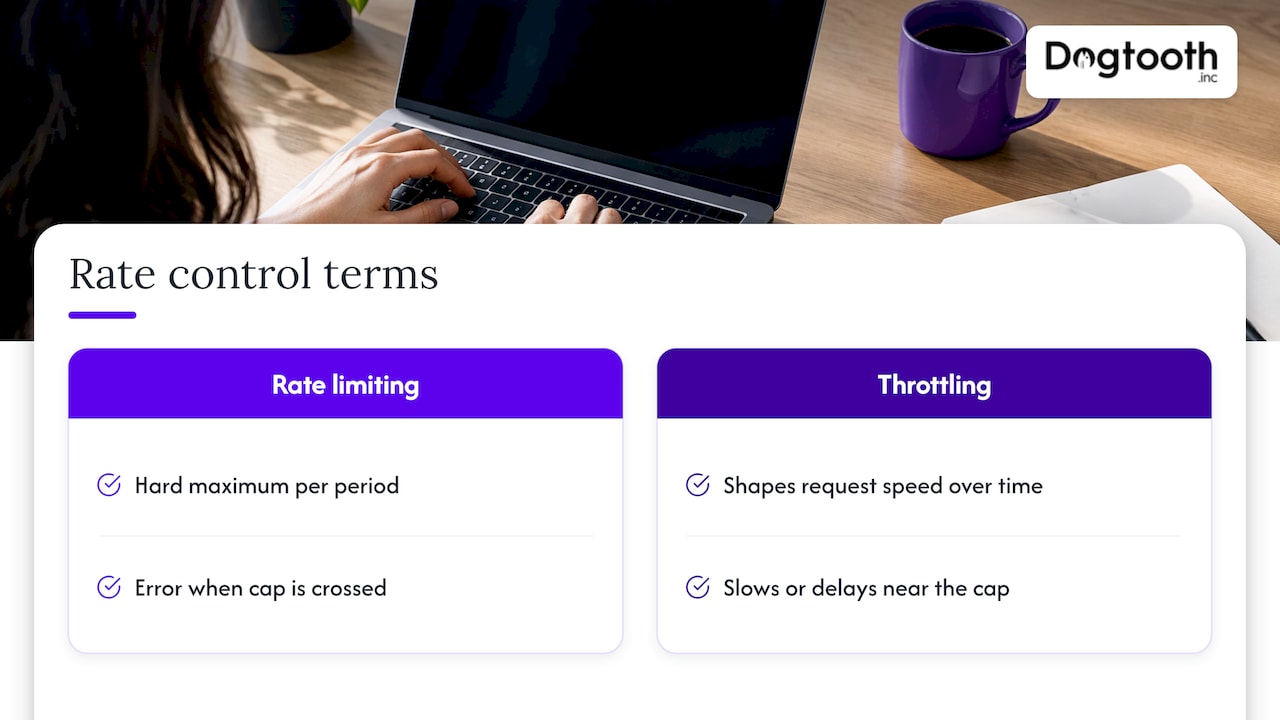
An API rate limit is a rule that caps how many requests a client can send in a defined period. Providers set them to protect servers, keep usage fair across customers and control cost. The word you will see next to it is throttling. The two are used loosely, but a common distinction is that rate limiting sets a hard maximum within a period, while throttling shapes the speed of requests over time to absorb spikes. In practice you meet both: a cap that returns an error when you cross it, and a slowdown or delay as you approach it.
The error is usually HTTP 429, “Too Many Requests.” Some providers return 503 when the service itself is constrained rather than your account. Microsoft’s Azure guidance recommends 429 for a user exceeding their limit and 503 for service-level constraints, with retry guidance only when a retry is safe and intended. Your code should treat both as signals to slow down, not as failures to repeat immediately.
Two sides of planning exist. If you consume third-party APIs (a store platform, a CRM, a payment processor, an AI model), you plan around limits you don’t control. If you publish APIs, you set limits for your own consumers. This guide leans toward the first, because that is where most operations teams get hurt, and touches the second where the design choices overlap.
Step 1: Map every workload that shares a limit
The first mistake is counting only the requests a user triggers. Limits are scoped, and the scope is rarely your application. Microsoft’s Copilot Studio planning guidance notes that a limit may apply to an environment, tool, API, connector, channel or downstream service, so your estimate must include every workload that draws on the same scoped capacity.
Build an inventory with one row per consumer of each API:
- Customer-facing traffic: checkout, search, account pages, booking forms.
- Scheduled jobs: nightly inventory syncs, report pulls, email list updates.
- Background work: webhooks you re-fetch from, enrichment, reconciliation.
- Automations and agents: AI agents that draft, check, book and report, each of which may call several APIs per task.
- Third-party tools: anything else authenticated with the same key, token or app.
Then note the scope of each limit: per key, per app, per store, per account, per IP, per endpoint. A limit that is per app per store behaves very differently from one shared across your whole account. If two teams in your company use the same API key, they share one budget whether they know it or not.
Limits can also be layered. Amazon’s API Gateway documentation, for example, describes four scopes: a regional limit across AWS, an account-level regional limit, per-stage or per-method limits, and per-client limits through usage plans. The effective ceiling is whichever applies first. The lesson holds for any stack: write down the layers, because the tightest one sets your real capacity.
Step 2: Estimate peak demand, not averages
An average hides the problem. If you send 86,400 requests a day, that is one per second on average. If 60 percent of them arrive during a two-hour sale or a campaign send, your peak is closer to eight per second, and that is the number the provider’s limiter sees. Microsoft’s guidance says to examine windows from per minute through monthly, because weekly or monthly averages can hide the concentrated demand that causes throttling.
For each workload, estimate three numbers:
- Baseline rate: requests per second in a normal hour.
- Peak rate: requests per second in the worst realistic window, such as a product drop, a flash sale, month-end billing or a scheduled send.
- Burst length: how many seconds or minutes the peak lasts. A short burst may fit inside a token bucket. A long one must be spread out or queued.
Count more than the obvious calls. A capacity guide from an API infrastructure company advises counting pagination, fan-out, polling, retries and background work as API attempts and planning against the provider’s relevant peak windows, not daily averages. One page load that fetches an order, its line items, the customer and shipping rates is four calls, not one. A list of 5,000 records at 100 per page is 50 calls before any processing.
The same guide suggests estimating mean concurrency as request rate multiplied by mean latency. If you make 20 requests a second and each takes half a second, you hold about ten requests open at once. That figure tells you whether your worker pool, connection pool and queue can actually deliver the rate you planned. Validate it with a realistic load test, not arithmetic alone.
Peak forecasts are easier when you have traffic history to model against. If you run predictive capacity planning on your own infrastructure, SLO-first autoscaling approaches show how forecasting demand ahead of a spike differs from reacting to it, and the same thinking applies to scheduling your outbound API calls.
A worked example
Take an online store syncing orders and inventory with a fulfillment system through a REST API on a store platform. Shopify’s REST Admin API documentation lists a standard limit of 2 requests per second, 4 on Advanced and 20 on Shopify Plus, enforced with a leaky bucket of 40 requests per app per store. Those figures are the published ones at the time of writing, and the platform can change them, so check the live page when you plan.
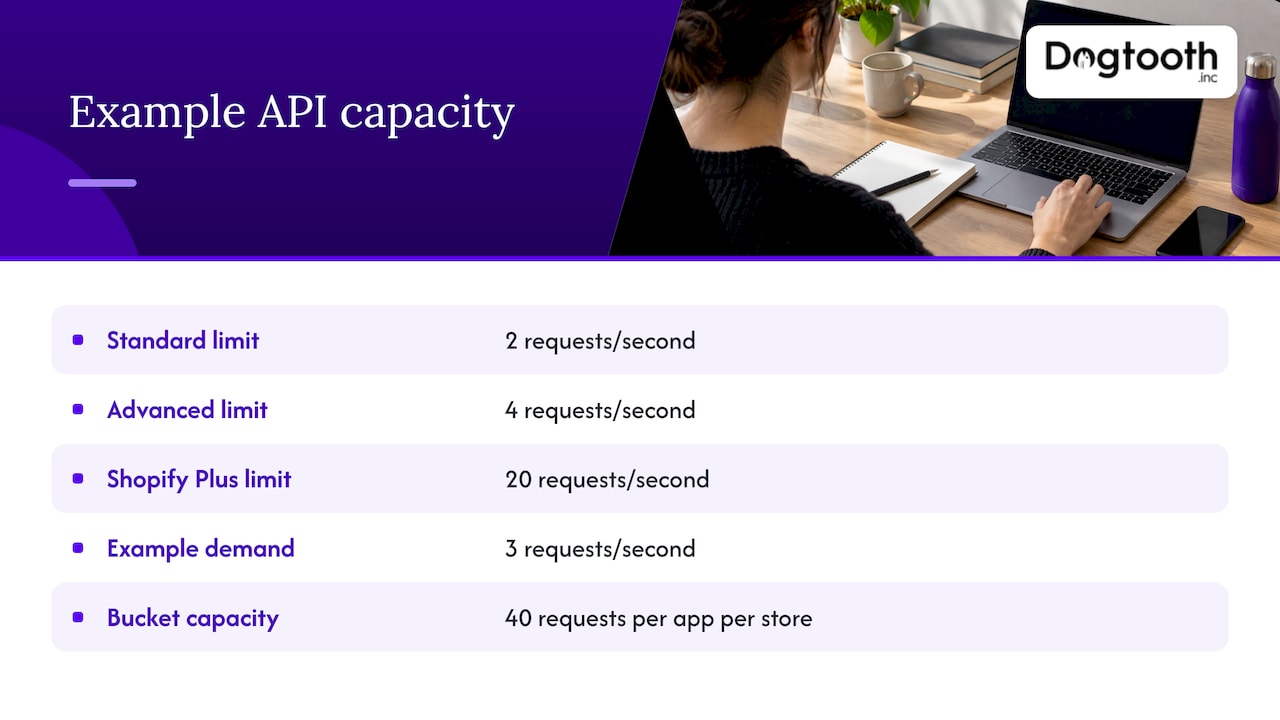
Suppose a promotion produces 600 orders in ten minutes. Each order needs one write to the fulfillment system and two reads of inventory, so 1,800 calls over 600 seconds, or three per second on average. On a standard plan that already exceeds 2 per second. Even on a plan with a higher limit, retries, polling and the nightly catalog sync running at the same time would eat into the headroom. The plan has to say which calls are essential (order writes), which can wait (catalog refresh) and which can be replaced by webhooks instead of polling. That prioritization is the real output of capacity planning.
Step 3: Choose a rate-limit strategy that fits the workload
No single algorithm suits every API. Postman’s rate-limiting guide summarizes the trade-offs, and they map onto how both providers enforce limits against you and how you should pace your own calls.
| Approach | How it behaves | Best for | Watch out for |
|---|---|---|---|
| Fixed window | Counts requests in set intervals, such as per minute | Simple limits, low-stakes APIs | Spikes at window boundaries can double the effective rate |
| Sliding window | Counts requests over a rolling period | Precise enforcement in production | More state to track |
| Token bucket | Tokens refill at a steady rate, each request spends one | Workloads with occasional bursts | Bucket size must match real burst length |
| Leaky bucket | Requests drain at a constant rate | Smoothing output to a fragile downstream | Bursts queue up and add latency |
Token buckets are common. Amazon’s API Gateway documentation explains that each request consumes a token and tokens refill at the configured rate, giving a steady rate plus a burst allowance. The same page cautions that configured throttles and quotas are best-effort targets, not guaranteed ceilings, so never design to run exactly at the published number. Leave headroom.
High-volume integrations
For bulk syncs, use a leaky-bucket style pacer on your side: a queue that releases calls at a fixed rate comfortably below the provider’s limit. Prefer webhooks over polling where the provider offers them, and use bulk or batch endpoints so one request carries many records. Cache reads that rarely change.
AI agents
Agents are the newer source of trouble. An agent that drafts, checks, books and reports may make a dozen calls in one task, and several agents running in parallel multiply that. Give each agent a call budget per task, route all of its calls through a shared client that enforces the limit, and decide in advance what the agent does when the budget runs out: wait, hand off to a queue or ask a person. We cover the guardrail side of this in our piece on AI agent runtime controls.
Step 4: Handle 429s without causing a retry storm
A retry storm happens when many clients fail at once, all retry at the same moment and push the provider back over the limit. The fix is discipline in how you respond. Microsoft’s throttling guidance for Azure gives the core rules: honor the Retry-After header; without one, use bounded exponential backoff. It also advises queuing retriable work instead of holding threads, using circuit breakers, and gradually reintroducing queued traffic after recovery.
In practice:
- Read the headers. Many APIs return the limit, remaining requests and reset time, and
Retry-Afterafter a 429, as Postman’s guide notes. Use them to pace calls before you hit the wall. - Back off with a cap. Double the wait after each failure, set a maximum wait and a maximum number of attempts, and add random jitter so clients don’t retry in lockstep.
- Queue, don’t block. Put the work on a durable queue so a user-facing thread never waits on a throttled call.
- Open a circuit breaker. When 429s keep coming, stop sending for a short period instead of sending requests you know will fail.
- Ramp back up. After recovery, drain the queue gradually, not in a single flood.
- Make retries safe. Use idempotency keys on anything that charges a card, creates a booking or sends a message, so a retried request can’t run twice.
The last point matters most in operations that touch money or customers. Our work on an AI booking system for three combat sports brands involves an agent that books sessions, charges cards and sends invites, exactly the kind of chain where a duplicate retry would be costly and where the order of calls has to survive a throttle.
Step 5: Set limits at the right boundaries if you publish an API
If your platform exposes an API to customers, partners or your own front end, you set the limits. Microsoft’s guidance is to define throttling boundaries and dimensions at design time to match the ways your system can saturate, and to enforce them at entry points as well as internal and egress boundaries, with limits by workload identity and operation name, and concurrency control at fan-out points.
That translates into a few design decisions:
- Limit per consumer, not globally. One noisy partner shouldn’t starve everyone else.
- Limit per operation. A search endpoint and a bulk export cost very different amounts to serve, so they need different caps. Deciding which dimensions to limit on is easier when you can see usage by endpoint; an uptime and API monitoring tool helps you spot which operations degrade first.
- Enforce on the server. Client-side limits are easy to bypass.
- Return clear errors. Use 429 with
Retry-Afterso well-behaved clients can adapt. - Design the contract first. Limits, error shapes and headers belong in the API contract, which is the argument we make in API-first architecture. If you are replacing an older API in stages, the same thinking applies to API modernization without a big bang.
Step 6: Test before launch and monitor after
Plans built on estimates need evidence. Microsoft’s Copilot Studio guidance recommends a representative pilot of at least one week, with production runtime paths and telemetry enabled, before using observed traffic to support a request for higher throughput. A single afternoon of testing will miss the weekly peak, the month-end job and the campaign send.
Before launch, replay or simulate your peak window against a sandbox or a staging account, with the retries, polling and background jobs switched on. Confirm that the queue drains, that backoff behaves and that no single workload crowds out the essential ones.
After launch, track the signals the capacity guide lists: accepted attempts, successful work, throttles by scope, retry volume, queue age, concurrency, latency, payload volume and remaining quota. Two are worth alerts from day one:
- Remaining quota below a set threshold, so you hear about it before the provider starts rejecting calls.
- Queue age, because a queue that grows means your rate is lower than your demand, even if no errors appear.
Review the dashboard whenever you add a feature, run a promotion, onboard a new integration or change platform plan. Providers also change limits, so subscribe to their changelogs.
Where rate limits bite hardest in e-commerce, tracking and email
The readers who feel limits most are the ones whose revenue depends on many systems staying in sync:
- Store migrations. Moving a catalog, customer list and order history to a new platform means thousands of writes against a limit you have never tested. Schedule the import in paced batches, and run it outside your sales peak.
- Attribution and ad tracking. Server-side event pipelines send a high volume of small calls to ad platforms. Our Meta CAPI tracking project across 15+ ad accounts is an example of an integration where per-account limits shape the architecture.
- Email and CRM. List syncs, subscriber updates and send triggers all compete for the same quota. A paced queue keeps a campaign from starving transactional messages.
- Dual-platform stores. Running two commerce platforms at once means two sets of limits to reconcile, as in our Shopify and WooCommerce dual-platform store.
Our perspective
Rate limits are an architecture decision, and most teams treat them as an error-handling afterthought. By the time the first 429 shows up in a log, the integration has usually been designed around the assumption that every call will succeed instantly.
We build the other way around. Before a line of integration code, we list every workload that will touch a provider, find the tightest scope that limits it, and decide what has to go first when capacity runs short. That ordering, with essential writes ahead of nice-to-have refreshes, is the single most valuable output of the planning session.
The same habit applies to the AI agents we build for clients. An agent that books sessions, charges cards and sends invites for three brands at once needs a shared, rate-aware client, safe retries and a clear rule for what happens when it can’t proceed. We run our own operation the same way: our in-house AI campaign manager drafts emails, runs compliance checks, tests inbox delivery and schedules sends on a single approval, so we feel these constraints ourselves.
Because we ship weekly and stay on after launch, the plan doesn’t freeze on day one. We watch quota, queue age and retry volume as traffic grows, and adjust before the provider forces the issue.
Chase Weir
Build integrations that hold up under volume
If your operation depends on platforms, agents and APIs that have to keep working at peak, Dogtooth Inc designs and builds the integrations, custom platforms, e-commerce engineering and AI agents around those limits, and a senior team stays on after launch. See what we build, from platform migrations to AI agents and email infrastructure.

For sending at scale, our MailFurnace software is built for high-volume email senders who need to protect deliverability as volume grows.
FAQ
What is the difference between API rate limiting and throttling?
Rate limiting sets a maximum number of requests in a period and rejects or blocks the rest. Throttling slows or shapes the flow of requests so spikes are absorbed. Many providers use both, and you will see them described interchangeably, so check each provider’s documentation for what happens when you cross the line.
How do I calculate how many API requests I need?
List every workload that shares the API, estimate its requests per second at baseline and at peak, and count pagination, polling, retries and fan-out as requests. Then compare the peak total with the tightest limit that applies. Validate the result with a load test and a pilot of at least a week.
What should my application do when it gets an HTTP 429?
Read the Retry-After header and wait that long. If there is no header, retry with bounded exponential backoff and jitter. Queue the work instead of holding a thread, and use idempotency keys so a retried charge or booking can’t run twice.
Which rate-limit algorithm is best?
None is best for everything. Fixed windows are simple, sliding windows are more precise, token buckets absorb occasional bursts and leaky buckets smooth output for fragile downstream systems. Choose based on whether your workload needs simplicity, burst tolerance, steady flow or exact enforcement.
How do AI agents change rate-limit planning?
An agent can make many calls per task, and several agents multiply that. Give each task a call budget, route calls through a shared rate-aware client, and define in advance what the agent does when capacity runs out.
Sources
- Throttle requests to your REST APIs for better throughput, AWS API Gateway documentation
- Plan Copilot Studio agent deployments for throughput and rate limits, Microsoft Learn
- Design throttling to improve resilience, Microsoft Azure Well-Architected Framework
- What is API Rate Limiting?, Postman
- How Much API Capacity Does Your Application Need?, Throttle
- API Throttling vs API Rate Limiting, GeeksforGeeks
- REST Admin API rate limits, Shopify developer documentation
- SLO-first predictive autoscaling, Opsphere
- SLA reporting and uptime monitoring, Funny Monitors