In the United States, email marketing compliance means following the CAN-SPAM Act: accurate sender information, honest subject lines, a clear ad disclosure, a valid postal address and an unsubscribe that works within 10 business days. The rules are simple to read and easy to break at volume, because they apply to every single message. The teams that stay clean build the checks into how campaigns are drafted, approved and sent, rather than relying on someone remembering a checklist on send day.
TL;DR
- CAN-SPAM covers every commercial email, including B2B and messages to past customers. There is no exception for small lists or for business recipients.
- Seven requirements matter: honest headers, non-deceptive subject lines, an ad disclosure, a physical postal address, a visible opt-out, opt-outs honored within 10 business days, and monitoring anyone who sends on your behalf.
- Penalties are assessed per email, up to $53,088 each, so one flawed template sent to a large list multiplies fast.
- Using an email platform or agency does not transfer your legal responsibility. Compliance has to be part of your sending system.
- The most reliable approach is automated checks before every send, with one human approval.
Table of Contents
- What CAN-SPAM covers
- The seven requirements, and where they go wrong
- Consent: what CAN-SPAM does and does not require
- What a violation costs
- A send-ready routine
- Compliance in the content itself
- Why manual compliance breaks at volume
- What we build for compliant sending
- Perspective
- FAQ
- Sources
What CAN-SPAM covers
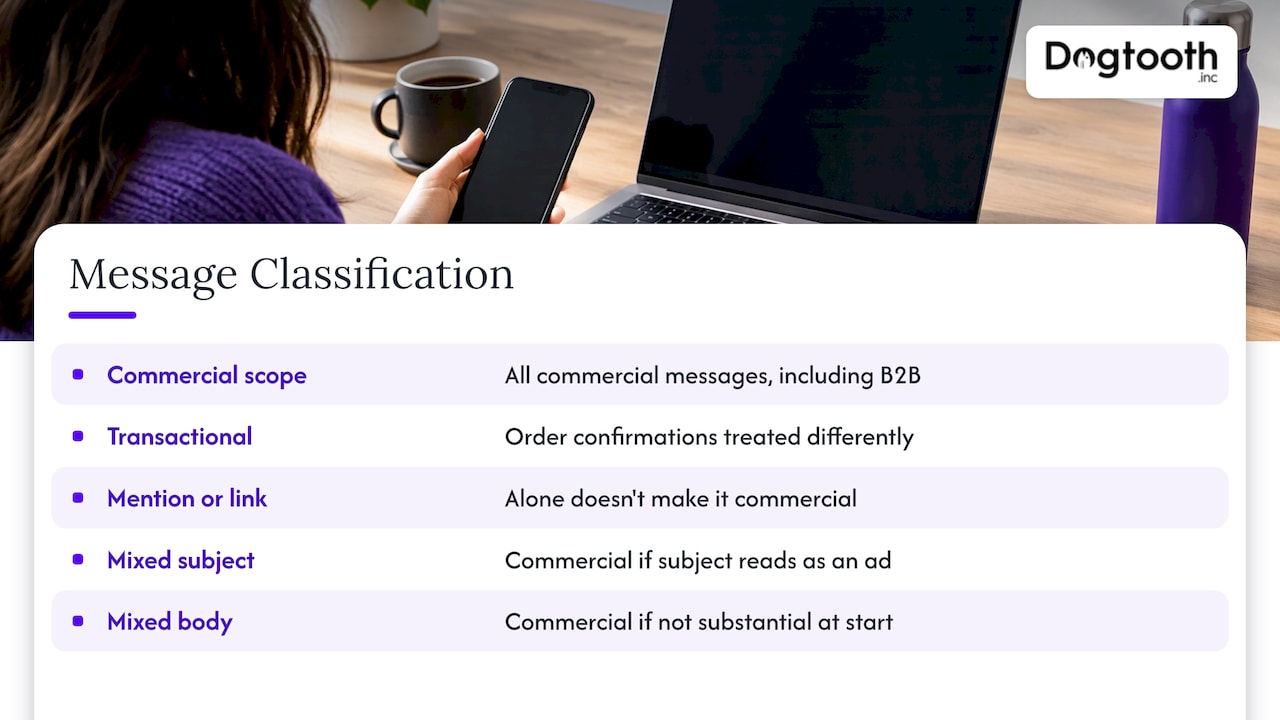
The CAN-SPAM Act of 2003 took effect on January 1, 2004. Despite the name, it is not limited to bulk mail. The FTC’s own guide says it covers all commercial messages and makes no exception for business-to-business email, so a note to former customers announcing a new product line has to comply.
The test is the message’s “primary purpose.” Under 15 U.S.C. § 7702, a commercial message is one whose primary purpose is advertising or promoting a commercial product or service, including content on a commercial website. Transactional or relationship messages, such as an order confirmation, are treated differently. Merely mentioning a company or linking to its site does not by itself make a message commercial.
Mixed messages are where teams get caught. Under the FTC’s 16 CFR Part 316 rule, a message that blends commercial and transactional content is treated as commercial if a reasonable recipient reading the subject line would likely conclude it is an ad, or if the transactional content does not appear, in whole or in substantial part, at the start of the body. A shipping notice with a half-screen promo banner above the tracking number is a common example of a message that can tip into commercial territory.
The FTC enforces the law. If your email is commercial, assume every requirement below applies.
The seven requirements, and where they go wrong
The statute is 15 U.S.C. § 7704. The FTC’s compliance guide translates it into seven points. Here is each one with the failure we see most often in how teams build their sending systems.
1. Honest header information
The From, To and Reply-To fields, plus the originating domain and address, must be accurate and identify the person or business that initiated the message. Header information is materially misleading if the sending address or domain was obtained through false or fraudulent pretenses, or if a sender relays a message through another computer to disguise where it came from.
Where it goes wrong: a template or integration that sends from a generic or borrowed domain, or a From name that no longer matches the brand after a rebrand or migration. Properly authenticated sending domains help here, and our SPF and DKIM setup guide walks through the DNS side.
2. Subject lines that match the content
A subject line may not be likely to mislead a reasonable recipient about a material fact concerning the message. “Your account has been updated” on a pure sales email is the classic violation. It is also a deliverability problem, since recipients who feel tricked report the message as spam.
3. A clear ad disclosure
The message must clearly and conspicuously identify itself as an advertisement or solicitation, unless the recipient gave prior affirmative consent. Under § 7702, affirmative consent means the person expressly agreed in response to a clear and conspicuous request, or initiated the contact themselves. If the consent was collected by a different party than the sender, the person must have been told at that moment that their address could be passed on for commercial email.
Where it goes wrong: purchased or partner lists. Consent collected for one company does not automatically cover another, and without documented consent the ad disclosure is required.
4. A valid physical postal address
Every commercial email must include a valid physical postal address for the sender. Per 16 CFR 316.2, that means your current street address, a Post Office box you have accurately registered with the U.S. Postal Service, or a private mailbox registered with a commercial mail receiving agency.
Where it goes wrong: the footer is edited in one template and not in the others, or a new brand launches with a placeholder address. When a company runs several brands, each needs its own correct footer.
5. A visible, working opt-out
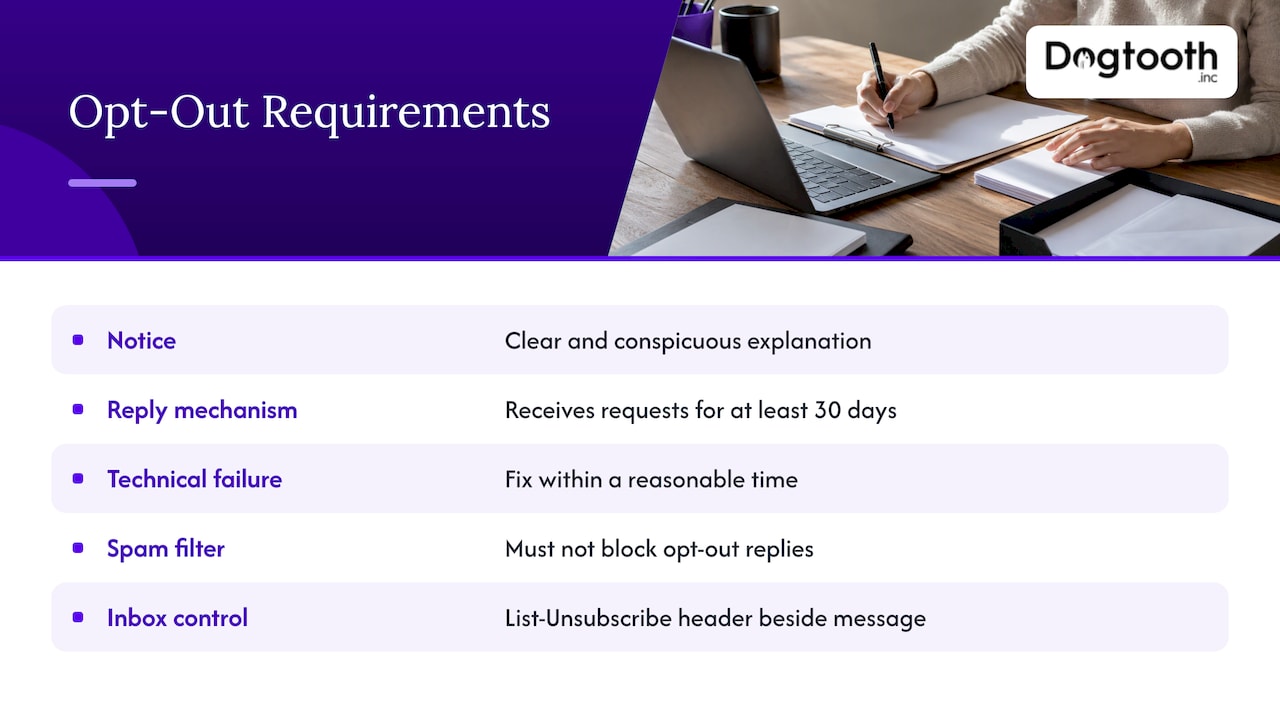
Each message needs a clear and conspicuous explanation of how to opt out, plus a functioning reply address or Internet-based mechanism that stays capable of receiving requests for at least 30 days after the message is sent. A short technical failure outside your control is not a violation if you fix it within a reasonable time.
The FTC’s guide adds a practical point: make the notice easy for an ordinary person to read, using type size, color and location, and make sure your own spam filter does not block opt-out replies. Tiny gray text in a footer is the usual failure.
Modern inboxes also surface an unsubscribe button themselves. The List-Unsubscribe header puts that control next to your message, and setting it up correctly is worth doing alongside the in-body link.
6. Opt-outs honored within 10 business days
Once someone opts out, you have 10 business days to stop. Under 16 CFR 316.5, you cannot charge a fee, ask for anything beyond an email address and the person’s opt-out preferences, or require more than a reply email or a visit to a single web page. A login wall or a multi-step survey before unsubscribing is out. You may share an opted-out address only to help others comply with the law.
Where it goes wrong: suppression lists that live in one tool while campaigns are sent from another. A customer opts out of the newsletter system and keeps receiving mail from the e-commerce platform, the CRM or a booking system. Ten business days is generous, but only if every system reads the same list.
7. Monitor what others send for you
You cannot contract away your responsibility. The FTC’s guide says both the company whose product is promoted and the company that sends the message may be held legally responsible, and businesses must monitor what others do on their behalf. Using an agency, affiliates or an email platform does not remove your obligation.
Consent: what CAN-SPAM does and does not require
CAN-SPAM is an opt-out law: it does not generally require a recipient to opt in before you send a commercial message. The affirmative-consent definition matters mainly for the ad disclosure, as described above. That said, a documented record of how and when each address joined your list protects you in any dispute and keeps your complaint rate low. Record the date, the form or source, and the wording the person saw.
CAN-SPAM is also not the only rule in play. State laws and mailbox-provider requirements add to it, and mail to recipients outside the U.S. can fall under other regimes. If your list includes recipients in the EU, Canada or California, have counsel confirm which additional rules apply to your program.
What a violation costs
Penalties are counted per message, not per campaign. The FTC’s maximum civil penalty is $53,088 per separate email in violation, a figure set by the January 2025 inflation adjustment. The agency adjusts it periodically, so check the FTC’s site for the amount in force when you read this.
Real cases show how the allegations look. In August 2024, a stipulated order entered a $2.95 million civil penalty against Verkada. The complaint alleged that its commercial emails lacked a valid postal address and an unsubscribe link or other opt-out notice, and that the company failed to honor opt-out requests. None of those are exotic failures. They are footer and suppression-list problems, the kind that live in templates and integrations.
A send-ready routine
Before any commercial campaign goes out, run through this list:
- Sender identity: the From name, From address and sending domain are accurate and authenticated.
- Subject line: it describes what is inside the email.
- Disclosure: the message is identifiable as an ad, unless you hold documented affirmative consent.
- Address: the footer shows a valid postal address for the sending brand.
- Opt-out: a plain, readable unsubscribe link works with one step and no login, and the List-Unsubscribe header is in place.
- Suppression: the audience has been matched against opt-outs from every system that sends mail, including transactional and e-commerce tools.
- Third parties: you have reviewed what affiliates, agencies and partners are sending in your name.
Then watch the results. Complaints, bounces and unsubscribe handling are compliance signals as much as deliverability signals. Our email list hygiene guide covers how to keep bounces low and repair bad addresses automatically, and our deliverability audit checklist shows what to review when a program has drifted. For a broader view, see the CAN-SPAM compliance breakdown on our site.
Compliance in the content itself
Rules apply to creative as much as to footers. Newer formats such as video in email need the same disclosure, address and opt-out treatment as plain text. If you are adding motion to campaigns, a guide to email video marketing covers how to make and send videos, and the compliance checks above apply to those sends exactly as they do to any other promotional message.
Why manual compliance breaks at volume
A checklist works when one person sends one newsletter. It stops working when you have several brands, multiple platforms, a store, a CRM, automated flows and a team that edits templates every week. Each added tool is another place where a footer goes stale or an opt-out fails to propagate. Because penalties accrue per message, the cost of a template defect grows with your list size.
The fix is structural: one source of truth for suppression, footers and sender details, and automated checks that run before a campaign is scheduled. That is a software problem, and it is the kind we build.
What we build for compliant sending
Our AI agents work inside real workflows, drafting, checking, booking and reporting. We run our own email operation the same way: an in-house AI campaign manager drafts on-brand emails, runs compliance checks, tests inbox delivery and schedules sends on a single approval. The person approving sees a finished, checked campaign rather than a to-do list.
For clients, that approach applies through email infrastructure and deliverability work, integrations that connect suppression and consent data across platforms, and MailFurnace, our proprietary deliverability software for high-volume email senders. Teams moving to Shopify or GHL can have these checks designed into the new stack from day one rather than patched in later, and our senior team stays on after launch. See how we handle inbox placement testing and DMARC enforcement for the authentication side.
If your sending spans more than one system and you want compliance checked before every send, talk to Dogtooth about your email infrastructure.
Perspective
Most compliance failures we would worry about are not legal misunderstandings. They are plumbing problems: a footer that was fixed in one template and not the other five, an unsubscribe that updates one database while a second platform keeps sending.
That is why we treat compliance as part of the build. When we design an AI agent or an integration, the question is what has to be true before a message leaves the building, and how the system proves it every time. In our own operation, a campaign manager drafts the email, runs the compliance checks, tests delivery and schedules the send, and a person approves once.
The law holds you responsible for what is sent in your name, so the strongest position is a system where the checks cannot be skipped. We ship weekly and stay on after launch precisely so those checks keep pace as your stack, brands and lists change.
Chase Weir
FAQ
Does CAN-SPAM apply to B2B email?
Yes. The FTC’s guide states the law makes no exception for business-to-business email. If the primary purpose of a message is to advertise or promote a commercial product or service, it must meet every requirement, whether it goes to a consumer or to a company contact.
How fast must I honor an unsubscribe request?
Within 10 business days. Your opt-out mechanism must also keep working for at least 30 days after each message is sent, and it cannot charge a fee or require more than a reply email or a single web page. Syncing suppression across every system that sends mail is what makes the deadline easy to meet.
Do I need a physical address in every marketing email?
Yes. Use your current street address, a Post Office box registered with the USPS in your name, or a private mailbox registered with a commercial mail receiving agency. Each sending brand should show its own valid address in the footer.
If my email platform sends the messages, who is responsible?
You still are. The FTC says businesses cannot contract away their responsibility, and both the company whose product is promoted and the company that sends the message may be held liable. Build monitoring and pre-send checks into your process so you know what goes out in your name.
Sources
- The CAN-SPAM Act: Requirements for Commercial Emailers (govinfo.gov)
- CAN-SPAM Act: A Compliance Guide for Business (FTC)
- 15 U.S.C. § 7702: Definitions
- 15 U.S.C. § 7704: Other protections for users of commercial email
- 16 CFR Part 316: CAN-SPAM Rule
- 16 CFR 316.2: Definitions
- 16 CFR 316.5: Prohibition on charging a fee or imposing other requirements on recipients
- Verkada: Joint Motion for Stipulated Order (FTC)
- What is the CAN-SPAM fine per email?
- Email Video Marketing: How to Make and Send Videos That Get Clicks