Email List Hygiene: Avoid 2%+ Hard Bounces and Automate Repairs

Email list hygiene is the ongoing practice of removing invalid, inactive, and risky addresses from your sending list so every campaign reaches real inboxes. The single highest-impact move you can make today is to stop sending to hard bounces and run an address verification pass before your next campaign. Expect a lower bounce rate, fewer spam complaints, and better inbox placement within one or two sends.
TL;DR:
- Sending to addresses with a bounce rate approaching 2% can harm your deliverability and outlook reputation if not cleaned promptly.
- Regularly verifying and removing role accounts, disposable emails, and unengaged contacts reduces spam complaints and improves inbox placement.
- Conduct a thorough hygiene process before list migrations, major campaigns, or after significant list growth to prevent reputation damage and deliverability issues.
- Automating verification, suppression, and re-engagement within your email pipeline safeguards reputation, especially for large volumes and multiple brands.
- Ensuring technical authentication like SPF, DKIM, and DMARC is correctly set up remains critical, as list hygiene alone cannot compensate for broken domain validation.
Table of Contents
- What is email list hygiene? Core concepts and vocabulary
- Why list hygiene matters: deliverability, cost, and KPIs
- When to clean: cadence and event-driven triggers
- Core hygiene tactics: an ordered, actionable workflow
- Technical deliverability signals to check with hygiene
- Compliance essentials integrated into hygiene: CAN-SPAM practical reminders
- How we run hygiene at scale with MailFurnace
- Treat hygiene as a system, not a chore
- Automate list hygiene with Dogtooth and MailFurnace
- FAQ
- Sources
What is email list hygiene? Core concepts and vocabulary
List hygiene and list scrubbing get used interchangeably, but they describe different scopes. Scrubbing is a one-time cleanup, often done before a migration or a big send. Hygiene is the recurring discipline, the habits and checks that keep a list healthy between campaigns.
A few terms come up constantly in this work:
- Hard bounce: a permanent failure, usually because the address does not exist.
- Soft bounce: a temporary failure, such as a full inbox or a server timeout.
- Role account: an address tied to a function rather than a person, like info@ or support@.
- Disposable email address: a throwaway address created for one signup, rarely checked again.
Hygiene covers the operational layer: verification, suppression lists, deduplication, and field normalization. Campaign tactics, like subject line testing or send-time optimization, sit on top of that foundation. A list with strong hygiene supports every downstream KPI you care about, from open rate to revenue per email, because the math only works when the denominator (your list) is made of real, reachable people.
Why list hygiene matters: deliverability, cost, and KPIs
Every hard bounce and spam complaint chips away at your sender reputation, and mailbox providers use that reputation to decide whether your next email lands in the inbox or the spam folder. A list full of outdated addresses doesn’t just waste send volume, it actively signals to Gmail, Outlook, and Yahoo that you might be a careless or malicious sender.
Four metrics tell you whether you have a hygiene problem: bounce rate, spam complaint rate, inbox placement rate, and engagement (opens and clicks). A rising bounce rate is often the first warning sign, usually followed by a drop in placement if it goes unaddressed.
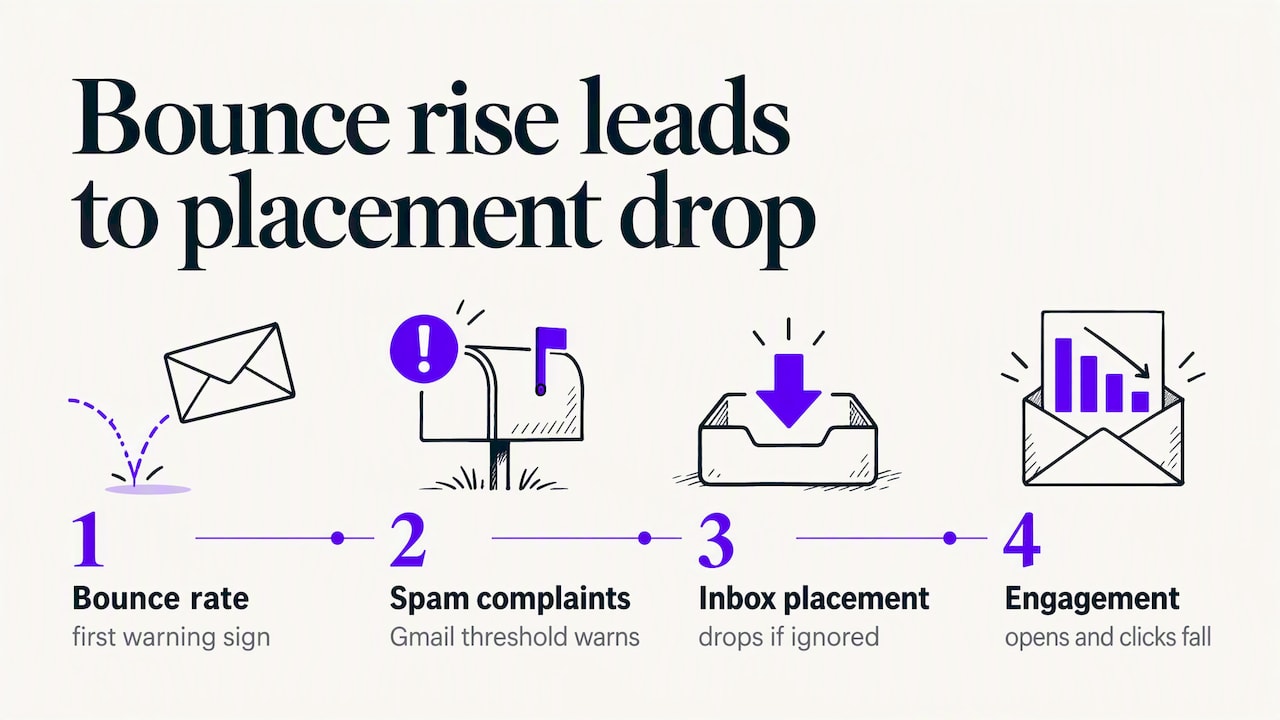
Gmail asks senders to keep spam complaint rates low in Postmaster Tools, and crossing that threshold puts future deliverability at risk, according to Gmail’s sender guidelines. That figure is a useful trigger point: if your complaint rate approaches it, pause and clean before you send again rather than after.
Cost matters too. Most email service providers price plans by list size or send volume, so every dead address you keep is money spent reaching nobody. Removing them is one of the few marketing tasks that saves cash and improves performance at the same time.
When to clean: cadence and event-driven triggers
How often you clean depends on how often you send and how fast your list grows.
- Monthly for heavy senders: daily or multiple-times-weekly senders accumulate bounces and disengaged contacts fast, so a monthly pass keeps the list current.
- Quarterly for moderate senders: weekly or biweekly senders can usually run a full clean every three months without much reputation drift.
- Immediately after a bounce or complaint spike: a sudden jump in either metric means something changed, a bad import, a broken signup form, or a reputation issue, and warrants an off-cycle clean.
- Before any list migration: moving to a new ESP or CRM is the moment to verify everything, since a fresh sending domain has no reputation cushion to absorb bad addresses.
- Before a major campaign: product launches, holiday sends, and other high-stakes campaigns deserve a verification pass first, not after you see the bounce report.
- After a large list addition: imported lists from events, partnerships, or purchased data (which we do not recommend) need verification before they touch your main sending domain.
A quick triage question cuts through the noise: has your bounce or complaint rate moved in the last 30 days? If yes, clean now. If no, stick to your routine cadence.
Core hygiene tactics: an ordered, actionable workflow
This is the order that works, because each step reduces the risk the next one carries.
- Remove hard bounces and invalid addresses first. Run your list through a verification service before you send anything else, since a hard bounce rate above roughly 2% is enough to hurt deliverability on most platforms.
- Filter or flag role accounts and disposable addresses. These rarely represent an engaged human, and many generate complaints or get flagged as spam traps.
- Segment unengaged contacts and run a short re-engagement campaign. Pull anyone who hasn’t opened or clicked in 90 to 180 days into a separate segment, send two or three messages asking if they want to stay subscribed, and set a clear success criterion in advance (for example, any open or click counts as reactivation).
- Apply a sunset policy to persistent non-responders. Anyone who doesn’t react to the re-engagement series gets suppressed or removed outright. Keeping them around only drags down your engagement rate and reputation.
- Use double opt-in for high-value lists. Requiring a confirmation click after signup filters out fake and mistyped addresses before they ever enter your sending pool, and best-practice guidance treats this as one of the core hygiene tactics alongside sunset policies and re-engagement flows.
- Confirm subscriptions periodically where appropriate. For lists that collect addresses passively (gated content, co-registration), an occasional confirmation email keeps the list honest.
- Deduplicate, normalize, and canonicalize email fields. Lowercase addresses, trim whitespace, standardize domain typos (gmial.com to gmail.com), and merge duplicate records so one person isn’t counted, and emailed, twice.
- Verify again before migrations or large sends, and strip complaint-prone segments. Anyone who has filed a spam complaint in the past should stay suppressed permanently, regardless of how the rest of the list looks.
Pro Tip: Run verification as an automated step in your signup flow, not just as a periodic batch job. Catching a bad address at the point of entry is cheaper than cleaning it out six months later.
Technical deliverability signals to check with hygiene
A clean list can still land in spam if your technical setup is broken, so these checks belong in the same workflow.
- SPF confirms which servers are allowed to send on behalf of your domain.
- DKIM signs your messages cryptographically so receiving servers can verify they weren’t altered in transit.
- DMARC ties SPF and DKIM together and tells receiving servers what to do when a message fails both.
- IP and domain reputation accumulate over time based on bounce rates, complaint rates, and engagement; a clean list protects both.
- PTR records and TLS support trust at the connection level, separate from message-level authentication.
Gmail requires SPF and DKIM and recommends DMARC, and starting February 1, 2024, large-volume senders have had to meet stricter authentication and one-click unsubscribe requirements, according to Gmail’s sender guidelines. If your bounce and complaint rates look fine but inbox placement is still poor, check authentication first. A reputation problem caused by a missing DMARC record looks identical to a list quality problem from the outside, and no amount of list cleaning fixes a broken authentication record.
Compliance essentials integrated into hygiene: CAN-SPAM practical reminders
Legal compliance and list hygiene overlap more than most marketers realize. Build these rules into your hygiene process rather than treating them as a separate legal checklist.
- Honor opt-out requests within 10 business days, and keep your unsubscribe mechanism functional for at least 30 days after a send, per FTC CAN-SPAM guidance.
- Include a valid postal address in every commercial message and identify the message honestly, meaning no deceptive subject lines or spoofed “from” names.
- Never charge a fee or require extra steps to unsubscribe; the opt-out process has to be as simple as clicking a link.
- Stay responsible for third-party senders. If an agency or contractor sends on your behalf, their compliance failures are still your legal exposure.
- Log every opt-out and suppression as part of your hygiene records, both for legal protection and so a re-import never accidentally re-adds someone who already left.
CAN-SPAM compliance is the legal floor. Good hygiene goes further, protecting your reputation and inbox placement in ways the law doesn’t require but inbox providers reward anyway.
How we run hygiene at scale with MailFurnace
Our own send pipeline follows a fixed sequence: ingestion, verification, authentication and reputation check, re-engagement, sunset, and ongoing monitoring. Each stage runs as a defined step rather than a manual judgment call, which is what makes it repeatable across multiple client sends in the same week.
- An AI campaign manager drafts emails, runs compliance checks, tests inbox delivery, and schedules sends on a single approval.
- Verification and content checks happen automatically before a send goes out, not as an afterthought after a bounce report comes back.
- MailFurnace, a deliverability platform, can significantly improve inbox placement rates and return on email spend.
Pro Tip: If your team lacks engineering resources, prioritize automating verification and suppression logging first. Those two steps catch most of the damage before it reaches your reputation.
Treat hygiene as a system, not a chore
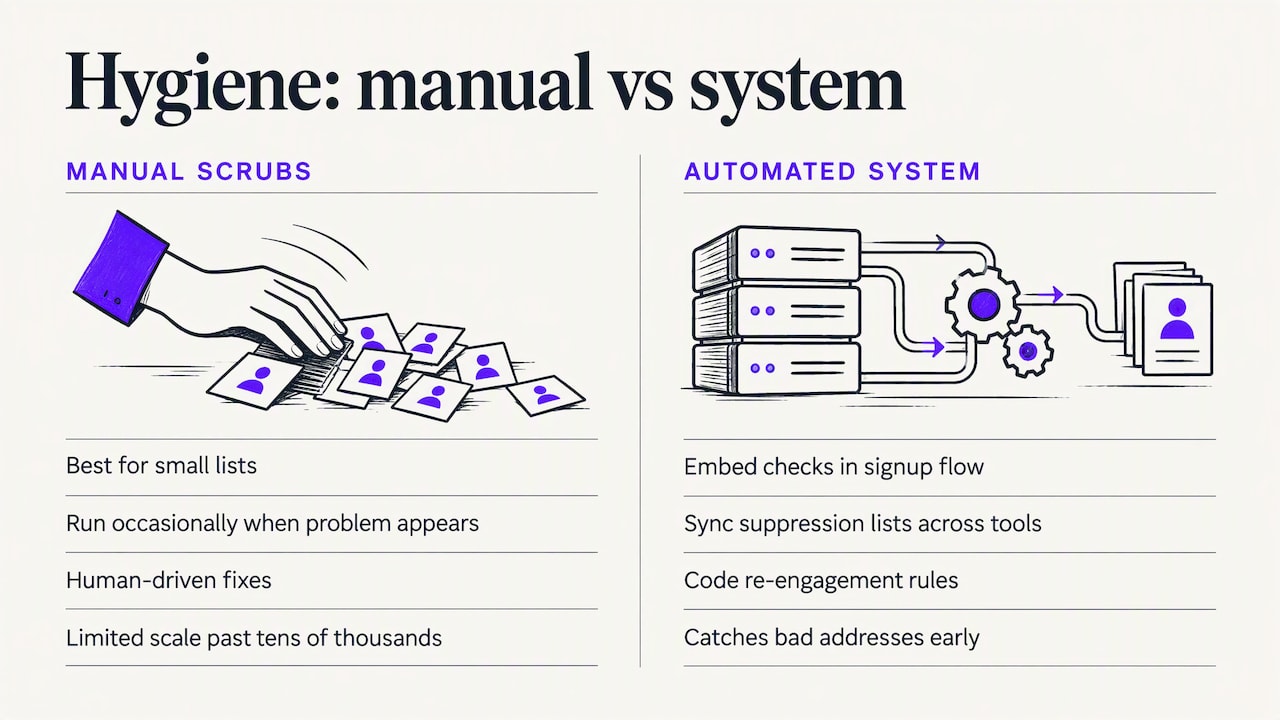
Most teams treat list hygiene as an occasional cleanup task, something you do when bounce rates get embarrassing. That’s backwards. The list hygiene that actually protects deliverability lives in engineering decisions: where verification runs in the signup flow, how suppression lists sync across tools, how re-engagement rules get coded rather than remembered.
Manual scrubs make sense for small lists. Past a few tens of thousands of contacts, build the checks into your pipeline, because automation catches a bad address before it ever damages your reputation, and it does so without punishing engaged subscribers who just haven’t opened an email this month.
— Chase
Automate list hygiene with Dogtooth and MailFurnace
Running verification, authentication checks, and re-engagement sequences by hand works until your send volume outgrows your team’s bandwidth. We build the platforms and automation that handle it instead: AI agents that draft, check, and schedule campaigns, paired with MailFurnace, our deliverability platform built to monitor reputation and placement continuously.
- If you’re sending at scale across multiple brands or domains, a managed system catches issues faster than periodic manual cleans.
- If you’re migrating ESPs or launching a new sending domain, platform-level verification protects your reputation from day one.
- If your team has no engineering capacity to build this in-house, we design and run it as part of our platform and deliverability work.
Reach out through our landing page to talk through what a managed hygiene setup looks like for your send volume.
This article is general information, not a substitute for advice from a qualified lawyer. Consult a qualified legal professional about your own circumstances before acting on anything here.
FAQ
What is email list hygiene?
Email list hygiene is the ongoing practice of removing invalid, bounced, or unengaged addresses from your sending list to protect deliverability. It includes verification, suppression management, deduplication, and re-engagement, run as a recurring process rather than a one-time cleanup.
How do you email employees about hygiene?
When the question concerns internal workplace hygiene policies rather than email marketing, that falls outside list hygiene practices and is better handled through HR communication guidelines. For email list hygiene specifically, internal teams are usually informed through a shared sending policy that defines verification steps, suppression rules, and compliance checks everyone must follow before a send.
How often should you clean an email list?
Heavy senders benefit from a monthly cleaning cadence, while moderate senders can often get by with a quarterly pass. Event triggers, like a bounce rate spike, a list migration, or a major upcoming campaign, should prompt an immediate clean regardless of your regular schedule.
What is another word for email hygiene?
“List cleaning” and “list scrubbing” are the most common alternative terms, though they technically describe a one-time cleanup rather than the ongoing hygiene process. “Email list management” is sometimes used as a broader synonym that includes hygiene along with segmentation and growth tactics.