CAN-SPAM compliance comes down to seven habits on every commercial email: honest sender details, an honest subject line, a clear ad label, a real postal address, a simple opt-out, opt-outs honored within 10 business days, and control over anyone who sends on your behalf. The law does not ask for prior consent. It asks that each message be truthful and that you stop mailing people who say stop. Because penalties are assessed per email, a small flaw in a template repeats across your whole list. That is why high-volume senders build these checks into their sending system rather than into a memo. We build exactly that kind of system at Dogtooth.
TL;DR
- CAN-SPAM covers any email whose primary purpose is advertising or promoting a commercial product or service, including B2B email. It does not require prior consent.
- Every commercial message needs accurate header information, a non-deceptive subject line, ad identification, a valid physical postal address and a working opt-out.
- Opt-outs must be honored within 10 business days, permanently, and the address can never be sold or traded.
- Penalties are assessed per email, and you can be responsible for what vendors and affiliates send for you.
- Compliance works best when it is automated: one suppression list, pre-send checks and a documented approval step.
Table of Contents
- What CAN-SPAM covers and what it leaves alone
- The core CAN-SPAM requirements, one by one
- Does CAN-SPAM require consent?
- Special cases to know
- What violations cost
- A pre-send CAN-SPAM checklist
- Why compliance fails at scale
- How Dogtooth builds compliance into sending
- Put the checks inside your sending stack
- FAQ
- Sources
What CAN-SPAM covers and what it leaves alone
The CAN-SPAM Act is the federal law that sets the rules for commercial email in the United States. It applies to a “commercial electronic mail message,” which 15 U.S.C. § 7702 defines as an email whose primary purpose is the commercial advertisement or promotion of a commercial product or service, including content on a commercial website.
Two points surprise teams that come from consumer marketing:
- It covers B2B email. The FTC’s guide says the law makes no exception for business-to-business messages. An email to a current customer that promotes a new product is as covered as one to a stranger.
- It covers the whole message, not the intent behind the campaign. The test is the primary purpose of the email, not whether you consider it “marketing” internally.
The FTC’s compliance guide for business groups messages into two kinds. Commercial messages must follow every rule below. Transactional or relationship messages are exempt from most of them, but they may never contain false or misleading routing information.
Is this email commercial or transactional?
Under 16 C.F.R. § 316.3, a message that consists only of commercial promotion is commercial. A mixed message is also commercial in two situations: a recipient reading the subject line would likely conclude it contains a promotion, or the transactional content does not appear in whole or substantial part at the beginning of the body.
The FTC’s rule lists what counts as transactional or relationship content:
- Facilitating, completing or confirming a transaction the recipient agreed to
- Warranty, recall or safety information
- Notices about changes to an ongoing account or relationship
- Messages about an employment relationship
- Delivering goods or services the recipient is entitled to receive
A worked example: an order confirmation is transactional. Put a banner for a sale above the order details, or write a subject line that sells, and the same email can tip into commercial territory. In 2023 the FTC took action against ConsumerInfo.com, which paid a $650,000 civil penalty in a case alleging deceptive acts and CAN-SPAM violations in its commercial email. If your platform sends receipts, password resets and promotions through the same pipeline, classify each template on purpose. Our guide to transactional email deliverability covers how to keep those streams separate.
The core CAN-SPAM requirements, one by one
The law is short once you read it as a list of things a message must be. Here is each one, what it means in practice and where teams slip.
1. Accurate header information
The “From,” “To,” “Reply-To” and routing information must be accurate and identify the person or business that initiated the message. The origin domain and email address must be real. Teams slip when a campaign goes out from a lookalike domain, a rotated sending domain or a generic name that hides who the sender is. A “From” name should be a name the recipient would recognize as you.
Authentication is related but separate. SPF, DKIM and DMARC are not CAN-SPAM requirements, but they are how mailbox providers verify that your headers are truthful. Our SPF and DKIM setup guide and the walkthrough on moving DMARC to enforcement show how.
2. A subject line that matches the content
The subject line must not mislead the recipient about what is inside. “Your account has been updated” on a pure sales email is the classic violation. The FTC’s guide treats deceptive subject lines as a core offense, and attorneys at All About Advertising Law note that historically CAN-SPAM litigation has focused on false or misleading header information and deceptive subject lines, even though the other requirements are equally part of the law.
3. Identify the message as an ad
Section 7704(a)(5) requires clear and conspicuous identification that the message is an advertisement or solicitation, unless the recipient gave prior affirmative consent. The law does not prescribe a word. You do not need an “ADVERTISEMENT” tag in the subject line. The message simply has to make its commercial nature clear to a reasonable reader. Most promotional copy does that on its face, but a message dressed up as a personal note or a system alert may not.
If you send emails containing affiliate links, the FTC has a separate set of rules on disclosing the relationship. This guide to FTC affiliate disclosure requirements explains how to audit them alongside your email content.
4. A valid physical postal address
Every commercial email must include a valid physical postal address for the sender, placed in the message. The same statute requires clear and conspicuous notice of the opportunity to decline further commercial email. The footer is where most of this lives, which is why template footers deserve a review each quarter. Addresses go stale when offices move, and a broken footer is copied into every send.
5. A working opt-out
Under Section 7704, you need a functioning return email address or another Internet-based opt-out mechanism, clearly and conspicuously displayed. It must keep working for at least 30 days after the message is sent. A link that dies after a week fails this test, and so does a mailbox that bounces.
The FTC’s rule is strict about friction. 16 C.F.R. § 316.5 bars a sender, or anyone acting for it, from requiring that a recipient:
- pay a fee
- provide any information other than an email address and opt-out preferences
- take any step other than sending a reply email or visiting a single web page
So no login, no account creation, no multi-page survey. A preference center is allowed, and the FTC’s guide says you may offer a menu of choices, but you must include an option to end all commercial messages from you. For mailbox-level unsubscribing, our guide to the List-Unsubscribe header covers setup and testing.
6. Honor opt-outs fast, and for good
The FTC’s guide gives senders 10 business days to stop mailing after an opt-out. Treat that as pipeline grace, not license: if a campaign is queued days in advance, the suppression list has to catch it. An opt-out does not expire. Only the recipient’s later affirmative consent changes it, as MCLaw’s compliance guide explains.
The statute also makes it unlawful to sell, lease, exchange or otherwise transfer the address of someone who opted out for any purpose other than complying with the Act. A list sale or a partner swap that includes suppressed addresses is a violation of its own, separate from your own mailings.
7. Know who is sending on your behalf
A sender is not only the party that presses send. The FTC’s guide says a company whose product is advertised in the message can be held responsible, and that the party that hires an outside sender cannot hand off its legal duty. Agencies, affiliates, lead-gen partners and platform vendors all count. Put the opt-out routing in the contract and know where the master suppression list lives.
Does CAN-SPAM require consent?
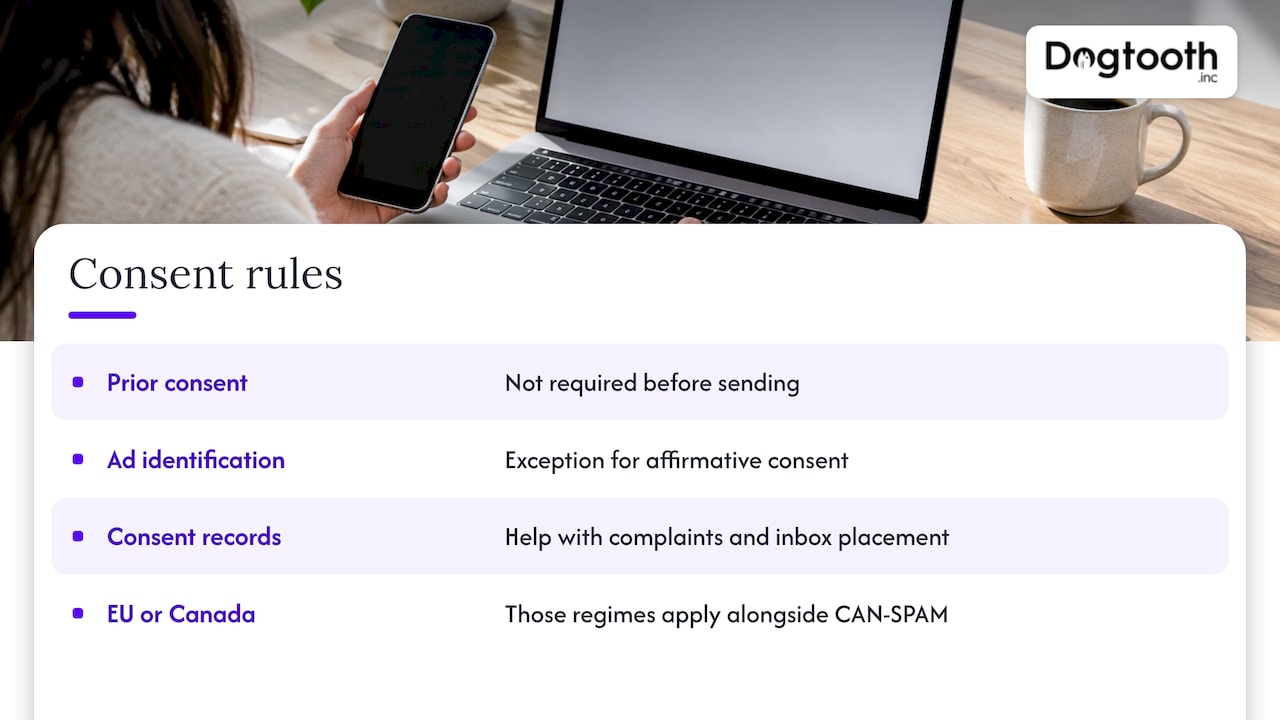
No. Unlike GDPR in the EU or CASL in Canada, CAN-SPAM works on an opt-out model: you may send commercial email without prior permission as long as each message follows the rules and you honor opt-outs, as MCLaw’s guide summarizes. The statute mentions consent in one place: the ad-identification requirement does not apply when the recipient gave prior affirmative consent.
That is the legal minimum, not the operating standard. Consent records protect you if a complaint arrives, and they keep your list healthier, which helps inbox placement. If any recipients are in the EU or Canada, those regimes apply on top of CAN-SPAM. Text-based channels carry their own consent rules too, such as consent for WhatsApp messages, so keep email and messaging consent in separate records.
Special cases to know
Sexually oriented content. 16 C.F.R. Part 316 requires the first 19 characters of the subject line to read “SEXUALLY-EXPLICIT:” in capitals and limits what appears in the initially viewable content. The rule does not apply when the recipient gave prior affirmative consent.
Forwarded and referral emails. If you pay or incentivize people to forward your message, you are still treated as the sender.
Opt-out requests by reply. A reply-based opt-out is acceptable, but someone must actually read that inbox or automate its processing.
What violations cost
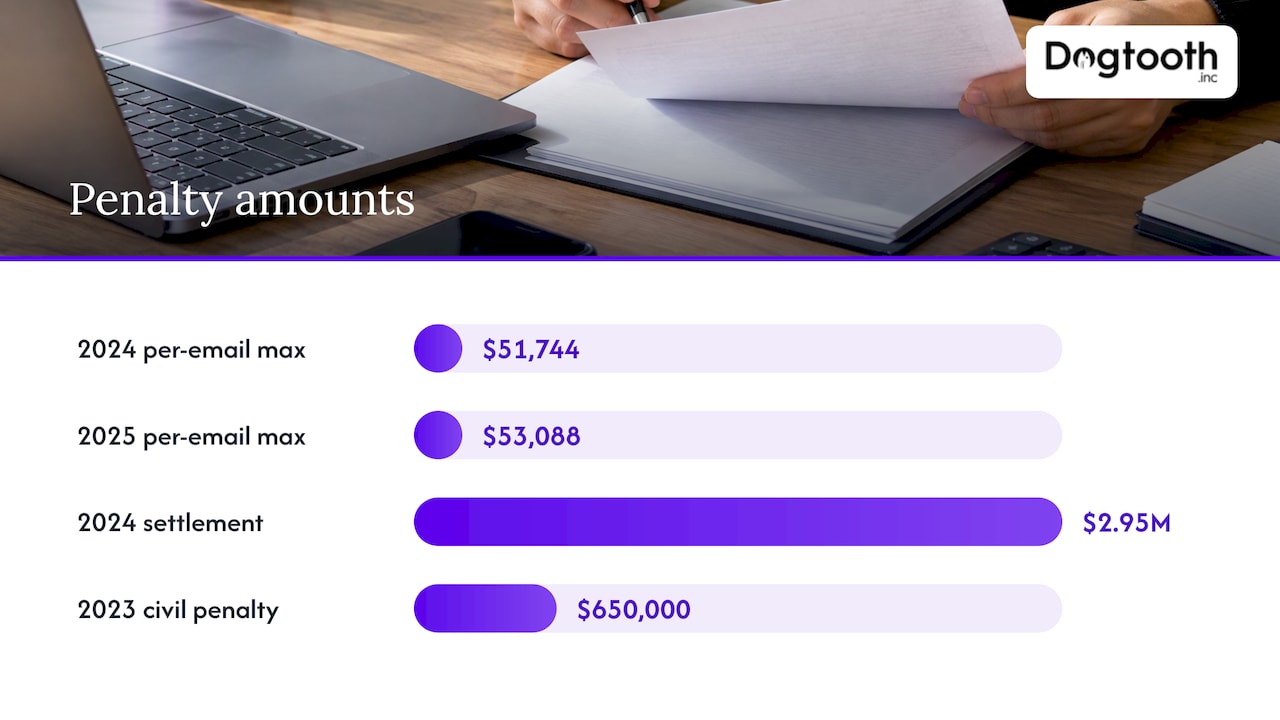
Penalties are the reason legal teams ask engineers about footers. According to SenderReputation.org, the FTC’s inflation-adjusted maximum civil penalty reached $53,088 per violating email with its January 2025 adjustment, up from $51,744 the year before. Because the FTC adjusts the figure for inflation each year, confirm the current amount on the FTC’s site before you quote it internally.
Three points matter more than the number:
- Per-email math. A flaw in a template multiplies across the send. The can-spam-act.com field guide notes there is no cap tied to company size.
- More than one enforcer. The FTC’s guide says other federal and state agencies can enforce the law and internet access providers may sue. The Department of Justice can seek criminal penalties, including imprisonment, for aggravated conduct such as address harvesting or hijacking computers to relay mail.
- The product company is exposed. Businesses whose products are advertised in violating emails can face penalties, not just the sender who pressed the button.
The largest CAN-SPAM penalty the FTC has obtained, reported by SenderReputation.org, was a $2.95 million settlement with a security-camera maker in 2024. The pattern in actual cases is not exotic spam. It is ordinary companies with a template that disguised marketing as account messages or an opt-out that did not work.
A pre-send CAN-SPAM checklist
Run this on every new template, and automate whatever you can.
- Classify the message. Commercial, transactional or mixed? If mixed, does the transactional content lead the body and does the subject line avoid promotion?
- Check the header. The “From” name and address identify your business. Domains are yours and are authenticated.
- Read the subject line against the body. A stranger should not be misled about what is inside.
- Confirm ad identification. The message is clearly an advertisement or solicitation to a reasonable reader.
- Verify the postal address in the footer is current and valid.
- Test the opt-out. Click it from a real inbox. It should take one step, with no login. Confirm it still works well past 30 days.
- Check the suppression flow. An opt-out entered today must exclude the address from tomorrow’s queued sends across every list and tool, not just the one that sent the message.
- Keep opt-outs permanent and never share, sell or trade suppressed addresses.
- Review vendor and affiliate sending. Contracts should require them to use your suppression list.
- Log the approval. Record who approved the send and what checks passed.
The University of Texas at Dallas compliance guide summarizes the same six core duties if you want a shorter version for internal training.
Why compliance fails at scale
Most violations are not deliberate. They come from systems that grew by accident:
- A marketing platform, a CRM, a store and a support desk each hold their own unsubscribe list, and nothing reconciles them.
- A queued campaign ignores opt-outs entered after scheduling.
- A template footer is copied from an old brand with an old address.
- A migration to a new platform drops the suppression history, and people who left are mailed again.
That last one is common for companies moving to Shopify, GoHighLevel or a custom stack. A migration that moves contacts but not suppression records turns permanent opt-outs into new violations overnight. Treat the suppression list as the first thing you migrate, and test it before the first send from the new system. The same hygiene that protects you legally also protects delivery: our guide to email list hygiene covers keeping bounces low and automating repairs, and an email deliverability audit shows what to check across authentication, content and list quality.
How Dogtooth builds compliance into sending
We design email infrastructure so that compliance is a step in the pipeline rather than a task someone remembers. Our own operation runs on an in-house AI campaign manager that drafts on-brand emails, runs compliance checks, tests inbox delivery and schedules sends on a single approval. The same approach is available to clients through our email infrastructure and deliverability work and our AI agent design, where agents draft, check, book and report inside real workflows. Our guide to AI campaign management explains how that works and how to start.
Our view on CAN-SPAM
Most companies think of CAN-SPAM as a legal footer. We think of it as an engineering requirement. The footer is the easy part. The hard part is that one person’s opt-out has to reach every list, every queued send and every vendor before the next message leaves.
That is why we run our own campaigns through a system where drafting, compliance checks, inbox testing and scheduling happen in one flow, with one human approval at the end. A person decides; the system makes sure nothing was skipped. It is the same pattern we put inside client workflows, and because we run it ourselves, we know where it breaks and what it takes to keep it running after launch.
If your sending has grown across several tools, the most valuable thing you can do is consolidate the suppression logic first, then automate the checks around it. Our senior team stays on after launch, because compliance rules, mailbox provider rules and your own lists keep changing.
Chase Weir
Put the checks inside your sending stack
If your team sends high volumes, a spreadsheet checklist will not hold. Dogtooth builds the systems behind compliant sending: email infrastructure and deliverability, integrations and APIs that keep suppression lists synchronized, and platform migrations that carry opt-out history forward. We also provide MailFurnace, our deliverability software for high-volume email senders.
To talk through your current setup, start at Dogtooth Inc.
FAQ
Does CAN-SPAM apply to B2B email?
Yes. The law covers any email whose primary purpose is promoting a commercial product or service, and it makes no exception for messages between businesses. Cold outreach, newsletters and promotional messages to existing customers all need the same headers, address and opt-out.
How long do we have to honor an unsubscribe request?
The FTC’s guide gives senders 10 business days. Build your system to act much sooner, because queued campaigns can send after someone opts out. The opt-out mechanism itself must keep working for at least 30 days after each message, and an opt-out does not expire.
Do transactional emails need an unsubscribe link?
Purely transactional or relationship messages, such as order confirmations and account notices, are exempt from most CAN-SPAM provisions, including the opt-out requirement. They still cannot carry false or misleading header information. If a message mixes promotion with transactional content, the primary-purpose test decides whether it counts as commercial.
Who is liable if an agency or vendor sends our emails?
The FTC’s guide says both the sender and the company whose product is advertised can be responsible. Contract language and a shared suppression list reduce the risk, but they do not move the legal duty away from you.
Is a preference center allowed instead of a simple unsubscribe?
Yes, if it stays simple. The FTC’s rule bars requiring more than a reply email or a single web page, and the FTC’s guide says a menu must include an option to end all commercial messages from you.
Sources
- The CAN-SPAM Act: Requirements for Commercial Emailers (FTC guide)
- 15 U.S.C. § 7702: Definitions
- 15 U.S.C. § 7704: Other protections for users of commercial email
- 16 C.F.R. § 316.3: Primary purpose
- 16 C.F.R. § 316.5: Prohibition on charging a fee or imposing other requirements on recipients
- 16 C.F.R. Part 316: CAN-SPAM Rule
- Stipulated Order for Permanent Injunction and Civil Penalty (ConsumerInfo.com)
- Inside the Ad Law Tool Kit: Email Marketing
- The CAN-SPAM Act: A Comprehensive Guide for Businesses and Marketers
- CAN-SPAM Act, Email Deliverability Glossary
- The CAN-SPAM Act: A Field Guide to Lawful Commercial Email
- CAN-SPAM Act Compliance Guide, University of Texas at Dallas