
Server side tracking means your server, not the visitor’s browser, collects and forwards analytics and ad events to their destinations. The main gain is control and reliability for events that live outside the browser, like payments and renewals. The trade-off is added engineering work and direct responsibility for how that data moves. Teams with system-of-record events or heavy ad-blocker losses gain the most.
TL;DR:
- Send payments, refunds, renewals, and offline conversions through the server; keep pageviews, engagement, and device context in the browser, with one path per event.
- The benchmark found browser requests fell by more than half and JavaScript transfer fell by a large majority, but only when vendor libraries were removed.
- Server routing does not remove privacy duties: enforce consent and Global Privacy Control signals on the server, and strip sensitive attributes before forwarding events.
- Start with one event type, such as payment webhooks, then compare server and browser counts for a few weeks before expanding the implementation.
- Use a stable event_id to make retries idempotent; matching retries should not create duplicate records, and a changed payload under the same ID should conflict.
Table of Contents
- How server side tracking works: clients, containers, and event flow
- Key benefits for marketers and analytics teams
- Trade-offs, privacy, and regulatory considerations
- What to send server side vs what to keep in the browser
- Implementation basics: GTM server-side and common setup patterns
- Performance, reliability, and testing
- When to adopt server side tracking: decision criteria
- Practical examples and real-world implementation experience
- Common mistakes with server side tracking and how to avoid them
- How Dogtooth Inc can help with server side tracking
- FAQ
- Sources
How server side tracking works: clients, containers, and event flow
A server side setup starts when a request, whether from a webpage, an app, or another server, arrives at a server container instead of going straight to a third party. According to Google’s server-side tagging documentation, that container runs “clients” that interpret the incoming request and convert it into a standard event format, then passes those events through tags and triggers that route data outward.
A few structural differences from browser tracking matter here:
- Server requests do not carry a browser session by default, so session context has to be added deliberately.
- Fewer device signals (screen size, user agent quirks) arrive automatically, since the server only sees what the request sends.
- Server keys and defined scopes control which systems can write events and what they’re allowed to touch.
- A stable event_id lets the receiving system recognize a retry instead of recording a second event.
Mobile apps and other servers plug into the same container by sending requests directly, using the same clients and tagging logic that browser-based hits use.
Key benefits for marketers and analytics teams
Server side tracking pays off in a few concrete ways once it’s running:
- Accuracy for system-of-record events. Payments, refunds, and renewals happen whether or not a browser tab stays open, so capturing them server-to-server avoids the gaps that come from browser-only collection, as noted in AdPix’s server-side tracking docs.
- Resilience against blockers. Ad blockers and browser privacy features that limit third-party scripts don’t touch server-to-server requests the same way.
- Lighter browser load. Moving vendor tags server-side cuts the number of scripts and requests the browser has to execute.
- More control over outbound data. A server container lets you filter, enrich, or redact fields before anything leaves your infrastructure.
A reproducible benchmark found that consolidating tags into a server-side flow cut browser requests by more than half and JavaScript transfer by a large majority in a controlled test fixture, with results specific to that test profile rather than guaranteed in production, according to the Metricfixer server-side GTM benchmark.
Trade-offs, privacy, and regulatory considerations
Routing events through your own server doesn’t put you outside privacy law. The FTC and HHS Office for Civil Rights have jointly warned that tracking technologies, including pixels, can lead to impermissible disclosures of sensitive information, citing enforcement actions against companies that shared health-related data with third parties without proper consent. Changing where the collection happens doesn’t change what the data is or who’s responsible for it.
Practical obligations that come with server side tracking:
- Enforce the same consent posture server-side that you enforce in the browser, including per-event consent flags.
- Honor global privacy signals like Global Privacy Control (GPC) at the server, not just the client, since Zenovay’s API documentation notes some endpoints reject events when GPC indicates opt-out.
- Strip or avoid forwarding sensitive attributes, especially anything resembling protected health information, before it reaches a third-party tag.
- Budget for ongoing monitoring: someone has to watch what’s actually leaving your server, not just what you intended to send.
Pro Tip: Treat your server container’s outbound tag list as a living document and review it on the same schedule you review third-party scripts in the browser.
What to send server side vs what to keep in the browser
The simplest rule is to assign each event to one path and never both. Payment confirmations, webhooks, renewals, refunds, operator-entered orders, and offline conversions belong server-side, since they often happen without a browser present at all. Pageviews, UI timing, engagement metrics, and device or browser attributes belong in the browser, where that context naturally exists. To link both streams for the same person, carry a stable anonymous_id or external_id across every event, server or browser.
| Event type | Best path | Why |
|---|---|---|
| Payment confirmation | Server | Happens via webhook, no browser involved |
| Refund or renewal | Server | Triggered by backend billing system |
| Operator-entered order | Server | No customer browser session exists |
| Pageview | Browser | Requires live page context |
| UI timing/engagement | Browser | Needs DOM and interaction data |
Implementation basics: GTM server-side and common setup patterns
Getting a Google Tag Manager server container running follows a predictable sequence:
- Provision the container, either automatically on Google Cloud or manually on another hosting platform.
- Map a custom first-party subdomain to the container, since Google’s server-side tagging overview recommends this for cookie handling and to reduce third-party cookie exposure.
- Configure clients (gtag.js, Measurement Protocol, or others) to interpret incoming requests correctly.
- Store server keys and secrets outside of version control, scoped to only the systems that need them.
- Switch the container to production mode before sending live traffic, and plan for minimum instance counts so cold starts don’t drop early requests.
Default testing subdomains work fine for development but aren’t meant for production traffic. Cost scales with request volume and the number of instances you keep warm, so most teams start small and monitor before committing to always-on capacity.
Performance, reliability, and testing
Expect real but variable gains. The benchmark above only showed its full improvement when browser-side vendor libraries were actually removed, not just repointed to a new endpoint.
- Idempotency keeps retries honest: sending the same event_id again returns the original response, while a different payload under that ID returns a conflict, per AdPix’s documentation.
- Server-only events typically don’t create browser sessions automatically, so Zenovay notes they can skew session-based metrics unless the implementation supplies session identifiers.
- Validate with reconciliation reports comparing server and browser counts for the same event type before trusting either stream fully.
A controlled test found median Largest Contentful Paint improved significantly after consolidating tags server-side, per the Metricfixer benchmark, though production results depend on your own stack.
When to adopt server side tracking: decision criteria
Server side tracking earns its complexity when specific conditions are already true:
- You have off-browser, system-of-record events like payments or renewals that current tracking misses.
- You’re losing measurable conversions to ad blockers or browser privacy restrictions.
- A partner or regulation requires tighter control over what data reaches third parties.
- Your team has the engineering bandwidth to monitor a new server component, not just launch it.
Start with one event type, often payment webhooks, track a reconciliation delta against existing data for a few weeks, then expand once that single path is proven reliable.
Practical examples and real-world implementation experience
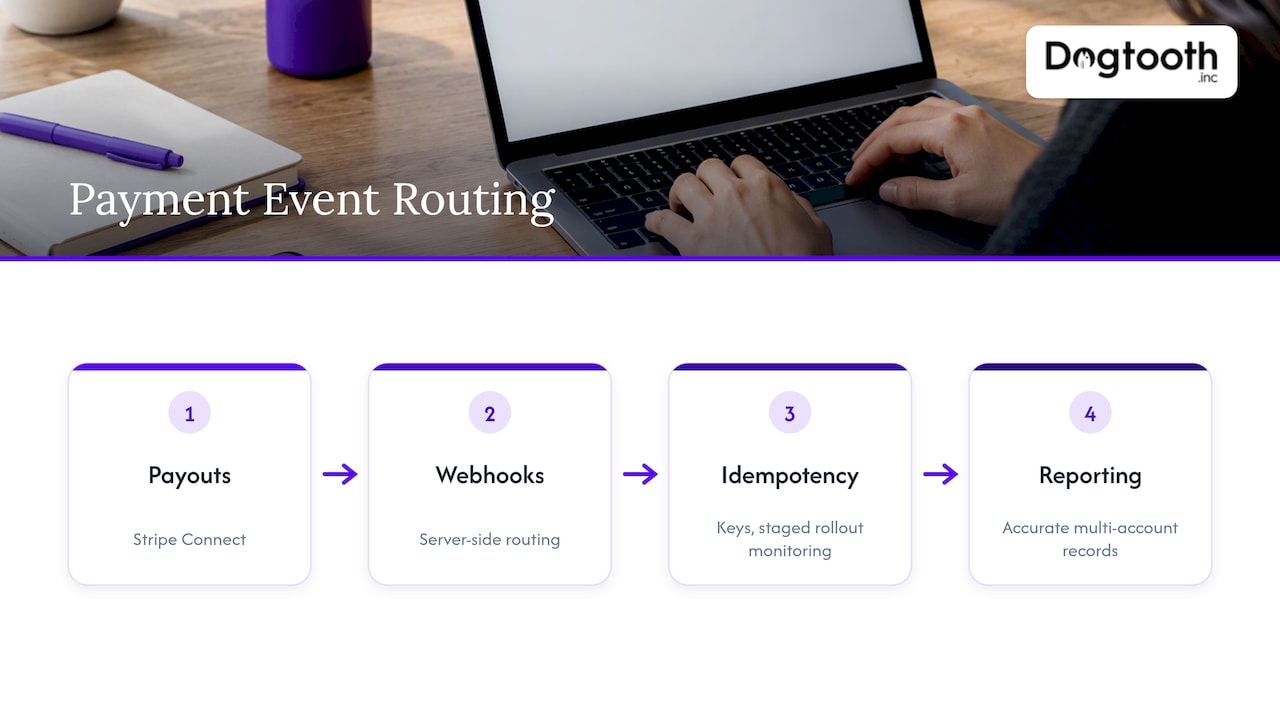
In one practitioner portal build, we routed Stripe Connect payouts through server-side webhooks to keep payment records accurate across multiple accounts. Staged rollouts, monitoring, and idempotency keys on every event kept duplicate charges and dropped events from reaching the reporting layer during that build.
Common mistakes with server side tracking and how to avoid them
The recurring failures we see: duplicate events from missing event_ids, and consent rules enforced in the browser but forgotten server-side. Fix both by assigning one source of truth per event type, enforcing idempotency keys everywhere, and mirroring consent checks on the server. Review both after 90 days.
— Chase Weir
How Dogtooth Inc can help with server side tracking
We build server side layers designed to handle production traffic reliably. Our e-commerce engineering and integrations work covers everything from mapping a first-party server container to wiring payment and CRM systems into it with idempotency and monitoring built in from day one.

Past projects show the pattern: a craft brewery’s POS and Shopify integration needed payment events that never dropped a transaction, and a media buying operation running Meta CAPI across 15+ ad accounts needed attribution that survived browser-level blocking. For payment-specific reconciliation patterns, PaySec’s analytics writeup covers webhook-driven approaches that pair well with a server container.
- Pilots often focus on one event type, like payments or webhooks, before expanding.
- Custom domain mapping, server key storage, and production-mode setup are handled.
- Ongoing monitoring after launch helps catch issues early.
If your current tracking is missing payment events or losing conversions to blockers, talk to our team about scoping a pilot.
FAQ
What is server-side tracking?
Server-side tracking is when a server, rather than the visitor’s browser, collects an event and forwards it to analytics or advertising platforms. It’s commonly used for events like payments and renewals that happen outside a browser session.
What is the server-side tracking process?
A request reaches a server container, where a client interprets it into a standard event, then tags and triggers route that event to its destination, as described in Google’s server-side tagging documentation. Idempotency checks using a stable event_id prevent retries from creating duplicate records, per AdPix’s docs.
Is server-side tracking legal?
Server-side tracking itself isn’t illegal, but it doesn’t remove your privacy obligations. The FTC and OCR have warned that any tracking technology, server-side included, can trigger enforcement if it discloses sensitive data like health information without proper consent.
What is the difference between client-side and server-side tracking?
Client-side tracking runs in the visitor’s browser and depends on scripts the browser agrees to execute, which blockers and privacy features can interrupt. Server-side tracking runs on infrastructure you control, giving you more reliability for off-browser events and more say over what data leaves your systems before it reaches a third party.
Sources
- An introduction to server-side tagging
- Server-side tracking · Analytics — AdPix Docs
- Web GTM vs Server-Side GTM: Reproducible Benchmark
- Model Letter: Use of Online Tracking Technologies
- Server-Side Tracking | Zenovay Docs