
Migrating to Shopify Plus makes sense for high-volume merchants with multi-store, multi-currency, or custom checkout needs, with project costs and timelines varying widely depending on complexity. The platform itself starts at $2,300 per month on a 3-year term or $2,500 per month on a 1-year term, with larger accounts shifting to a variable fee. The three risks that sink timelines are messy data, under-tested integrations, and SEO loss from a sloppy cutover.
TL;DR:
- A standard Shopify upgrade takes two to four weeks; replatforms need 60 to 90 days, while complex enterprise projects can take six months or longer.
- Merchants expecting rapid growth should ask how Shopify calculates its fee tied to revenue, which may replace flat pricing for larger accounts with greater complexity.
- Full replatform budgets rise with catalog complexity, rebuilt integrations, custom checkout work, and historical data; theme code and app logic usually require rebuilding, not porting.
- Before launch, map every old URL to a 301 redirect, preserve metadata and canonical tags, then monitor Search Console and rankings daily for two weeks.
- Require at least two full sandbox migration runs, test integrations against real transaction edge cases, and define pass criteria and rollback triggers before scheduling cutover.
Table of Contents
- Who should migrate to Shopify Plus, and who should wait
- Shopify Plus pricing and the migration budget you need to plan for
- What a realistic Shopify Plus migration timeline looks like
- Migration paths: what changes depending on where you’re coming from
- The migration playbook: from discovery to hypercare
- Protecting SEO and revenue through the cutover
- Common mistakes that cause rollbacks
- How to choose a migration partner and what the SOW must include
- How we run Shopify Plus migrations at Dogtooth
- Where to put scarce migration budget
- Managed Shopify Plus migrations with Dogtooth
- FAQ
- Sources
Who should migrate to Shopify Plus, and who should wait
Shopify Plus earns its cost when a business has outgrown the flexibility of standard Shopify or a legacy platform in specific, measurable ways. The signals are usually functional before they are financial: a brand needs wholesale or B2B pricing tiers, runs multiple storefronts off one back end, sells in several currencies, or wants checkout customizations that standard Shopify can’t support natively.
It helps to separate two very different projects that both get called “migrating to Shopify Plus.” One is an upgrade: a merchant already on standard Shopify moves to Plus mostly for pricing, support, and feature access, with relatively light technical lift. The other is a replatform: moving off Magento, WooCommerce, BigCommerce, or a custom-built site, which touches every system that currently talks to the old store. Scope, cost, and risk multiply in the second case.
Business signals worth checking before committing to either path:
- Revenue and order volume consistently near or above the ceiling where standard Shopify’s transaction limits or app stack start causing friction.
- Checkout customization needs, such as post-purchase upsells, custom shipping logic, or B2B-only purchase flows.
- Multi-store or multi-region operations that currently rely on duct-taped integrations or manual syncing.
- Integration complexity with an ERP, PIM, OMS, or 3PL that standard Shopify’s app ecosystem struggles to support at scale.
Timing matters as much as readiness. Avoid scheduling a cutover during peak season, and never set a go-live date before every integration has been validated in a staging environment. A migration that looks simple on paper can stall for weeks once a single connector to an ERP or fulfillment partner fails its first test run.
Shopify Plus pricing and the migration budget you need to plan for
Platform cost is the easy part to estimate. Shopify Plus starts at $2,300 per month on a 3-year term or $2,500 per month on a 1-year term, with larger, higher-complexity merchants sometimes moved to a variable, revenue-based fee structure instead of a flat rate. That number is predictable. The migration project itself is where budgets swing.
The variable fee model exists specifically for merchants whose transaction volume or complexity exceeds the flat-rate tier, according to Shopify’s own Plus pricing page, so any business expecting rapid growth post-migration should ask how that threshold is calculated before signing.
Migration services themselves vary widely depending on a handful of cost drivers:
- Catalog size and variant complexity: a 500-SKU catalog with simple variants migrates faster and cheaper than 50,000 SKUs with custom metafields.
- Custom app and integration count: every ERP, PIM, OMS, or 3PL connector that needs rebuilding or revalidating adds scoped hours.
- UI and checkout rebuild scope: a theme using Plus-exclusive checkout extensibility costs more upfront than a near-default storefront.
- Historical data retention: pulling years of order and customer history into the new environment takes longer than a clean-slate launch.
A practical budget checklist for the person signing off on the project: confirm whether quoted prices include post-launch support, ask for a breakdown of migration runs (how many sandbox tests before production), and get the rollback plan priced separately rather than bundled as an assumption.
What a realistic Shopify Plus migration timeline looks like
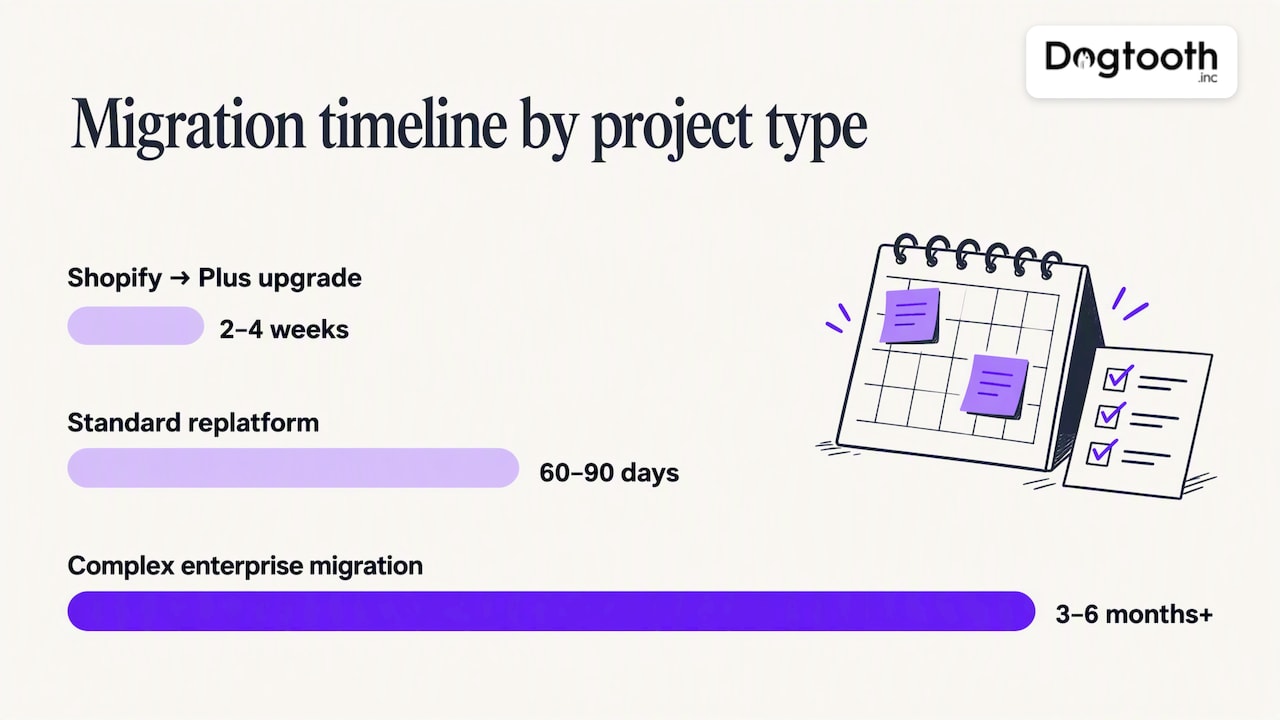
“90 days” gets thrown around as a default migration timeline, but it only applies to a specific kind of project. A straightforward upgrade from standard Shopify to Plus, with no replatforming, can close in two to four weeks. A standard replatform, migrating a mid-sized catalog off Magento or WooCommerce with a handful of integrations, typically lands in the 60 to 90 day range. Complex enterprise migrations, those with large catalogs, multiple integrations, custom checkout logic, or multi-store rollouts, commonly stretch to 3 to 6 months or longer.
The variables that move a project from one band to the next:
- Catalog size: tens of thousands of SKUs with nested variants and metafields take meaningfully longer to map and validate than a few hundred products.
- Integration count: each ERP, PIM, or 3PL connection adds its own testing cycle, and connectors rarely work correctly on the first pass.
- Checkout customization depth: rebuilding complex checkout logic using Plus-exclusive extensions takes longer than keeping a near-default flow.
- Data history: migrating years of order and customer records adds processing and QA time that a clean launch skips entirely.
Parallel runs and rehearsal windows are the part teams most often try to skip under deadline pressure, and it’s the wrong place to cut. Running the old and new systems side by side, even briefly, catches data mismatches and integration failures that a single dry run misses. Teams that build in a dedicated rehearsal window before the real cutover consistently report fewer post-launch emergencies than teams that go straight from staging to production.
Migration paths: what changes depending on where you’re coming from
The source platform determines most of the scope, and three paths cover the vast majority of projects.
- Shopify to Shopify Plus. This is closer to an upgrade than a migration. Products, customers, and orders are already in Shopify’s data model, so the work centers on configuration, checkout customization, and unlocking Plus-exclusive features rather than data transformation.
- Magento, WooCommerce, or BigCommerce to Shopify Plus. This is a full replatform. Catalog structure, variant logic, and customer data all need mapping into Shopify’s schema, and custom theme code or plugins almost never carry over directly. Shopify’s own guidance on choosing a migration service notes that theme files and custom app logic need to be rebuilt rather than ported, which is the single most underestimated line item in replatform budgets.
- Custom-built platform to Shopify Plus. This path carries the highest variability, since a bespoke system may have business logic, pricing rules, or integrations with no direct Shopify equivalent. Expect a longer discovery phase to document what the custom system actually does before anyone can plan how to rebuild it.
Across all three paths, metafields deserve specific attention. Custom product attributes, loyalty tiers, and B2B pricing rules often live in metafields that need to be recreated, not just copied, and anything stored in a proprietary format on the old platform typically needs a transformation script rather than a straight export and import. Merchants planning multiple storefronts or international expansion stores should also map out how Shopify Plus’s multi-store architecture will handle shared versus store-specific catalogs before migration runs begin, since retrofitting that structure after launch is far more expensive than designing it upfront.
The migration playbook: from discovery to hypercare
A Shopify Plus migration succeeds or fails on the strength of its statement of work. Shopify’s enterprise guidance on choosing a data migration service lays out the deliverables a competent service should produce: discovery, data mapping, migration runs across sandbox and production, QA plans, a cutover and rollback plan, and dedicated SEO deliverables. Here’s how that breaks down in practice.
- Discovery and data health checks. Export everything from the source system first, then audit it for duplicate customer records, orphaned orders, and incomplete product data before any mapping begins. Skipping this step means every downstream phase inherits the source system’s mess.
- Data mapping and transformation rules. Define exactly how products, variants, customers, orders, and metafields translate into Shopify’s data model, including what happens to fields with no direct equivalent.
- Integration test plans. Every system touching order data, ERP, PIM, OMS, and 3PL connections, needs its own validation plan, tested against real transaction scenarios rather than sample data.
- Design and checkout rebuild. This is where Plus-exclusive tools matter. Shopify’s Checkout UI extensions and post-purchase extension points let enterprise merchants customize checkout flow and add post-purchase offers without the script-based workarounds older platforms required.
- QA, UAT, and rehearsed cutover. Run multiple migration passes, staging first, then a full rehearsal that mimics production conditions, with explicit rollback triggers defined before anyone schedules a go-live date.
- DNS, caching, and go-live sequencing. Time the DNS cutover and cache invalidation carefully. A mismatched TTL setting can leave some visitors on the old site for hours after launch.
- Post-launch hypercare. Define a 2 to 4 week hypercare window with specific SLAs: who responds to a checkout failure at 2 a.m., how fast a data discrepancy gets resolved, and when the hypercare period formally ends.
Pro Tip: Price the rollback plan and the number of migration runs as explicit SOW line items, not as assumptions baked into a flat project fee.
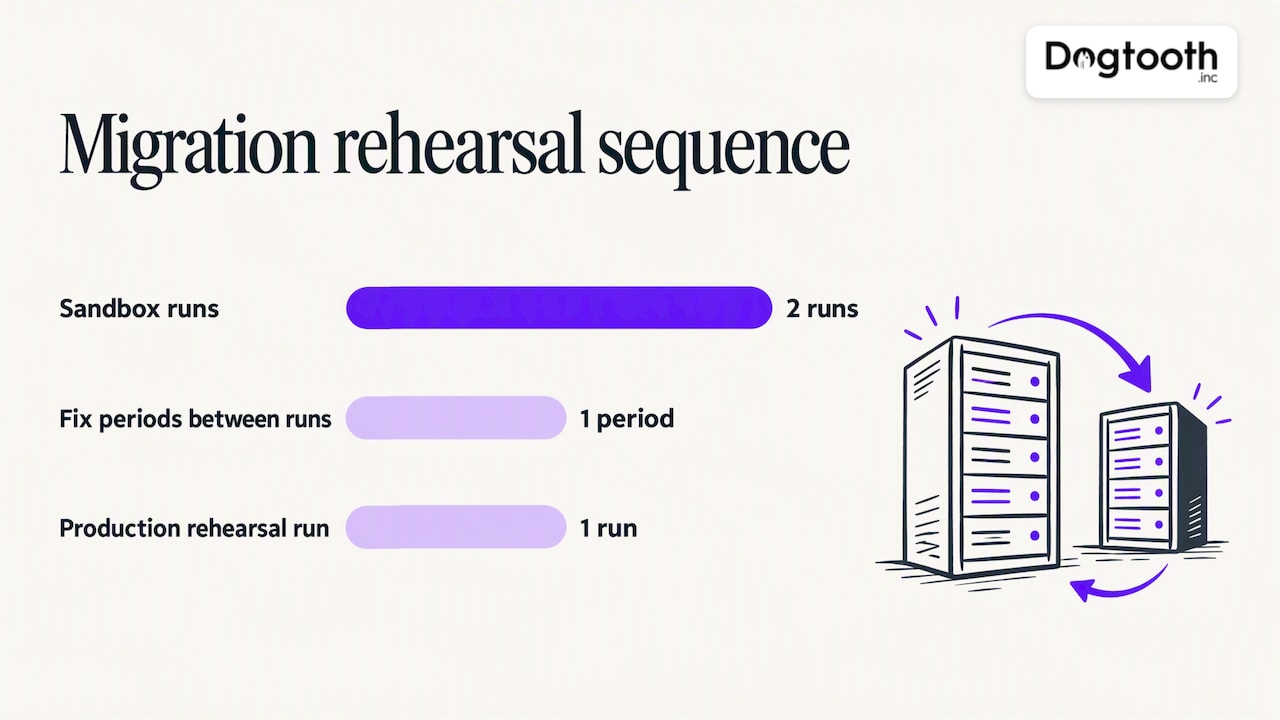
The number of migration runs matters more than most SOWs reflect. One sandbox pass followed by a single production run is not enough for anything beyond the simplest catalog. Plan for at least two full sandbox runs with a gap between them to fix what the first run exposes, and treat the production run as a rehearsal with a defined rollback point, not a one-way door. Shopify Plus’s developer tools, including the Transporter app for bulk data ingestion and robust REST and GraphQL APIs, exist specifically to make repeated migration runs practical rather than painful. Integration validation deserves the same rigor: a connector that works in testing with sample data can still fail against a real order with international tax rules or a discount stack it’s never seen. For merchants coordinating CRM data alongside the storefront migration, structured data mapping practices used in CRM migrations translate directly to the product, customer, and order mapping work a Shopify Plus project requires.
Protecting SEO and revenue through the cutover
Organic traffic is the single most common casualty of a rushed platform migration, and nearly all of the damage is preventable with a checklist, not luck.
- Build a complete 301 redirect map before cutover, covering every URL on the old site, not just the obvious category and product pages.
- Validate every redirect in staging, checking for redirect chains (a redirect pointing to another redirect) and for pages that got missed entirely.
- Preserve metadata, canonical tags, and structured data exactly as they existed, and confirm the new sitemap reflects the final URL structure before submission.
- Monitor Search Console, Core Web Vitals, and keyword rankings daily for the first two weeks after launch, then weekly through the 60 to 90 day mark.
Shopify’s own enterprise guidance lists SEO migration deliverables as a required part of a competent data migration service, not an optional add-on, which underscores how often SEO gets treated as an afterthought when it should be scoped from day one.
The failure modes worth testing for explicitly before cutover: redirect chains longer than two hops, orphaned pages with no inbound redirect at all, canonical tags pointing to the wrong URL structure, and a sitemap that still references pre-migration URLs. Any one of these can quietly bleed ranking signal for weeks before anyone notices the traffic drop in analytics.
Common mistakes that cause rollbacks
Most migration failures trace back to a small set of avoidable shortcuts, usually taken under deadline pressure.
- Rushed cutovers with no parallel run. Going straight from a single staging test to production skips the step that catches real-world data mismatches.
- Under-scoped integrations. Treating an ERP or 3PL connector as a simple API call instead of testing it against actual transaction edge cases.
- Vague QA acceptance criteria. Without specific, written pass/fail conditions, “QA complete” becomes a judgment call made under time pressure.
- No rollback plan. Assuming the migration will work rather than defining the exact trigger conditions and steps for reverting if it doesn’t.
- Skipping hypercare. Treating launch day as the finish line instead of the start of a 2 to 4 week monitoring window with defined response SLAs.
Each of these is cheap to prevent in the SOW and expensive to fix after a failed launch.
How to choose a migration partner and what the SOW must include
The partner selection process should function like a technical interview, not a sales pitch. Ask direct questions about platform experience: how many Shopify Plus migrations has the team run, what source platforms have they migrated from, and can they describe a project that didn’t go as planned and how they handled it. References matter more here than in most vendor decisions, since migration quality is hard to assess until something breaks.
The SOW itself should contain, at minimum:
- A defined scope that names every system being migrated, every integration being validated, and every feature being rebuilt.
- A data mapping document covering products, customers, orders, and metafields, including fields with no direct Shopify equivalent.
- A specific number of migration runs, sandbox and production, with a gap between runs to address issues found.
- Written QA acceptance criteria that define pass and fail conditions in advance, not after testing begins.
- A cutover and rollback plan, with explicit rollback triggers and who has authority to pull it.
- Hypercare SLAs covering the post-launch window, with response times by issue severity.
- Pricing for scope changes, since almost every migration surfaces at least one unplanned issue.
Pro Tip: If a prospective partner can’t produce a written cutover playbook or rollback plan before the contract is signed, that’s a sign they haven’t run one before.
Red flags worth walking away from: no documented cutover process, SLAs described only in vague terms like “fast response,” and any hesitation to commit to a rollback plan in writing. A partner confident in their process will have these documents ready, not promised.
How we run Shopify Plus migrations at Dogtooth
We treat Shopify Plus migrations with AI agents handling the repetitive verification work so our senior team can focus on the decisions that actually need judgment. AI agents run inside the actual migration workflow, checking data mapping accuracy, flagging catalog discrepancies, and validating integration test results faster than manual QA alone allows.
The team ships on a weekly cadence rather than disappearing for months between check-ins, which means issues surface and get fixed while there’s still runway to adjust scope instead of after a deadline has already passed. A senior team stays on the project from discovery through hypercare, not handed off to junior staff once the contract is signed.
Email deliverability often gets overlooked during a replatform, even though transactional and marketing email infrastructure migrates alongside the storefront.
Where to put scarce migration budget
If I had to compress this entire playbook into one piece of advice, it would be this: spend your scarce hours on integration mapping and parallel runs, not on cosmetic polish. A beautiful theme that fails to sync inventory with your ERP on day one will cost you more in emergency fixes than a plainer theme that works correctly from launch.
Migration is also the best opportunity you’ll get to remove platform debt instead of recreating it. If your current custom checkout logic is held together with scripts nobody fully understands, don’t pay a vendor to rebuild that same fragility inside Shopify Plus. Use the Plus-exclusive tools built for this purpose instead.
Finally, assign real governance before work begins: one executive sponsor who can make scope-change calls quickly, and one technical owner who holds the actual runbook. Projects without both roles clearly assigned are the ones that drift.
— Chase
Managed Shopify Plus migrations with Dogtooth
A migration goes smoother when the team running it treats your platform debt as something to remove, not replicate, and when a senior person is accountable from discovery through hypercare rather than a rotating cast of junior staff.

That’s how we approach every Platform Builds & Migrations engagement: AI agents handle the repetitive QA and data validation work, a senior team owns the decisions, and we stay on after launch instead of disappearing once the cutover is done.
- An initial assessment covers your current platform, integration count, and catalog complexity to scope a realistic timeline.
- You get a written SOW with migration run counts, QA criteria, and a rollback plan before any contract is signed.
- Post-launch support includes monitoring and deliverability checks, since a migrated storefront with broken email infrastructure isn’t actually done.
Reach out through our Platform Builds & Migrations page to start that assessment.
FAQ
Is Shopify still worth it in 2026?
Shopify remains a strong choice for most ecommerce businesses in 2026, particularly those needing a reliable, well-supported platform without maintaining their own infrastructure. For merchants with complex B2B, multi-store, or high-volume needs, Shopify Plus specifically adds checkout customization and enterprise-grade support that standard Shopify doesn’t offer.
Why is Shopify Plus so expensive?
Shopify Plus platform fees start at $2,300 per month on a 3-year term or $2,500 per month on a 1-year term, reflecting the enterprise features, priority support, and checkout extensibility included at that tier. Larger or higher-volume merchants may move to a variable, revenue-based fee instead of the flat rate.
How much would it cost to migrate my website to Shopify?
Migration costs vary widely based on catalog size, integration count, and how much custom checkout or theme work is required, with simple upgrades costing far less than full replatforms from a legacy system. Getting a specific estimate requires a discovery phase that maps your current data and integrations before a migration partner can scope accurate pricing.
What’s the difference between Shopify and Shopify Plus?
Standard Shopify suits smaller and mid-sized merchants, while Shopify Plus adds enterprise features like checkout customization through Checkout UI extensions, multi-store management, B2B functionality, and priority support. Plus also starts at a higher monthly platform fee that reflects that expanded feature set.
Sources
For readers who want to verify figures or dig into technical details directly, Shopify’s Plus pricing page covers current platform fees and the variable fee structure. Shopify’s enterprise blog on choosing a data migration service details recommended SOW deliverables, and Shopify’s developer documentation on Checkout UI extensions and the Checkout extensibility overview cover the Plus-exclusive tools referenced throughout this playbook.