
Inbox placement testing tells you where a message actually lands at each mailbox provider: the inbox, a tab such as Promotions, the spam folder, or nowhere at all. You send your real campaign to a small set of test mailboxes at Gmail, Outlook, Yahoo and others, then read the folder each copy ended up in. It is a fast, useful diagnostic. It is also a snapshot, not a forecast, and most of the mistakes people make come from forgetting that.
This guide covers how a test works, how to run one that means something, how to read the numbers, and what to do when the results are bad.
TL;DR
- A placement test sends your exact production message to seed mailboxes and reports inbox, tab, spam or missing for each provider. It catches obvious problems early.
- Seed mailboxes have no engagement history, so results are directional. Real subscribers are filtered based on their own opens, clicks and deletions.
- A “delivered” status from your email platform only means the receiving server accepted the message. It says nothing about the folder.
- Pair seed tests with Google Postmaster Tools, Yahoo Sender Hub and Microsoft SNDS, and fix authentication (SPF, DKIM, DMARC) before anything else.
- Test the same message, route and timing as the real send, and keep seed lists small.
Table of Contents
- Inbox placement is not the same as delivery
- How an inbox placement test works
- What seed tests can and cannot tell you
- How to run a test that means something
- Reading the results
- Cross-check with the dashboards providers give you
- Know the thresholds that matter
- When the test comes back bad: a fix order
- Our perspective
- Building placement checks into your workflow
- Frequently asked questions
- Sources
Inbox placement is not the same as delivery
Most email platforms report a delivery rate. That figure counts messages the receiving server accepted. Amazon SES-style reporting records a delivery when the receiving server returns a 250 OK, and that response arrives before any filtering decision about the folder. A campaign can show 99% delivered and still sit in spam for a large share of recipients.
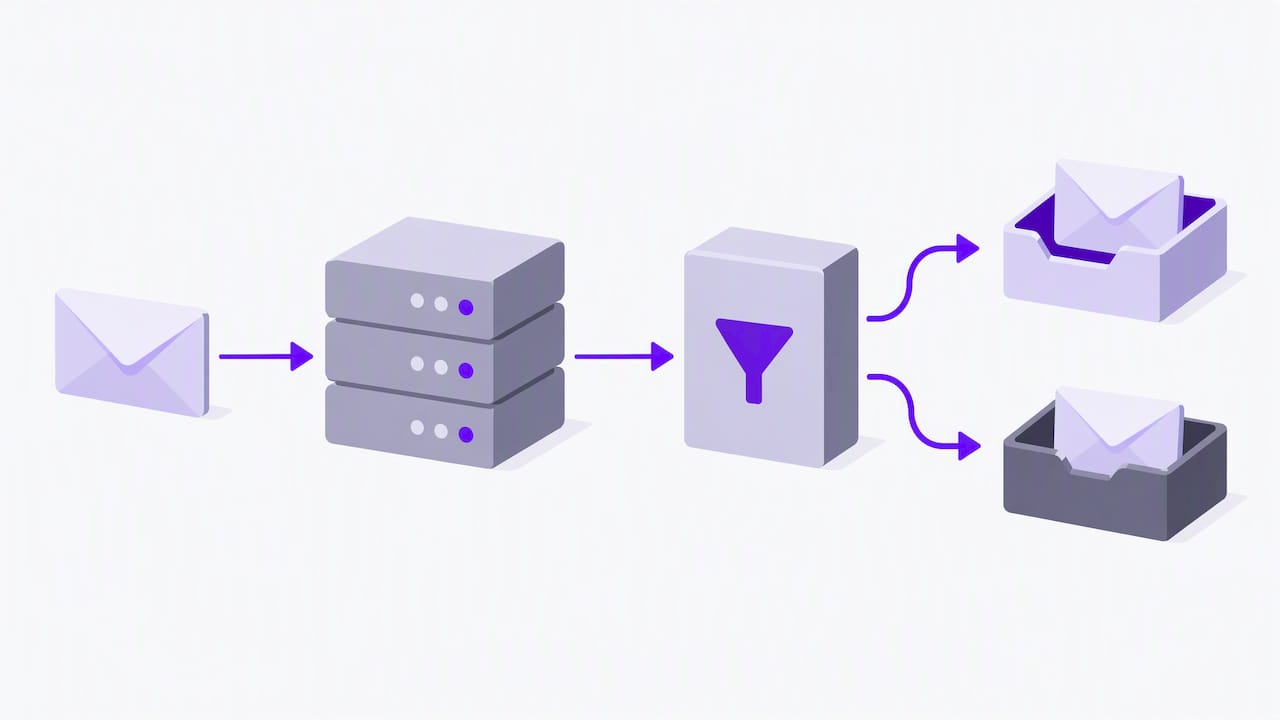
The gap is widest at Microsoft. Outlook and Hotmail can accept a message and then route it to junk after acceptance without telling the sender, so your dashboard reports success while the message is filtered. That is why a placement test exists: it looks at the folder, not the handshake.
Here is the vocabulary worth keeping straight:
| Term | What it measures | Where you see it |
|---|---|---|
| Delivery rate | Share of messages the receiving server accepted | Your email platform |
| Inbox placement rate | Share of accepted messages that reached the primary inbox | Placement tests, panel data |
| Bounce rate | Messages rejected outright | Your email platform |
| Spam complaint rate | Share of recipients who marked you as spam | Google Postmaster Tools, feedback loops |
How an inbox placement test works
The mechanics are simple.
- The testing service gives you a list of seed addresses spread across providers such as Gmail, Outlook, Yahoo, iCloud and regional or corporate mailboxes.
- You send your campaign to those addresses, usually through the same system you use for the real send.
- The service checks each seed mailbox and records where the message landed: inbox, Promotions or another tab, spam, or missing.
- You get a report broken down by provider, often alongside authentication results and spam-filter signals.
Tools generally fall into two types. Seed-based tools use test mailboxes and are quick and inexpensive, which suits pre-send checks. Panel-based tools model results from a very large set of real consumer inboxes and add engagement data, which is aimed at high-volume senders with dedicated analysts. Published price ranges for the two types are far apart, from tens of dollars a month for seed tools to five or six figures a year for enterprise panel products, so match the tool to your volume rather than buying the biggest option.
What seed tests can and cannot tell you
This is the part most guides skip past. A seed mailbox is a fresh account. It has never opened your email, clicked a link or replied. Modern mailbox providers weigh each subscriber’s own history heavily, so placement is a personalized outcome: the same email can reach one person’s inbox and another’s spam folder.
The practical consequences:
- Seeds are directional. Seed lists are a diagnostic, not a statistically representative sample, and they should not be treated as a revenue forecast.
- False positives and negatives happen. A seed can land in the inbox while a chunk of your engaged-poorly subscribers get spam, and the reverse is also possible.
- They are best at finding obvious failures. A message that lands in spam at every seed provider has a real problem, usually authentication, a blocklisted domain or IP, or content and link issues.
- They supplement, not replace, other signals. Twilio’s guidance on seed testing frames it the same way: an early-warning layer next to your other monitoring.
So the right question is not “did we get 100% inbox?” It is “does anything in this result disagree with what our other data says?”
How to run a test that means something
Use the real message
For the most accurate read, the test should use the exact production message, the same sending route and the same timing as the real campaign. A stripped-down test email from a different domain or IP tells you about that test email, not your campaign. Include your actual links, tracking domain, images and footer, because those are common triggers.
Keep the seed list small
It is tempting to add hundreds of seed accounts. Twilio notes that a large seed list inside a high-volume production send can create an artificial pattern of non-engagement that providers may read negatively. Use a small, targeted list for pre-send validation only, and keep it out of your normal sends.
Test before you scale, not after
Run the test on the final creative and before the full send. If you are changing something big, such as a new sending domain, a new platform, or a migration, test before and after the change so you have a baseline to compare against.
Test the segments you care about
If most of your audience is B2B, Microsoft-hosted corporate mailboxes matter more than consumer Gmail. If you sell to consumers, Gmail and Yahoo dominate. Weight the report toward where your subscribers actually are.
Reading the results
A report usually shows four outcomes per provider. Here is how to interpret each.
| Result | What it usually means | First thing to check |
|---|---|---|
| Inbox | No obvious filtering problem for a new, unengaged mailbox | Compare with real open rates by provider |
| Promotions or other tab | Classified as marketing content; not necessarily bad | Whether tab placement matches your open-rate expectations |
| Spam | Reputation, authentication, content or link problem | Authentication results and blocklists |
| Missing | Rejected, deferred or silently dropped | Bounce logs and SMTP responses |
Provider differences are normal. In 2025 B2B benchmarks from Validity, inbox placement at Office 365 was around 50.7% and at Outlook/Hotmail around 26.77%, while the same report shows financial services averaging 57% and technology and professional services above 80%. Treat those as context for your own numbers, not as targets. Your industry, list quality and sending pattern all move the figure.
The pattern matters more than any single score. Look for:
- One provider is bad, the rest are fine. That points to a provider-specific reputation issue. Check that provider’s own dashboard.
- Every provider is bad. Suspect authentication, a blocklisted domain, or the content itself.
- Results change sharply between tests. Something changed: the template, the link domain, the IP, or the list.
Cross-check with the dashboards providers give you
A seed test sees only a handful of mailboxes. The mailbox providers see all your traffic and publish some of what they know:
- Google Postmaster Tools shows domain and IP reputation and spam rate for mail sent to Gmail.
- Yahoo Sender Hub gives Yahoo’s equivalent view, including sender best practices that call for SPF and DKIM and a valid DMARC policy of at least p=none.
- Microsoft SNDS reports on IP-level behavior and is the main way to spot Microsoft’s silent filtering.
Experts consistently warn against relying only on ESP reports. Cross-reference your ESP logs with these dashboards so that a seed test, your platform’s numbers and the providers’ own data tell one consistent story.
Know the thresholds that matter
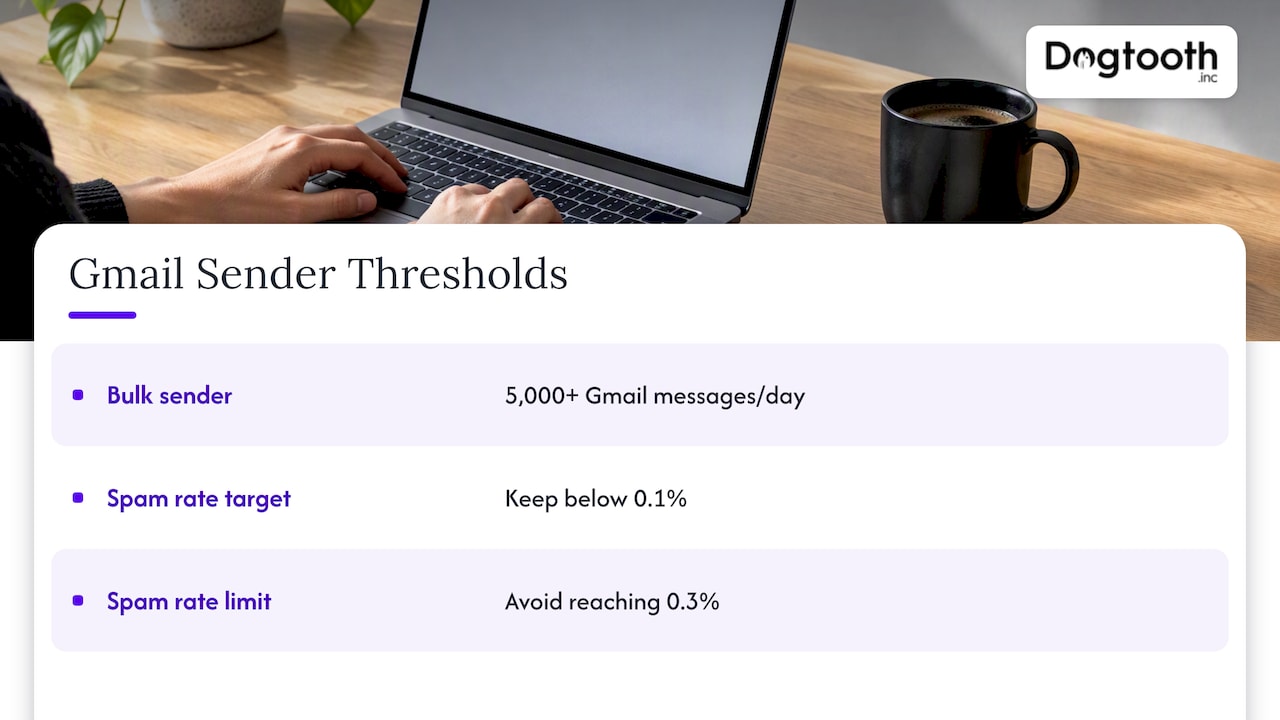
Google defines bulk senders as those sending 5,000 or more messages a day to Gmail addresses. Google’s sender guidelines say to keep your user-reported spam rate below 0.1% and to avoid ever reaching 0.3%. Staying above 0.3% hurts deliverability and removes eligibility for mitigation. These limits are why a placement test alone is not enough: a clean seed result tells you nothing about your complaint rate.
Authentication is the other baseline. Industry data summarized by The Digital Bloom reports that fully authenticated domains using SPF, DKIM and DMARC are about 2.7 times more likely to reach the inbox, and that enforcement at p=quarantine or p=reject is a leading driver of placement gains. Treat it as the entry ticket, not an optimization.
When the test comes back bad: a fix order
Work from the cheapest, highest-impact fixes down.
- Authentication. Confirm SPF, DKIM and DMARC pass and align for the domain you send from. Move DMARC toward enforcement once reports show your legitimate sources are covered.
- Blocklists and infrastructure. Check whether your sending domain or IP is listed, and whether your sending domain, tracking domain and links all share a clean reputation.
- List quality. Hard bounces and dead addresses hurt reputation fast. We cover this in our guide to email list hygiene and automated repairs, including how to stay out of 2%+ hard bounce territory.
- Complaints and engagement. Suppress people who have not opened in a long time, make unsubscribing easy, and send to your most engaged segment first.
- Content and links. Remove URL shorteners, mismatched link domains and heavy image-only layouts, then retest.
- Retest the same message. Change one thing at a time so you know what moved the result.
If you sit between platforms, plan the move carefully. Changing ESPs resets part of your sending footprint, and a pre- and post-migration test gives you evidence of what changed. Our Keap-to-Maropost migration case study shows what a multi-account move looks like in practice.
Our perspective
We run email at volume for ourselves and for clients, and the same pattern repeats: teams treat a placement test as a grade when it is really a smoke alarm. A good result does not prove you are healthy, and a bad one does not always mean your list is in trouble. What matters is whether the test agrees with the rest of your telemetry.
That is how we run our own operation. Our in-house AI campaign manager drafts on-brand emails, runs compliance checks, tests inbox delivery and schedules sends on a single approval. The test is one step in a chain, wired to the checks before it and the reporting after it, so nobody has to remember to run it.
Three opinions we hold firmly:
- Test the real send, not a clean room. Most false comfort comes from testing a simplified message.
- Put placement data next to engagement data. If seeds say inbox but real opens at one provider fall off a cliff, believe the opens.
- Automate the routine, review the exceptions. A human should look at the report when something moves, not every Tuesday.
If you want to see what this looks like end to end, our pet niche email list case study covers building and monetizing a list where deliverability was part of the work.
— Chase Weir
Building placement checks into your workflow
Buying a tool is the easy part. The value comes from where the test sits in your process:
- Before every major campaign: run a seed test on the final message and route.
- After any infrastructure change: new domain, new IP, new platform, new DNS records.
- On a schedule for key flows: welcome series and transactional mail deserve regular checks because they run unattended.
- With alerts: a drop in provider-level placement or a spike in complaints should notify a person, not wait for a monthly report.
When the checks, the thresholds and the alerts live in one system, you stop finding out about problems from revenue reports. That is the kind of integration work we do for brands with established sending volume. If you want deliverability monitoring and email infrastructure built around your actual stack, you can talk to our team about email infrastructure and deliverability, including our MailFurnace software for high-volume senders.
Frequently asked questions
What does inbox placement mean?
Inbox placement is the share of your emails that reach the recipient’s primary inbox instead of spam, a promotional tab or being silently dropped. It differs from delivery, which only means the receiving server accepted the message. A campaign can have a very high delivery rate and a much lower placement rate.
How do I prepare for an inbox placement test?
Use the final version of your campaign, sent from the same domain, IP and platform you will use for the real send. Confirm that SPF, DKIM and DMARC pass before you test, since failing authentication will dominate the result. Keep the seed list small so it does not distort your engagement patterns.
Are free inbox placement tests reliable?
Free tests are fine for a quick directional check, especially for catching authentication errors and obvious spam triggers. They usually use fewer seed mailboxes, so a clean result is weaker evidence. Use them as a first pass, then confirm with Google Postmaster Tools, Yahoo Sender Hub and your own engagement data by provider.
Why did my test say inbox when subscribers say they cannot find my emails?
Seed mailboxes have no engagement history, while your real subscribers do. Providers filter each person based on how they have treated your past messages, so a seed can land in the inbox while a disengaged subscriber’s copy goes to spam. Check your spam complaint rate and provider-level open rates for the real picture.
How often should I run a placement test?
Run one before major campaigns and after any change to your domain, IP, platform or DNS records. For always-on flows like welcome series, schedule regular checks. Between tests, watch complaint rate and provider dashboards continuously.
Sources
- Google: email sender guidelines and spam rate thresholds
- Validity 2025 email deliverability benchmark report
- The Digital Bloom: B2B email deliverability report 2025
- SES Monitor: Postmaster Tools, Sender Hub and SNDS guide
- Suped: how valuable are seed lists and what are their limits
- Twilio: how to use email seed list testing effectively
- Mailer To Go: Microsoft 365 email delivery guide
- Yahoo Sender Hub: sender best practices