Moving a store from Magento to Shopify is a replatform, not a copy job. Products, customers and orders move fairly easily. The hard parts are the custom logic you built over the years, the URLs Google already knows, and the integrations that keep your warehouse, ERP and email running. Done well, a mid-market store can finish in roughly 14 to 24 weeks and come out cheaper to run. Done carelessly, it loses organic traffic for months.
This guide covers what the migration really costs in the US, what breaks, how to protect search traffic, and how we sequence the work so cutover day is boring.
TL;DR
- Mid-market Magento to Shopify Plus projects with a certified agency are estimated at $85,000 to $250,000 all-in, over a 14 to 24 week timeline for 2,000 to 15,000 SKUs.
- Compare five-year total cost of ownership, not the day-one invoice. Dropping Adobe Commerce licensing and specialized PHP headcount is what drives payback.
- SEO is the biggest avoidable risk: build a 1:1 redirect map for every indexed URL before cutover.
- Budget for 60 to 90 days of post-launch support. Problems surface only when real customer volume arrives.
- Plan the migration in phases, with a written scope of work, rather than one big-bang weekend.
Table of Contents
- Why brands are leaving Magento
- What a Magento to Shopify migration costs in the US
- Look at five-year cost, not launch-day cost
- The SEO risk and how to avoid it
- Data, apps and integrations: what actually moves
- A realistic timeline
- Our perspective
- Working with Dogtooth on your migration
- Pre-launch checklist
- FAQ
- Sources
Why brands are leaving Magento
Three pressures come up in nearly every conversation. Maintenance is the first: hosting, security patches, extension upgrades and developers who know Magento’s stack. Licensing is the second, for stores on Adobe Commerce. Adobe does not publish a price list, but merchants and agencies report roughly $22K to $125K a year at the mid-market level. Speed is the third: every campaign, landing page or checkout tweak takes a developer ticket instead of a merchandiser’s afternoon.
Shopify trades some flexibility for a managed platform: hosting, PCI scope, uptime and checkout are Shopify’s job. If your team spends more time keeping the store alive than improving it, that trade is usually worth making. If your business depends on deeply unusual catalog logic, say complex configurable products with live pricing from an ERP, it is still possible, but the work moves into custom apps and APIs, and your budget should say so.
What a Magento to Shopify migration costs in the US
Magento migrations cost more than moves from simpler platforms, because the work is genuinely harder: custom modules, B2B pricing rules, multi-store setups and years of messy data. Published ranges vary widely by store size and edition, and the numbers below are estimates, not quotes.
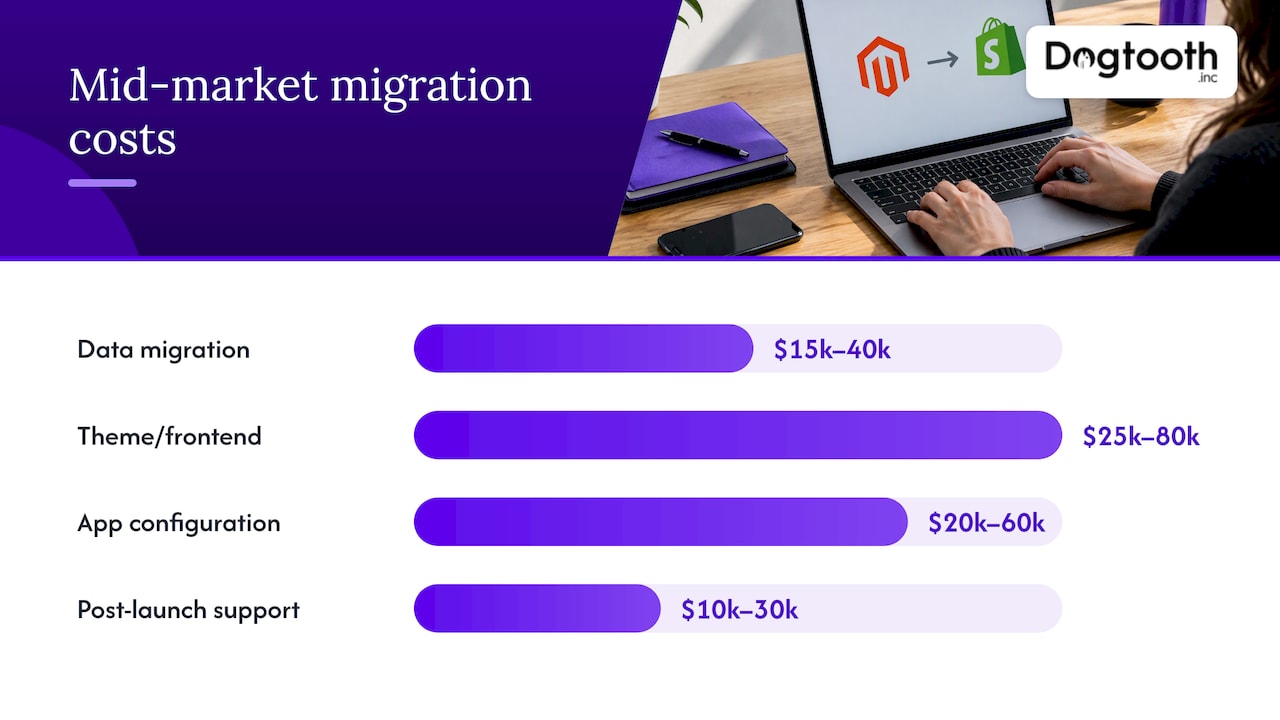
For mid-market brands moving to Shopify Plus with a certified partner, one 2026 estimate breaks the total down like this:
| Work item | Typical range |
|---|---|
| Data migration | $15,000 to $40,000 |
| Theme and frontend development | $25,000 to $80,000 |
| App configuration | $20,000 to $60,000 |
| 60 to 90 day post-launch support | $10,000 to $30,000 |
| All-in | $85,000 to $250,000 |
Smaller stores on Magento Open Source cost far less, and automated tools exist for them. Matrixify describes a no-developer route that reads standard Magento CSV exports, and a Shopify app for importing from Magento is free to install, though additional charges may apply. Those tools suit simple catalogs. They do not rebuild your theme, your custom checkout rules or your integrations.
We do not publish fixed prices at Dogtooth, because scope decides the number. What we can say is how to read any quote: ask what is in the data line, what is in the app line, and whether post-launch support is included or hidden.
The line item agencies leave out
Many quotes skip the post-launch spike. Staff need training on the new Shopify admin, and hotfixes show up once real volume hits the new store. A dedicated 60 to 90 day retainer is a sensible line, typically $10,000 to $30,000 in that estimate. If a proposal has no such line, ask what happens in week two after launch.
Look at five-year cost, not launch-day cost
The upfront bill is large, so it draws all the attention. The better comparison is five years of cost on each platform. Experts advise weighing the migration against Adobe Commerce licensing fees (cited at $22K to $200K+ a year) and the specialized PHP developer time you no longer need. By that analysis, many mid-market brands see payback in under 12 months. Treat that as a pattern to test, not a promise: your hosting, license tier and team size will move the result.
Build the model with these lines on both sides:
- License and platform fees (Adobe Commerce license or Shopify Plus fee)
- Hosting, CDN and security tooling
- Developer and DevOps salaries or retainers
- Paid apps and extensions
- Payment processing rates
- One-time migration cost and the post-launch retainer
- Revenue effects: conversion rate, page speed, campaign velocity
If the one-time spend needs financing, plan cash flow before you sign. Some brands look at working capital options for ecommerce businesses so a replatform does not squeeze inventory purchases during the same quarter.
The SEO risk and how to avoid it
A badly handled migration often costs 25 to 50% of traffic in the first 90 days. Under good conditions, traffic dips slightly for two to four weeks and recovers to pre-migration levels within about two months. The difference is almost entirely preparation.
Before cutover
- Crawl the whole Magento site and list every URL that returns a 200 status. Cross-reference with Google Search Console so pages that earn impressions are never missed.
- Map every indexed URL one to one to its new Shopify equivalent. Keep redirects to a single hop wherever you can, and never let chains run past two.
- Know Shopify’s URL rules. Shopify forces prefixes like /products/ and /collections/, so almost every product URL changes. Plan for that from day one rather than discovering it on launch day.
- Check canonicals on filtered collections. Default behavior can create duplicate canonical tags on filtered URLs, and that needs a fix in the theme.
- Carry over titles, meta descriptions, structured data and image alt text. Rankings depend on them.
After cutover
- Resubmit your sitemap in Google Search Console to speed up indexing and ease the crawl-budget impact of the new architecture.
- Monitor 404s and redirect errors daily for the first two weeks.
- Compare organic landing page traffic to a pre-migration baseline, page group by page group, not just in total.
We wrote a longer walkthrough on writing the scope of work first for safe Shopify Plus cutovers, including how to keep SEO from dropping at launch.
Data, apps and integrations: what actually moves
Shopify’s own migration guide works as a reference checklist so nothing is forgotten, and Shopify’s enterprise migration guide covers data, SEO and payments step by step. Here is how we think about each layer.
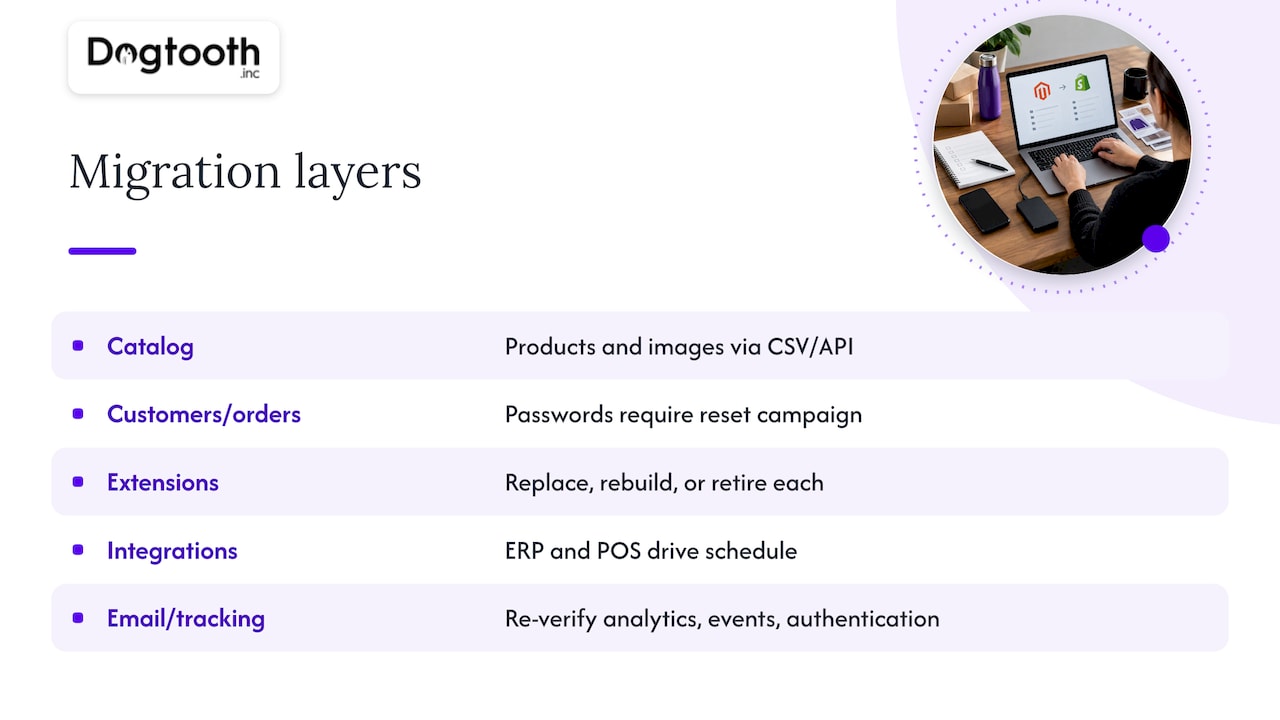
Catalog. Products, variants, collections and images move well through CSV or API. Configurable and bundled Magento products are where mapping gets creative, because Shopify’s variant limits and option structure differ. Decide early how each product type will be modeled.
Customers and orders. Customers and order history can be imported. Passwords cannot be moved in readable form, so plan a reset email campaign and warn customers before launch. Subscriptions and stored payment tokens need a specific plan with your payment provider.
Extensions. Every Magento extension needs a decision: replace with a Shopify app, rebuild as a custom app, or retire it. Many stores find a third of their extensions do nothing useful anymore. Retiring them cuts cost.
Integrations. ERP, inventory, shipping, POS and CRM connections are usually the real schedule driver. We have connected a craft brewery’s POS to its Shopify store, and the lesson holds for most stores: the integration is the project, the storefront is the paint. If your backend is old and brittle, an approach like API modernization without a big bang lets you replace it in pieces.
Email and tracking. Flows, tags and pixels all break quietly. Re-verify analytics, server-side events and email sender authentication before launch. If attribution matters to your media buying, see our guide to building a privacy-aware custom attribution model.
A realistic timeline
For 2,000 to 15,000 SKUs, 14 to 24 weeks including discovery and post-launch tuning is a fair planning range. Smaller, simpler catalogs can move faster: we launched a Shopify supplement store in seven weeks, though that was a new build rather than a Magento teardown.
| Phase | What happens | Rough share of time |
|---|---|---|
| Discovery and audit | URL crawl, extension inventory, integration map, scope of work | 15% |
| Build | Theme, apps, custom logic, data mapping | 45% |
| Migration and QA | Trial imports, redirect testing, checkout tests, staff training | 25% |
| Cutover and tuning | Final delta import, DNS switch, monitoring, fixes | 15% |
The percentages are our planning rule of thumb, not an industry statistic. Pick a launch window away from your peak season. A freeze on catalog changes in the last two weeks makes the final data sync far simpler.
Our perspective
Most failed replatforms we hear about share one cause: the team treated cutover as an event instead of a process. We prefer to run a migration the way we would run any legacy system change, in phases, with the old store live until the new one has earned the right to replace it. That is the same logic behind our five phases for avoiding a risky big bang.
We also believe the migration should leave you with a better operation, not just a new logo on the admin. Once the store is on Shopify, the interesting work starts: checkout, conversion and automation. We have written about Shopify checkout optimization and practitioner fixes for conversion rate for exactly that reason. Our senior team stays on after launch, because the first weeks of real traffic are when a migration is actually tested. And where AI agents can draft, check or report inside your workflow, we build them in, since we run our own operation that way.
One honest note: if your store is small, standard, and has no custom logic, an automated import tool and a good theme may be all you need. We are the right fit when your catalog, integrations or SEO footprint make a mistake expensive.
— Chase Weir
Working with Dogtooth on your migration
Dogtooth Inc. handles platform builds and migrations, e-commerce engineering, integrations and APIs, and AI agents for workflow automation. For a Magento exit that means an audit first, a written scope, a phased build, and support after launch. We have also run multi-platform builds, such as a dual-platform Shopify and WooCommerce store. If you are weighing a move, talk to us at Dogtooth and bring your URL count, extension list and integration map.
Pre-launch checklist
- Full URL crawl matched to Search Console data
- Approved redirect map, tested on staging
- Canonical and filtered-collection behavior checked
- Trial import of products, customers and orders, with spot checks
- Every integration tested end to end with real orders
- Payment, tax and shipping rules verified
- Email authentication, flows and tracking pixels confirmed
- Customer notice and password-reset plan ready
- Staff trained on the Shopify admin
- Rollback plan and a 60 to 90 day support window agreed
FAQ
How long does a Magento to Shopify migration take?
For a mid-market store with 2,000 to 15,000 SKUs, plan for 14 to 24 weeks including discovery and post-launch tuning. Simple catalogs can go faster. Custom integrations are the usual cause of delay.
Will I lose my Google rankings?
Not necessarily, but you can if redirects are sloppy. With a 1:1 redirect map and good canonical handling, traffic typically dips briefly and recovers within about two months. Without them, drops of 25 to 50% are reported.
Do I need Shopify Plus?
Not always. Plus is typically the fit for higher volume, multiple storefronts, B2B or heavy customization. A smaller store may do fine on a standard plan, so check your needs against Shopify’s current plan pages before deciding.
Can I migrate by myself with an app?
For small, simple stores, yes. Tools can import products, customers and orders from Magento CSV exports, as Matrixify describes. Custom modules, theme work and integrations still need developer time.
Sources
- How to Migrate from Magento 2 to Shopify Plus in 2026, Ecommerce Times
- Magento to Shopify Migration 2026: Adobe Commerce and TCO
- Magento to Shopify migration cost, ShopExperts
- Shopify Help Center: Migrate to Shopify
- Magento to Shopify Migration: The Complete Guide, Shopify
- Migrate from Magento to Shopify, Matrixify
- Import from Magento, Shopify App Store