Moving from Oracle to PostgreSQL is mostly a code migration, not a data migration. The tables and rows move with off-the-shelf tooling. The work that decides your timeline is the PL/SQL, the Oracle-specific features your application leans on, and the validation you do before cutover. Plan in that order: assess, convert the schema, refactor the code, move the data, validate, then cut over.
This guide walks through each step, names the tools that do the heavy lifting, and flags the places where projects stall.
TL;DR
- Run an assessment first. Ora2Pg and the AWS Schema Conversion Tool both produce reports that show what converts automatically and what needs manual work.
- Stored procedures, packages and functions drive the schedule. Tools convert most DDL, but PL/SQL to PL/pgSQL still needs human refactoring.
- Compare source and target by row counts, object counts and primary key min/max values, never by disk size.
- Validate before cutover day, not on it. Pre-migration checks surface schema and connectivity problems while there is still time to fix them.
- Applications tightly coupled to Oracle features (spatial data, vendor packages) may need architectural changes, not just a new connection string.
Table of Contents
- What actually changes when you leave Oracle
- Step 1: Assess before you commit to a date
- Step 2: Decide what is really in scope
- Step 3: Convert the schema
- Step 4: Refactor the PL/SQL
- Step 5: Move the data
- Step 6: Validate like you mean it
- Step 7: Cut over
- Our perspective: treat it as a legacy migration first
- Where we can help
- FAQ
- Sources
What actually changes when you leave Oracle
Relational databases hold tables of data, plus procedural code in the form of triggers, functions and stored procedures. The tables are the easy part. As the AWS migration walkthrough explains, Oracle uses the PL/SQL dialect, which differs from PostgreSQL’s PL/pgSQL, and that difference is where the effort goes.
The PostgreSQL documentation has a dedicated chapter on porting from Oracle PL/SQL. It is worth reading before you scope anything. A few examples of what you will meet:
- Data types. Oracle’s non-standard
varchar2becomesvarcharortext.numbershould be mapped tonumericor a specific integer type based on the precision and scale you need, to avoid unnecessary performance costs. - Built-in functions. PostgreSQL does not natively support Oracle’s
instr. The porting guide recommends building the equivalent from existing PostgreSQL functions. - Language differences. PL/pgSQL is similar to PL/SQL, but similar is not identical, and every difference is a place a converted routine can behave differently.
None of this is exotic. It is simply a lot of small differences multiplied across hundreds or thousands of objects.
Step 1: Assess before you commit to a date
The most common mistake is picking a go-live date before anyone has inventoried the database. Start with an assessment report.
Ora2Pg is a free, open-source tool that connects to your Oracle database, scans it automatically, extracts structure or data, and generates PostgreSQL-compatible SQL scripts. It has been in development for more than 25 years, so its behavior on odd Oracle features is well documented.
The AWS Schema Conversion Tool takes a similar approach. Its assessment report has a Summary tab with auto-conversion estimates and an Action Items tab listing what needs manual remediation. According to the AWS assessment report documentation, DMS Schema Conversion can also use generative AI to recommend conversions for code objects that typically require complex manual work. Treat those recommendations as a first draft for an engineer to review, not as finished code.
Read the estimate with skepticism
Estimating migration cost is hard. Ora2Pg’s ESTIMATE_COST directive reports the human-days needed for conversion, using a default unit of five minutes per object for an expert, and that unit is adjustable (Microsoft’s Ora2Pg guide describes it). Experts point out that manual refactoring of packages, procedures and functions is the main driver of total time.
So use the number for relative sizing, then adjust it:
- Count the objects by type: tables, views, sequences, triggers, packages, procedures, functions.
- Flag the ones the tool marks as needing manual work.
- Have an engineer who knows your application sample a handful of the hardest routines and convert them by hand. The time that takes is a better predictor than the tool’s default.
- Multiply, add testing time, and add a buffer for the things nobody has found yet.
One practitioner thread on Reddit suggests running Ora2Pg’s complexity report and then budgeting 12 to 18 months for a large estate. That is one person’s experience, not a benchmark, but it is a useful reminder that large PL/SQL codebases are not a quarter-long project.
Step 2: Decide what is really in scope
Before you convert anything, list what depends on Oracle beyond the database engine.
A common pitfall in heterogeneous migrations is assuming every application feature transfers directly. If the database supports proprietary, vendor-specific or commercial off-the-shelf applications tightly coupled to Oracle, they may not convert without significant architectural change. AWS prescriptive guidance gives an example: spatial data that relied on Oracle Spatial may need PostGIS instead.
Check these before you sign off on scope:
- Third-party packages that require Oracle as their backing store
- Reports and BI tools with Oracle-specific SQL
- Scheduled jobs, message queues and database links
- Application code that embeds Oracle syntax in queries, such as hierarchical queries or proprietary outer join syntax
- Security and audit requirements that were solved with Oracle features
If your records include personal data from the EU, the move is also a data-handling event. This guide to migrating records without losing information or breaking GDPR (in Spanish) covers the data-protection side of a platform migration and is a useful checklist even though it is written for recruiting data.
Step 3: Convert the schema
Schema conversion turns Oracle DDL into PostgreSQL DDL. AWS describes this as one of the key tasks in any heterogeneous migration, in contrast to a rehost or replatform where the engine stays the same (AWS Prescriptive Guidance).
The usual approach:
- Run the conversion tool against a copy of the schema.
- Review the report and sort the Action Items by object type and risk.
- Fix what the tool could not convert, including complex or encrypted objects, which tools commonly flag for manual remediation.
- Load the result into an empty PostgreSQL instance and confirm it builds cleanly.
One practical tip from the AWS guidance: it is often safer to leave foreign key constraints, triggers and secondary indexes out of the initial script and apply them only after the base data load completes. Loading with them in place invites processing conflicts and slows the load.
AWS also provides a step-by-step schema conversion walkthrough if you are targeting a managed PostgreSQL service on that cloud.
Step 4: Refactor the PL/SQL
This is the long middle of the project. Automatic conversion gets you a starting point; an engineer who understands the business logic has to finish it.
Work from the riskiest code down
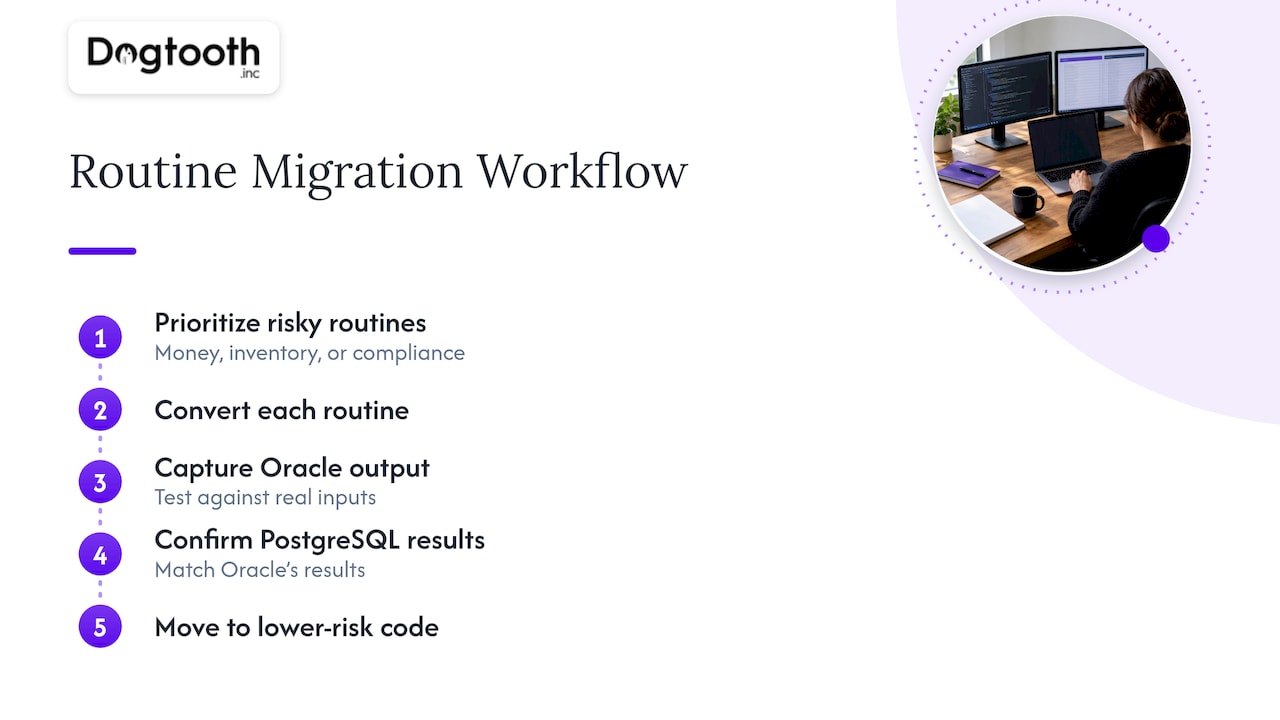
Start with routines that touch money, inventory or compliance. Convert them, write tests that capture Oracle’s current output on real inputs, and confirm the PostgreSQL version returns the same results. Then move to lower-risk code.
Watch for behavior, not just syntax
A routine can compile and still be wrong. Typical sources of silent differences include numeric precision from number mappings, how empty strings and nulls are treated, date arithmetic, and transaction handling inside procedures. The PL/pgSQL porting chapter covers many of these. Build a test suite from production-like data before you trust any converted routine.
Consider rewriting, not just porting
Sometimes a 3,000-line package is the wrong thing to preserve. If business logic can move into the application layer, where it is easier to test and version, the migration is a chance to do that. It adds scope, so decide deliberately rather than drifting into it. Our write-up on API modernization without a big bang covers how to move logic out of a legacy core incrementally.
Step 5: Move the data
With the schema in place, you have two broad choices:
| Approach | How it works | Best when |
|---|---|---|
| One-time load | Export from Oracle, load into PostgreSQL during a maintenance window | Smaller databases, or systems that can tolerate a planned outage |
| Continuous replication | Do an initial load, then stream changes until cutover | Large or always-on systems where downtime must be minutes, not hours |
A free tool like Ora2Pg handles the one-time export and load well. For near-zero downtime, teams pair an extraction tool with a change-capture replication product, as in this Quest walkthrough combining SharePlex and Ora2Pg. Cloud migration services from the major providers offer the same pattern as a managed service.
If downtime is the constraint, our article on zero downtime migration, with four Oracle workflows and DBA cutover checks, goes deeper on the cutover mechanics.
Step 6: Validate like you mean it
Validation is where migrations are won. Never rely on file-size comparison. Oracle databases accumulate bloat and dead tuples that make them look much larger than the equivalent PostgreSQL instance, as the AWS schema conversion guide notes.
Use a multi-step check, as Microsoft’s premigration guidance recommends:
- Match row counts for every table.
- Match counts of all other objects: sequences, extensions, triggers, indexes.
- Compare the minimum and maximum primary key values on source and target.
Then go beyond counts. Run the same business reports on both systems and diff the output. Replay a day of real queries against the new database and compare results and timings. Row counts prove rows arrived; report diffs prove the logic still works.
Validate early, not on cutover day
Services like Azure Database Migration Service include a pre-migration validate function that finds schema and connectivity issues without causing downtime. Run it weeks ahead so you can plan remediation for specific action items instead of discovering them in the cutover window. Even if you use a different tool, copy the habit: do a full rehearsal migration at least once, on production-sized data.
Step 7: Cut over
A cutover plan is short and boring on purpose. It should contain:
- A freeze time for writes on Oracle
- The final sync or load step and who runs it
- Validation checks with pass/fail thresholds
- The switch of application connection strings
- A rollback decision point, with the conditions that trigger it
- A named owner for each step
Keep Oracle available and read-only for a defined period after go-live. If you need to roll back, you want a clean source and a clear record of what changed on PostgreSQL since cutover.
After cutover, watch query performance. Execution plans differ, and indexes that mattered in Oracle may not matter in PostgreSQL, while new ones will. Plan a tuning pass in the first weeks, not a hand-off to nobody.
Our perspective: treat it as a legacy migration first
We build platforms and run legacy migrations, and the pattern is the same whatever the technology. The database swap is the visible part. The risk sits in everything attached to it: undocumented logic, integrations nobody remembers, and a cutover with no rehearsal.
That is why we favor phased work over a single big-bang weekend. Our piece on legacy system migration in five phases lays out how we sequence it. We have applied the same discipline when moving a Drupal 6 research platform to a modern stack, where an old system had to keep serving users while its replacement was built.
Three opinions we hold firmly for an Oracle exit:
- Estimate from samples, not from tool defaults. Convert your ugliest package by hand before you commit to a schedule.
- Keep one engineer who owns the business logic. Tools do not know why a procedure rounds the way it does.
- Stay on after launch. Tuning, edge cases and surprises show up in the first month of production, and that is when the team should still be around.
— Chase Weir
Where we can help
If your Oracle estate feeds a custom platform, an e-commerce stack or internal tools, the database is only one piece. Our team handles platform builds and migrations, integrations and APIs, and the application work that surrounds a database change. See what we do at Dogtooth Inc and tell us what you are running today.
FAQ
Is Ora2Pg enough to migrate an Oracle database to PostgreSQL?
For many projects it is a strong starting point. It is free, scans your Oracle database, and generates PostgreSQL-compatible scripts for structure and data. It will not finish the job alone: complex PL/SQL still needs manual refactoring and a proper validation plan.
How long does an Oracle to PostgreSQL migration take?
It depends mostly on how much procedural code you have, not on data volume. Ora2Pg’s cost estimate gives a rough count of human-days, but experts note that refactoring packages, procedures and functions dominates total time. Sample your hardest code before you promise a date.
What are the biggest risks?
Code that converts but behaves differently, applications tightly coupled to Oracle-specific features, and skipping validation until cutover day. Each is avoidable with an early assessment, a scoped list of dependencies, and a rehearsal on production-sized data.
How do I check that all my data arrived?
Compare row counts for every table, count the other objects (sequences, extensions, triggers, indexes), and compare minimum and maximum primary key values. Do not compare disk size, because Oracle bloat can inflate the source figure.
Can I migrate with almost no downtime?
Yes, by loading the bulk of the data first and replicating changes until a short final switch. It needs a change-capture tool and a rehearsed cutover plan. Smaller systems that can accept a maintenance window are simpler with a one-time load.
Sources
- Ora2Pg: free Oracle and MySQL to PostgreSQL migration tool
- PostgreSQL 17 documentation: Porting from Oracle PL/SQL
- AWS: Oracle database schema conversion
- AWS DMS: assessment report with generative AI
- AWS Prescriptive Guidance: migrate an Oracle database to Aurora PostgreSQL
- AWS: use SCT to convert the Oracle schema to PostgreSQL
- Microsoft Learn: Ora2Pg migration guide
- Microsoft Learn: premigration validations
- Quest: near-zero downtime migration with SharePlex and Ora2Pg
- Reddit r/PostgreSQL: Migration from Oracle to PostgreSQL