The highest-impact changes for Shopify checkout are enabling express wallets like Shop Pay, showing full costs before payment, defaulting to guest checkout, and auditing checkout extensions for speed. Shop Pay can lift conversion roughly 1.7x over standard guest checkout, while unexpected costs and forced account creation drive a large share of preventable cart abandonment. We can help stores that want a technical partner implement these changes.
TL;DR:
- Forced account creation drives abandonment for 19% of shoppers, while surprise shipping, tax, or fees account for 39%, so show estimated totals in the cart.
- Before enabling buy now, pay later, compare provider fees and approval rates with margins and order value, and promote it only where the economics work.
- Each checkout extension loads its own JavaScript bundle; use Chrome DevTools under Slow 4G to fix visibility delays affecting LCP before interaction delays affecting INP.
- Segment checkout losses by step and device: information or shipping exits signal usability friction, while final payment exits can indicate price shock or declined cards.
Table of Contents
- Make checkout faster and simpler
- Show costs and delivery clearly before payment
- Expand and promote payment options correctly
- Audit and optimize checkout performance
- Build trust at checkout with contextual messaging and clear policies
- Test, measure, and prioritize: a practical roadmap
- Advanced Shopify-specific tools and extensibility
- Personalization techniques in Shopify checkout using AI
- Integration of Shopify checkout with third-party analytics and marketing tools
- Legal compliance considerations in checkout
- Dogtooth perspective: how an agency approaches Shopify checkout optimization
- How we can help with your Shopify checkout
- FAQ
- Sources
Make checkout faster and simpler
Speed is a feeling as much as a metric. A shopper who hits several form fields and a login prompt experiences friction even if the page takes a while to load. The fastest wins come from removing steps, not adding polish.
Start with guest checkout. Forced account creation causes abandonment for 19% of shoppers, according to Baymard Institute research on checkout usability. Make guest checkout the default path in your Shopify settings and push account creation to the post-purchase confirmation screen, where it costs nothing in conversion and still captures repeat buyers.
Next, open the checkout editor and cut anything you don’t strictly need. Company name, a second phone number field, or an optional newsletter checkbox at the payment step all add visual weight without adding value. Shopify’s own guidance on checkout optimization treats field reduction as a high-impact, low-effort fix, since the default template includes fields many stores don’t actually use.
Then address autofill. Browsers can complete an address automatically if your field order and naming match what Chrome, Safari, and mobile keyboards expect. Keep address line one, city, state, and ZIP in a logical sequence, and avoid custom field labels that confuse autocomplete.
Finally, give express payment buttons room to work. Shop Pay, Apple Pay, and Google Pay buttons are most effective when they sit above the fold and aren’t visually competing with a custom “buy now” button you built yourself.
- Set guest checkout as the default and move account creation to after purchase.
- Remove optional fields like company name or secondary phone from the checkout editor.
- Order address fields to match standard autofill patterns.
- Keep native express payment buttons visually prominent and unduplicated.
Pro Tip: Test your checkout on a real phone with autofill enabled, not just a desktop browser. Mobile autofill behavior often breaks in ways desktop testing never surfaces.
Show costs and delivery clearly before payment
Surprise costs are the single biggest driver of abandoned carts. Baymard Institute found that extra charges, shipping, tax, or fees revealed only at the final step, cause abandonment for 39% of shoppers, making it the most common reason people leave a cart behind.
The fix is to surface an estimated total as early as the cart page. If you can calculate exact shipping and tax based on a guessed location, show it. If not, show a clearly labeled estimate (“Estimated total, final shipping calculated at checkout”) so the number at payment isn’t a surprise.
Free-shipping thresholds deserve the same visibility. A progress indicator (“Add more for free shipping”) in the cart drawer keeps the incentive active through checkout instead of burying it on a banner the shopper saw once and forgot.
Delivery estimates matter just as much as price. A shopper deciding between your store and a competitor often cares more about “arrives by Thursday” than about saving a few dollars on shipping. Add delivery date ranges on the cart page and carry them through to the shipping and review steps rather than dropping them once the shopper picks a shipping method.
- Show an estimated or exact total, including shipping and tax, starting on the cart page.
- Display free-shipping progress bars in the cart and checkout summary.
- Add delivery date estimates on the cart and shipping steps, and keep them visible through review.
None of this requires custom development in most cases. Shopify’s checkout editor and native cart settings handle cost and shipping transparency for the majority of stores; the remaining cases usually involve complex shipping rules or multi-warehouse logistics that need custom logic.
Expand and promote payment options correctly
More payment options generally mean fewer abandoned carts, but only when they’re introduced without clutter. Wallets like Shop Pay, Apple Pay, and Google Pay remove the need to retype card details, which is why Shop Pay adoption correlates with meaningfully higher completion rates compared to standard guest checkout.
Buy now, pay later options like installment plans can expand your addressable audience, particularly for higher-ticket items, but they come with processing costs and chargeback dynamics that vary by provider. Model the economics before turning on a BNPL option broadly rather than enabling it store-wide by default.
Where this gets technical is contextual promotion. The Payments API lets checkout UI extensions detect which payment types are available and selected, so you can render a short prompt, like a one-line banner encouraging Shop Pay, only when it’s actually offered to that buyer. This avoids promoting a payment method that isn’t available in the shopper’s region or for their cart contents.
A common mistake is custom-built payment UI that duplicates or conflicts with Shopify’s native components. Building your own payment method selector on top of the native one creates confusion about which button to tap and can break on updates to Shopify’s checkout.
- Offer major wallets and at least one BNPL option where your margins and order values support it.
- Use the Payments API to detect and promote available wallets with brief, contextual messaging.
- Avoid custom payment controls that duplicate or compete with native checkout UI.
Pro Tip: Check your BNPL provider’s approval rates for your average order value before promoting it heavily. A low approval rate can create more frustration than it solves.
Audit and optimize checkout performance
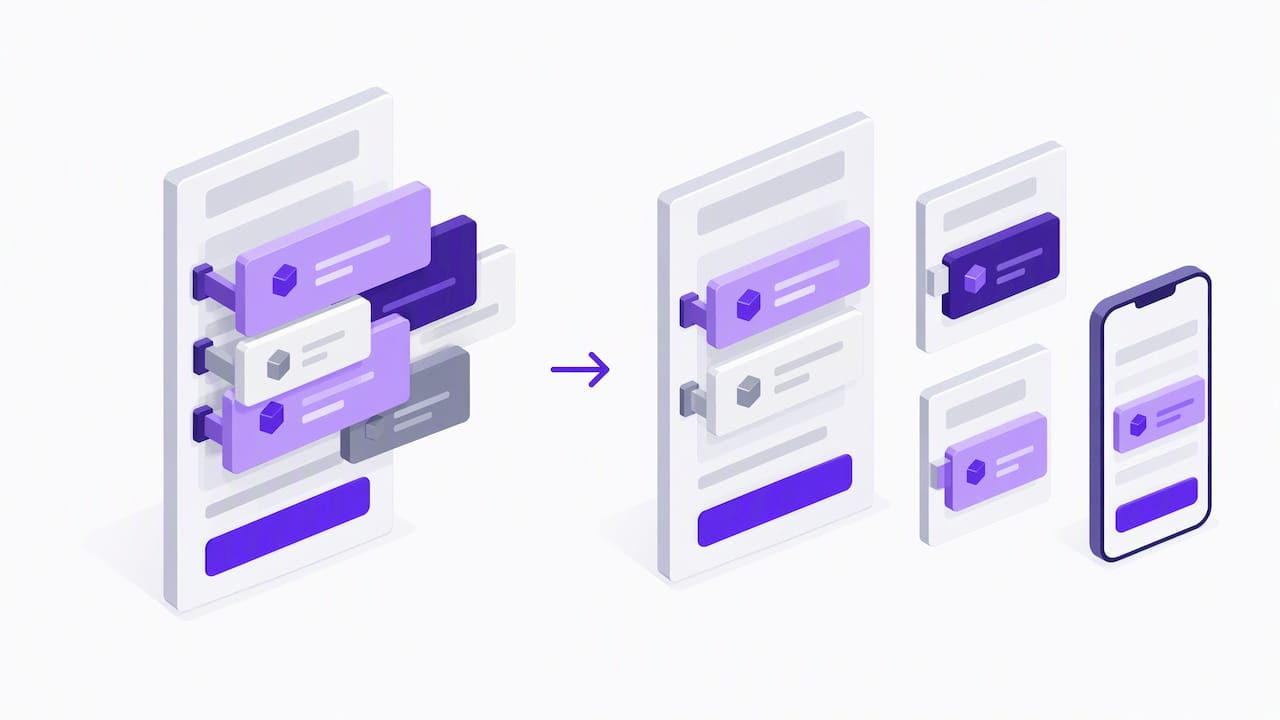
Checkout speed is now a Core Web Vitals problem, not just a perception problem. Shopify’s own documentation on auditing checkout UI extensions notes that every extension loads its own JavaScript bundle on each checkout view, and a slow or unused extension can directly degrade Largest Contentful Paint (LCP) and Interaction to Next Paint (INP).
Shopify’s performance guidance makes clear that extension bloat is a direct, measurable drag on checkout speed, which means an extension audit belongs on every store’s optimization checklist, not just high-traffic ones.
Run the audit with this sequence:
- Open Chrome DevTools and set network throttling to Slow 4G to simulate a realistic mobile connection.
- Filter the network panel by “extensions” to isolate the JavaScript each checkout extension loads.
- Record a performance trace through the checkout flow and locate the LCP marker on the timeline.
- Identify which extension’s script execution lines up with that LCP marker, that’s your primary suspect.
- Repeat the trace focused on interaction events to find which extension correlates with poor INP scores.
The key metrics here are extension_visible, which measures how quickly an extension renders something the buyer can see, and extension_buyer_usable, which measures how quickly it becomes interactive. A slow extension_visible time hurts your LCP score, while a slow extension_buyer_usable time hurts INP. Prioritize fixing visibility issues first since LCP affects the broadest set of buyers, then address usability for the interactions that matter most, like applying a discount code or selecting a shipping method.
Once you’ve identified the offenders, the remediation path usually involves removing extensions nobody uses, reassigning render targets so extensions don’t stack on the same block, consolidating overlapping functionality, or working with the extension’s developer to reduce bundle size or add a lightweight placeholder while the real content loads. Always retest on a throttled mobile connection after each change, since desktop performance rarely reflects what mobile buyers experience.
Build trust at checkout with contextual messaging and clear policies
Trust signals work best when they appear exactly where doubt creeps in, not scattered across the page. The moment a shopper selects a credit card as their payment method is a natural point for a short security line, something like “Your payment is encrypted and secure,” rendered via the Payments API so it only appears when relevant. A banner that’s always visible regardless of context reads as noise; one that appears at the decision point reads as reassurance.
Returns and refund policies deserve the same treatment. A small, clearly labeled link to your return policy near the order summary answers a question some buyers are silently asking right before they commit. Pairing that with a repeated delivery estimate at the review step reinforces that the order will arrive when expected, which matters more for first-time buyers than repeat ones.
What to avoid is just as important. Upsells and cross-sells at the payment step interrupt the one task the shopper is trying to complete. Move those offers to a post-purchase page, where they convert without adding risk to the transaction you already have in hand.
- Show brief, contextual security messaging only when a buyer selects a card, using the Payments API.
- Keep return and refund policy links visible and accessible from the order summary.
- Move upsells and cross-sells to post-purchase pages instead of the payment step.
Test, measure, and prioritize: a practical roadmap
Not every abandoned cart is a UX problem. Some are price sensitivity, some are window shopping, and some are genuine friction you can fix. The way to tell the difference is to look at where in the funnel the drop happens. A high drop rate on the information or shipping step often points to a UX issue, like a confusing form or missing payment method; a high drop rate right at final payment confirmation more often points to price shock or a declined card. Segment this by device too, since mobile and desktop often reveal different failure points entirely.
Once you know where the friction lives, prioritize fixes by impact versus effort rather than tackling them in the order you noticed them:
- High impact, low effort: enabling guest checkout and surfacing the full order total earlier in the flow.
- High impact, medium effort: improving payment error messaging and tightening autofill field order.
- High impact, high effort: a full checkout flow redesign or custom logic for complex shipping rules.
Work through that list in order. A full redesign rarely outperforms the cumulative effect of several smaller fixes done well, and it carries far more risk of introducing new bugs.
Test changes with staged rollouts or A/B tests rather than shipping everything at once, so you can attribute a lift or a drop to the specific change you made. Track checkout conversion rate overall, conversion at each individual step, average order value, and mobile performance metrics like LCP and INP before and after each change. If you’re running a deeper diagnostic on where conversion is leaking across your funnel, a practitioner-level conversion audit can help you quantify where the biggest dollar impact sits.
Pro Tip: Run tests across both weekdays and a weekend, since checkout behavior can shift between these periods.
Advanced Shopify-specific tools and extensibility
The Payments API exposes available and selected payment types, including credit card, wallet, deferred, and local payment methods, as read-only data. That means you can build contextual messaging based on what’s actually available to a given buyer, but you can’t use it to add new payment methods or override Shopify’s native payment logic. Treat it strictly as a detection and messaging layer, never as a way to assume a payment method is available before checking.
Checkout UI extensions render at specific targets within the checkout flow, and the pattern that works best is rendering a short message before or after an existing native block rather than attempting to rebuild that block yourself. A one-line banner above the payment method list outperforms a custom payment widget that has to be maintained against every Shopify checkout update.
Version management matters more than it seems. Shopify has been moving checkout extensions toward Polaris web components, deprecating the older React-based components in favor of components with better performance and accessibility. If you or your developer built extensions on the older React patterns, check the current API version’s migration notes before your next major update, since deprecated components can silently break on a future Shopify release.
- Use the Payments API only for detection and contextual messaging, never to assume availability.
- Render extensions before or after native blocks rather than recreating them.
- Check API version migration notes, especially the shift to Polaris web components, before upgrading.
Personalization techniques in Shopify checkout using AI
Personalization at checkout works best when it’s narrow and contextual rather than broad. Dynamic shipping recommendations based on a buyer’s location, personalized payment method ordering based on what’s historically converted for similar carts, and tailored messaging for returning versus first-time buyers are the most common applications store owners are experimenting with.
The practical constraint is Shopify’s checkout architecture itself. Because checkout UI extensions render at fixed targets with limited customization, AI-driven personalization usually works through what data gets surfaced and when, not through rebuilding the checkout experience itself. A returning buyer might see their previously used shipping address pre-selected, or a first-time buyer might see a security reassurance line that a repeat customer doesn’t need.
Where this tends to go wrong is over-personalizing the payment step itself. Dynamically changing which payment methods appear first based on predictive scoring can create an inconsistent experience between devices or sessions, undermining the trust that a clean, predictable checkout builds. Keep AI-driven adjustments focused on messaging and recommendations elsewhere in the funnel, like product recommendations or cart upsells, and keep the checkout itself consistent and native.
For stores building this kind of logic into their stack, the bigger engineering lift is usually connecting customer history data to checkout-adjacent extensions cleanly, which is closer to a custom integration project than a checkout setting.
Integration of Shopify checkout with third-party analytics and marketing tools
Checkout data only becomes useful once it connects to the tools you use to make decisions. Standard integrations include pixel-based tracking for ad platforms, server-side conversion APIs for more reliable attribution, and analytics platforms that report step-by-step funnel data beyond what Shopify’s native reports show.
Server-side tracking has become more important as browser-based pixel tracking degrades under privacy restrictions and ad blockers. Routing checkout events through a server-side conversion API gives more reliable attribution data for ad spend decisions, particularly for stores running paid acquisition at scale.
The common failure point is duplicate or conflicting tracking scripts loaded both through theme code and through checkout extensions, which can inflate conversion counts or create gaps depending on how each script fires. Audit your tracking setup the same way you’d audit checkout extensions: confirm what fires, when, and whether anything is double-counting.
For stores building a more rigorous measurement layer, especially ones trying to understand true marketing attribution rather than last-click numbers, a custom attribution approach tends to produce more trustworthy reporting than stacking multiple off-the-shelf pixels. If your checkout changes are meant to move a specific metric, make sure your analytics setup can actually isolate that metric’s movement before you start testing.
Legal compliance considerations in checkout
Checkout is where payment data, personal information, and purchase intent all converge, which makes it the part of your store with the most compliance exposure. PCI DSS compliance covers how card data is handled, and Shopify’s hosted checkout architecture handles most of this burden for merchants by keeping card data off your own servers, provided you haven’t built custom payment integrations that bypass that architecture.
Data privacy regulations, including rules that apply to shoppers in the European Union, govern what customer data you collect at checkout and how you use it for marketing or analytics. If you sell to buyers outside the United States, check which regional privacy rules apply to those specific customers rather than assuming a single standard covers every market you ship to.
Accessibility compliance is often overlooked in checkout audits despite carrying real legal exposure in several jurisdictions. A checkout that isn’t navigable by keyboard or screen reader can create both a legal risk and a direct conversion loss among buyers with disabilities. An accessibility-focused checkout review can catch issues like missing form labels or poor focus order that standard conversion audits typically miss. Confirm your SSL certificate and encryption setup are current as part of the same review, since certificate issues can trigger both security warnings and compliance gaps simultaneously.
Dogtooth perspective: how an agency approaches Shopify checkout optimization
Our approach follows this sequence: audit, prioritize by impact and effort, implement, measure, then iterate. Most of what moves the needle, guest checkout, full-cost transparency, extension cleanup, doesn’t require a rebuild. It requires someone to actually run the audit and act on what it shows.
Stores may need a technical partner for legacy platform migrations where checkout logic has to carry over without breaking, extension performance problems deep enough to require custom development rather than configuration, and checkout logic tied to complex business rules like multi-warehouse shipping or subscription billing.
E-commerce engineering and Shopify Plus migrations can be relevant in these cases, since the risk in a migration or a deep extension rebuild is rarely the code itself. It’s the drop in conversion or search visibility if the cutover goes wrong.
— Chase Weir
How we can help with your Shopify checkout
Stores that have outgrown trial-and-error fixes may need Shopify checkout work, whether that means cleaning up slow extensions, migrating a complex store without losing conversion, or building custom checkout logic that off-the-shelf settings can’t handle.

Our e-commerce engineering work includes projects like a Shopify and WooCommerce dual-platform build and a supplement store launch, with a focus on checkout performance and platforms that keep performing after launch.
- Checkout and extension audits that identify exactly where speed and conversion are being lost.
- Safe, SEO-aware migrations for stores moving off legacy platforms or consolidating systems.
- Ongoing support and optimization can continue after launch.
If your checkout needs more than a settings change, book a consult with our team and we’ll walk through what’s actually worth fixing first.
FAQ
What is the fastest way to reduce Shopify cart abandonment?
The fastest fixes are enabling guest checkout and showing full costs, including shipping and tax, before the payment step. Baymard Institute research ties forced account creation and surprise charges to a large share of preventable cart abandonment, and both issues can typically be fixed through Shopify’s checkout editor without custom development.
Does Shop Pay actually increase conversion rates?
Yes, stores using Shop Pay see conversion rates roughly 1.7 times higher than stores relying on standard guest checkout alone. The lift comes from removing the need to retype card and shipping details on repeat purchases.
How do checkout extensions affect page speed?
Each checkout UI extension loads its own JavaScript bundle on every checkout view, and Shopify’s performance documentation notes that unused or poorly built extensions can directly degrade LCP and INP scores. Auditing extension timing with Chrome DevTools identifies which ones to remove, consolidate, or optimize.
What should I check before enabling buy now, pay later options?
Review your margins and average order value against the provider’s fees and typical approval rates before turning BNPL on broadly, since processing costs vary and can offset the conversion gains. It’s also worth confirming the option appears only where it’s actually available, using the checkout’s payment detection rather than showing it to every buyer by default.
How do I know if my checkout changes are actually working?
Track checkout conversion rate by individual step, not just the overall rate, along with average order value and mobile performance metrics like LCP and INP. Staged rollouts or A/B tests over at least a full week, including a weekend, give a clearer read than comparing before-and-after numbers from different time periods.
Sources
These are the primary references behind the fixes covered in this guide, useful if you want to go deeper on the research or the technical implementation details.