
A feature flag lets you switch a new feature off in seconds without redeploying, while a code rollback means rebuilding and redeploying the previous version. A good rollback plan uses both and knows which problems each one can fix. Flags handle the bad behavior. Rollbacks, data repair and a written runbook handle everything a flag can’t reach, such as rows already written, emails already sent and payments already taken.
This guide is for operators and owners of established products: an e-commerce store, a platform mid-migration, an AI workflow going live. It explains the mechanics in plain terms and gives you a plan you can hand to your team or a technical partner before the next release.
TL;DR
- A feature flag is a runtime switch around a code path. Turning it off is usually much faster than redeploying an older version.
- Separate deployment (code reaches production) from release (users see it). Deploy dark, then expose the feature to staff, then a small percentage, then everyone.
- Decide in advance which metrics trigger a rollback and who is allowed to pull the switch.
- A flag does not undo database changes, queued jobs, sent messages or captured payments. Plan those separately.
- Remove flags once a feature is fully live, or they become clutter in your code.
Table of Contents
- What a feature flag is, in plain terms
- Why a flag beats a rollback for most incidents
- The three kinds of flag you’ll actually use
- Roll out in stages, not all at once
- What a flag cannot undo
- A rollback plan you can paste into your release process
- Where flags matter most for your kind of business
- Keep flags from becoming debt
- Where Dogtooth fits
- Our perspective
- FAQ
- Sources
What a feature flag is, in plain terms
A feature flag (also called a feature toggle) is a conditional in your code: if the flag is on, run the new behavior; if off, run the old one. Microsoft’s cloud architecture guidance describes the technique as deploying a new feature into production while restricting who can see it, activating it for specific users without restarting the app or shipping new code, and quickly deactivating a problem feature instead of doing a rollback or hotfix.
The value is the split between two events that used to be one:
- Deployment: the code lands on your servers.
- Release: customers can actually use it.
Without flags, those happen together, so every deployment is a bet. With flags, you deploy on a quiet Tuesday and release when you’ve watched the numbers.
Why a flag beats a rollback for most incidents
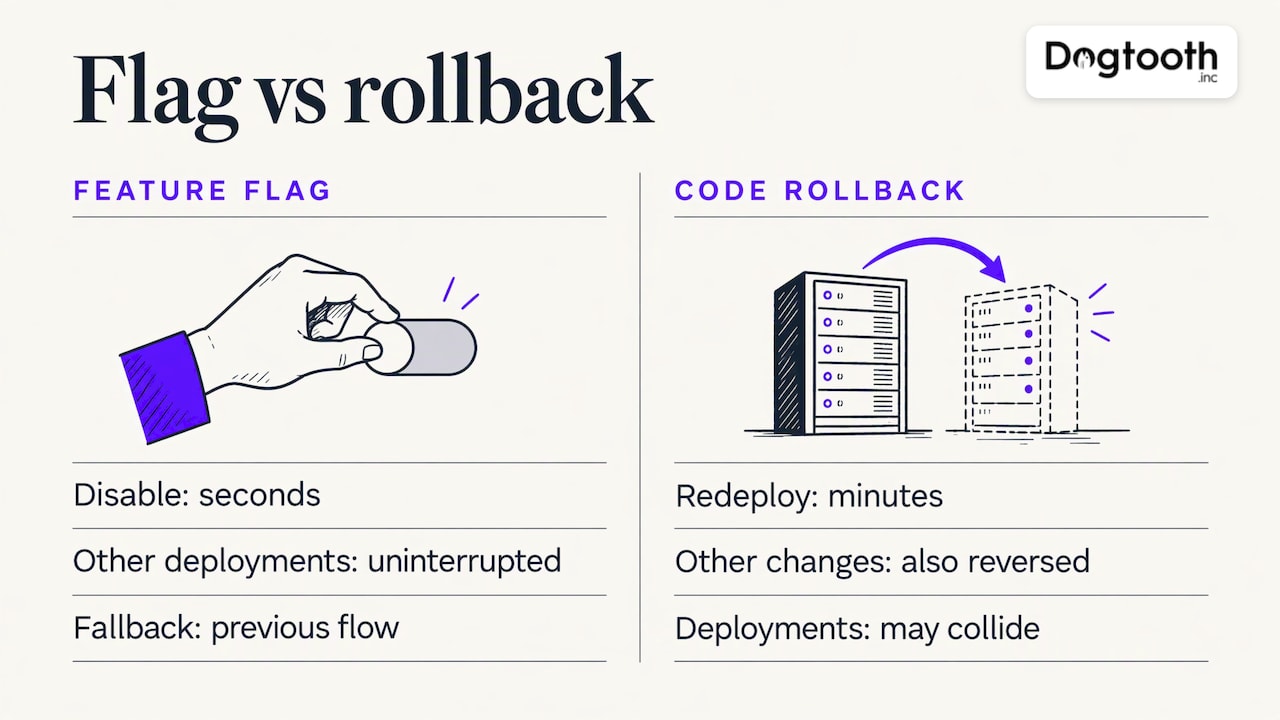
A classic rollback redeploys the previous version. It works, but it takes time, it also reverses every other change that shipped alongside the bad one, and it can collide with other teams’ deployments.
GitHub’s engineers describe the difference in their account of shipping with feature flags: a flagged change can be disabled completely in a matter of seconds without interrupting other deployments, while a code rollback could take minutes. They also run two automated test builds, one with every flag off and one with every flag on, to cut the chance that a code path goes untested.
For a business, the translation is simple. If a new checkout flow starts failing at 2 p.m. on a sale day, the question is how many orders fail before someone fixes it. Microsoft’s Azure documentation gives exactly this example: an on-call engineer turns off a new checkout flag and every user instantly falls back to the previous flow, with no redeploy.
The three kinds of flag you’ll actually use
Not every flag does the same job, and mixing them up is how teams end up with a mess. Unleash’s documentation separates them by lifespan:
| Flag type | What it does | How long it lives |
|---|---|---|
| Release flag | Hides a new or unfinished feature until it’s ready | Weeks to months |
| Experiment flag | Splits users to compare versions | Days to weeks |
| Kill switch | Turns off a risky or nonessential feature during trouble | Often permanent |
The same documentation suggests that for a feature that might be unreliable, you wrap it in a flag that’s off by default, so the application still works even if it can’t fetch the latest flag state. That is a useful design rule: the safe behavior should be what happens when the flag system itself fails.
Roll out in stages, not all at once
The real power of flags shows up in progressive delivery: exposing a feature to more users as your confidence grows.
Who sees it first
GitHub describes shipping to individual users first, then to staff, then to a percentage of users. Staff-first is underrated. Your own team hits the new feature in real conditions, with real data, and sends you a message instead of a refund request.
How fast to expand
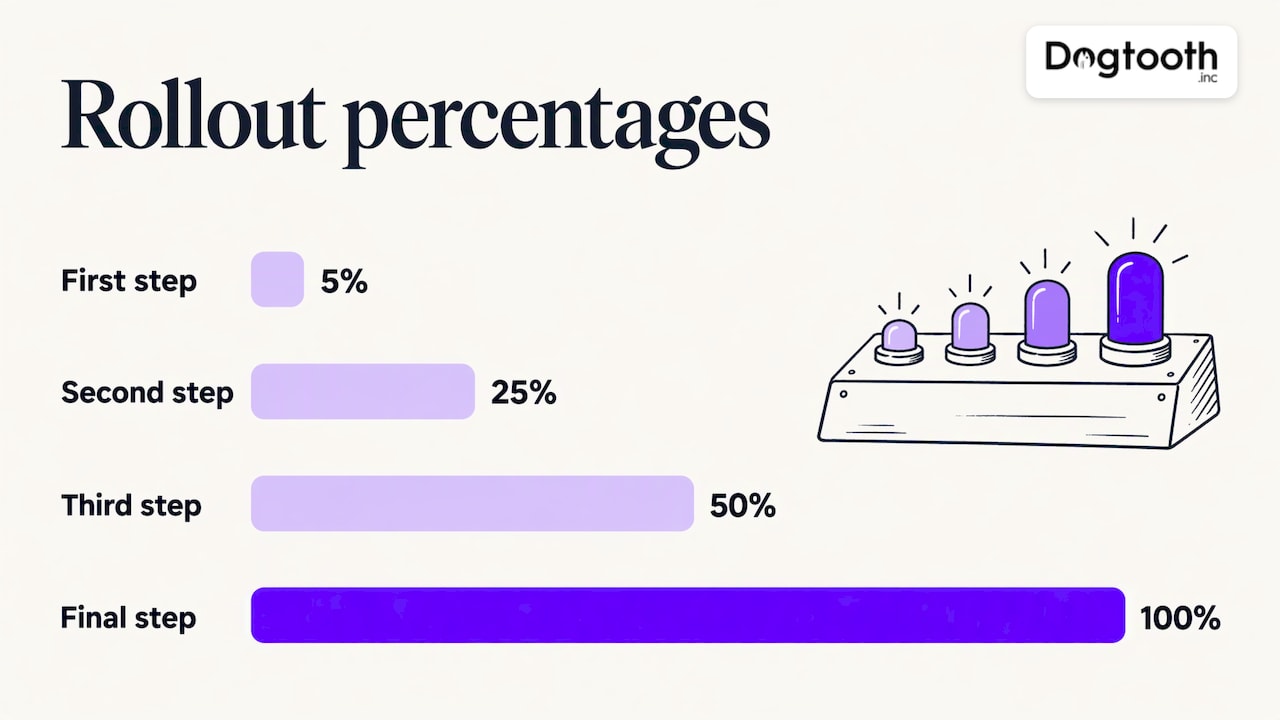
AWS’s DevOps guidance lists dark launching, two-phase deployments, feature flags and canary releases as ways to release gradually and reduce risk. Percentages vary, but a common ladder looks like the Azure rollout example: 5%, 25%, 50%, then 100%, watching error metrics between steps. Treat it as a review plan, not a timer. Don’t move up a step until someone has actually looked at the numbers.
What to watch at each stage depends on the feature:
- Error rate and page speed, for any change.
- Conversion and cart completion, for e-commerce changes.
- Support tickets and refund requests, for anything customer-facing.
- Email bounce and spam-complaint rates, for anything that touches sending.
Let the system pull the brake
Mature teams automate the decision. IBM’s guarded rollout documentation describes a rollout that monitors health metrics and, if it detects a regression with auto rollback enabled, reverts exposure to 0%. With auto rollback off, it pauses and notifies you. GitLab’s engineering handbook goes further: it watches feature-level metrics such as latency and error rate alongside platform guardrails such as CPU, memory and queue depth, because a feature with a low error rate can still cause a resource spike somewhere else.
That last point matters for a non-engineer reading dashboards. Watching only the feature’s own numbers can miss damage elsewhere. If you’re designing what your team sees, our guide to operations dashboard design covers layout, KPIs and alerts.
What a flag cannot undo
This is where rollback plans fail. Turning a flag off stops the new code from running from that moment. It does not reverse what the new code already did. Think through these cases before launch:
- Database changes. If the release added or changed columns, the old code must still work with the new schema, or the rollback itself breaks the app.
- Bad data already written. Rows saved incorrectly stay incorrect until someone repairs them, possibly by restoring from a point-in-time backup.
- Queued jobs. Background tasks created in a new format may be unreadable by the old code.
- Messages already sent. Emails, text messages and webhooks can’t be recalled.
- Money already moved. A payment captured or a payout triggered needs its own correction.
- Cached data. Entries stored in a new shape can confuse the old version.
A useful question to ask for every release: if we switch this off ten minutes after launch, what will still be different? Write the answer in the release notes. If the answer is “nothing”, the flag is a complete rollback. If it’s “a few hundred customers got a wrong invoice email”, you now know to prepare a correction email and a data query before launch, not during the incident.
Schema changes deserve special care. The safest pattern is to make changes in small, backward-compatible steps, so old and new code both work at every point, and only remove the old structure after the new one has proven itself. Our database migration strategy guide walks through how to choose an approach, plan it and cut over safely.
A rollback plan you can paste into your release process
A rollback plan is a short document, written before the release, that anyone on call can follow at 2 a.m. Here is a template.
- Name the flag and its owner. One flag name, one person accountable, one backup.
- Set the stop conditions with numbers. For example: checkout error rate above a threshold you choose, page load beyond a limit, or complaint volume past a set count. Numbers prevent a debate while customers are affected. One rollout guide recommends setting these before launch and prepping the rollback in advance.
- Write the exact action. “Set the flag to 0% and remove targeting rules that still return true.” That detail matters: in some systems, a matching targeting rule bypasses the percentage, so the feature stays on for those users.
- List what the flag won’t fix. Use the ten-minute question above: data, sent messages, queued jobs, payments.
- Pre-write the cleanup. A data repair query, a correction email draft, a refund process.
- Define who gets told. Support, the account team, and whoever updates your status page.
- Test the switch. Flip it in staging before launch to confirm the fallback path actually works.
For parts of your app that are nonessential but heavy, such as product recommendations on a store, build permanent kill switches. An O’Reilly report on feature management describes these safety valves as permanent flags that disable nonessential functionality to keep the core healthy, documented in runbooks with the symptoms that should trigger them.
Where flags matter most for your kind of business
E-commerce and migrations
Moving to Shopify, WooCommerce or a custom storefront is the classic case for staged exposure. Send a slice of traffic to the new checkout, compare conversion and error rates against the old one, then widen. If something breaks, you route traffic back instead of explaining a lost weekend of orders. The same idea underpins gradual replacement of legacy systems; see our plan for moving from a monolith to microservices while you keep shipping.
AI agents and automation
When an AI agent drafts, books or charges, a flag is your off switch. Put each agent action behind its own flag, so you can stop automatic charging while leaving drafting running. For the controls around this, read our piece on AI agent safety and runtime controls.
Email and marketing systems
Changes to sending infrastructure are hard to reverse because sent mail is gone and reputation damage lingers. Ramp new sending setups with a small share of volume, watch bounce and complaint rates, and only then increase.
Keep flags from becoming debt
Every flag is a branch in your code, and a forgotten flag is a source of confusion. Release flags should have an owner and an end date, and removing the flag, along with the old code path, is part of the feature’s definition of done. Keep a short inventory: flag name, purpose, owner, date added, planned removal. Kill switches are the exception; they stay, but they should be listed in the runbook.
Where Dogtooth fits
We build custom platforms, migrations, e-commerce builds and AI workflow automation for brands with real volume, and we stay on after launch. If you’re planning a migration or a major release and want the rollout, the fallback and the monitoring designed together, talk to our team about your project.
Our work includes e-commerce engineering, integrations and APIs, and AI agents that work inside live workflows. You can see how a project ran in our case study on a Shopify and WooCommerce dual-platform store.
Our perspective
Most rollback trouble we see described comes from treating the release as a single moment. A deploy goes out, everyone holds their breath, and the only way back is another deploy.
We prefer to think of a release as a sequence: the code lands, a small group tries it, the numbers get read by a person who knows what they mean, and exposure widens. The switch matters, but the habits around it matter more: named owners, stop conditions agreed in advance, and a written list of what a switch can’t reverse.
That’s why we work as a senior-led team that stays on after launch. A platform is not finished when it goes live. The weeks after are when the monitoring, the fallbacks and the cleanup get tested for real, and we want to be there for them. Weekly shipping only works when each change is small enough to reason about and easy to step back from.
If your team is about to migrate a store, retire a legacy system or put an AI agent in front of customers, plan the way back before you plan the way forward.
Chase Weir
FAQ
What’s the difference between a rollback and turning off a feature flag?
A rollback redeploys an earlier version of the code, which takes minutes and undoes every change in that version. Turning off a flag disables one feature at runtime, usually in seconds, and leaves everything else in place. GitHub’s engineering team uses flags for exactly this reason.
Do I still need a rollback plan if I use feature flags?
Yes. A flag stops the new code path, but it can’t reverse data already written, messages already sent or payments already taken. Your plan should also cover schema compatibility and a data repair route, plus who decides to flip the switch and when.
What percentages should a staged rollout use?
There’s no universal number. Common ladders run from about 1% or 5% up through 25% and 50% to 100%, as in Microsoft’s Azure example. Move to the next step only after you’ve reviewed error rates, speed, conversion and support tickets for the current one.
Can the rollback happen automatically?
It can. IBM’s guarded rollout feature can revert exposure to 0% when monitored metrics show a regression, or pause and notify you if auto rollback is off. You still need to choose the metrics and thresholds, and someone should own the response.
When should we delete a feature flag?
Once the feature is fully released and stable, remove the flag and the old code path. Release and experiment flags are short-lived by design, per Unleash’s guidance. Permanent kill switches stay but should be documented in your runbook.
Sources
- Feature flags, .NET architecture guidance (Microsoft Learn)
- Understand feature management using Azure App Configuration (Microsoft Learn)
- How we ship code faster and safer with feature flags (GitHub Engineering)
- What is a feature flag and why are feature flags used? (Unleash docs)
- Implement incremental feature release techniques (AWS Well-Architected DevOps Guidance)
- Configuring guarded rollout (IBM App Configuration)
- Feature Gates framework (GitLab Handbook)
- Progressive Rollouts (Flagpool documentation)
- Effective Feature Management (O’Reilly report)