DMARC enforcement means your DMARC policy is set to quarantine or reject, so mail servers act on messages that fail authentication instead of just reporting them. A domain at p=none is only being watched. A domain at p=quarantine or p=reject is protected. Getting there safely takes a few weeks of reading reports and fixing senders, not a single DNS edit. This guide covers what enforcement does, the rollout order that avoids blocking real email, and the mistakes that cause trouble.
TL;DR
- DMARC enforcement is a policy of p=quarantine or p=reject. At p=none, failing mail is still delivered normally.
- A message fails DMARC when both SPF and DKIM fail to align with the From domain. Passing either one with alignment is enough.
- Roll out in stages: p=none with reports, then quarantine on a small percentage, then reject. Fix every legitimate sender before you tighten.
- Gmail, Yahoo and Outlook.com all expect bulk senders to publish DMARC. Required is not the same as enforced, but enforcement is where the spoofing protection lives.
- Forwarding, mailing lists and forgotten third-party tools are the usual reasons good mail fails.
Table of Contents
- What DMARC enforcement actually means
- What counts as a DMARC violation
- p=none, p=quarantine and p=reject compared
- How failing messages are handled in practice
- Who requires DMARC now: Gmail, Yahoo and Outlook
- A safe rollout from monitoring to reject
- Why good email fails DMARC
- Does enforcement affect deliverability?
- Perspective: what we see when teams hit the enforcement wall
- When to get help
- Quick checklist before you switch to reject
- FAQ
- Sources
What DMARC enforcement actually means
DMARC is an authentication protocol that builds on SPF and DKIM to help protect against domain spoofing, phishing and spam. It does two jobs. It tells receiving systems what to do with messages that fail SPF or DKIM checks, and it tells them where to send reports about the results.
That first job is the “policy”, and the policy is where enforcement lives. Without it, DMARC is a visibility tool. With a strict policy, it becomes a control: you decide that mail pretending to be you should not reach the inbox.
The check itself is about alignment. DMARC compares the domain in the visible From header with the domain authenticated by SPF, the domain that signed the message with DKIM, or both. The FTC staff perspective on email authentication puts it plainly: SPF validates the envelope-from domain, DKIM validates the signing domain, and DMARC ties both back to the address people actually see.
This is why a spoofer can pass SPF on their own server and still fail DMARC. Their authenticated domain is not your From domain.
What counts as a DMARC violation
A DMARC violation, or failure, happens when both the SPF and the DKIM alignment checks fail. One passing, aligned check is enough for the message to pass DMARC.
A few examples make this concrete:
- Your own newsletter tool sends mail as you, signed with its own domain, and you never set up a custom DKIM key. SPF may pass for the tool’s domain and DKIM may pass for the tool’s domain, but neither aligns with yours. DMARC fails.
- A message is forwarded by a recipient to another mailbox. SPF often breaks because the forwarding server is not in your SPF record. If DKIM survived intact and aligned, DMARC still passes.
- A criminal sends a fake invoice from your domain. Neither check aligns. DMARC fails, and your policy decides what happens next.
The SPF and DKIM pieces are meant to be used together. CISA guidance says SPF, DKIM and DMARC are not intended to work in isolation and should be implemented as a set.
p=none, p=quarantine and p=reject compared
The p= tag in your DMARC record is the enforcement lever. Google’s documentation describes the three values this way: none delivers messages normally, quarantine marks them as spam or sends them to quarantine, and reject refuses them without delivering.
| Policy | What happens to a failing message | Is it enforcement? | Best used for |
|---|---|---|---|
| p=none | Delivered normally; reports still sent | No | Discovery: finding every system that sends as you |
| p=quarantine | Routed to spam or a quarantine area | Yes | The middle step, ideally with a small percentage first |
| p=reject | Refused, not delivered | Yes, the strongest | The end state for domains that send real mail |
A practical note: p=none is not useless. It is the right first step. It just does not stop anyone from spoofing you, so treat it as a starting point and never as the finish line.
How failing messages are handled in practice
When a receiving server evaluates a message, it runs SPF and DKIM, checks alignment, looks up your DMARC policy, and then applies it. What “applies it” means can vary a little by receiver. Quarantine usually lands the message in spam. Reject usually produces a bounce at the SMTP stage, so the sender gets an error and the user never sees the message.
The point of enforcement is the user’s mailbox. A phishing message that is rejected never gets a chance to be clicked. For a wider view of how IT teams reduce phishing risk beyond DMARC, this five-step phishing prevention playbook pairs well with the policy work described here.
Who requires DMARC now: Gmail, Yahoo and Outlook
Readers often ask whether Gmail enforces DMARC. Gmail requires it of bulk senders, and the details matter.
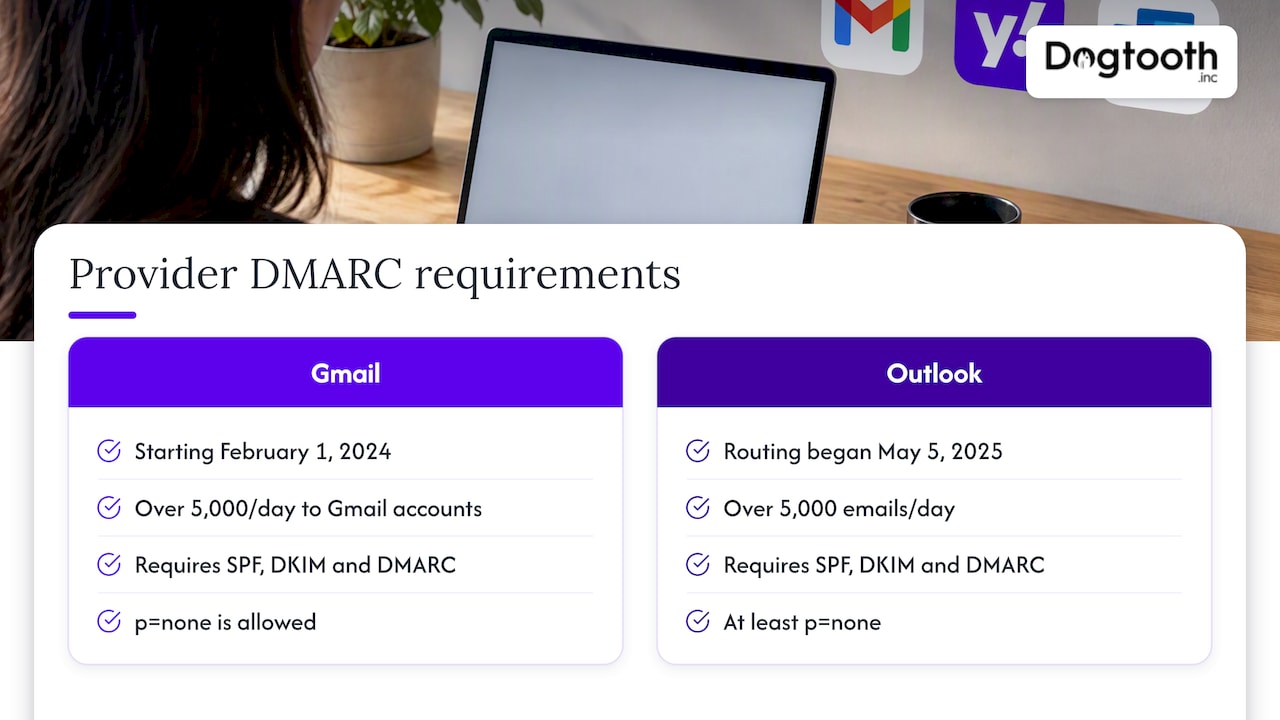
Starting February 1, 2024, senders sending more than 5,000 messages per day to Gmail accounts must set up SPF, DKIM and DMARC, and the DMARC policy can be p=none. For direct mail to personal Gmail accounts, bulk senders must also align the From domain with either the SPF or the DKIM domain. Marketing and subscribed messages need one-click unsubscribe and a visible unsubscribe link in the body.
Consequences are real. Senders that miss the requirements may see temporary or permanent failure codes, or have messages sent to spam.
Microsoft followed for its consumer service. For domains sending over 5,000 emails a day, Outlook.com requires SPF, DKIM and DMARC with at least p=none and alignment with SPF or DKIM. Non-compliant mail goes to Junk first, with rejection possible later. Microsoft’s announcement says that routing began on May 5, 2025.
The takeaway for a US sender: the mailbox providers set the floor at p=none for high-volume senders. Your own risk sets the ceiling. If anyone could plausibly impersonate your brand, which is true of any brand with customers, the floor is not enough.
A safe rollout from monitoring to reject
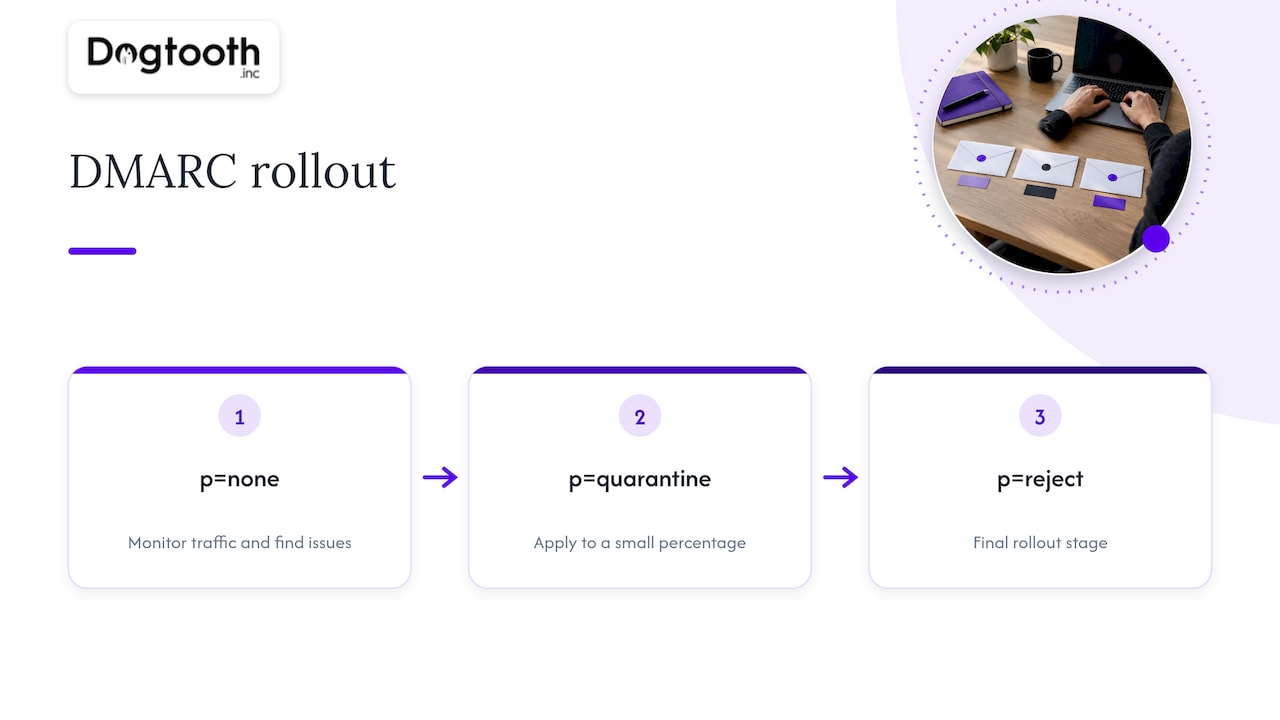
Google recommends a gradual approach. Start with p=none to monitor traffic and identify issues with outgoing email and senders. Then move to p=quarantine for a small percentage of messages, and finally to p=reject. Here is how that looks as a working plan.
Step 1: Get SPF and DKIM right first
CISA’s advice is to make sure SPF and DKIM are in place before DMARC, and to validate records and policies before deployment so legitimate mail is not marked as spam. Check that each sending platform signs with a key on your domain, not only its own.
Step 2: Publish p=none with reporting
Add a DMARC TXT record at _dmarc.yourdomain.com with p=none and a rua address for aggregate reports. The FTC notes that DMARC reports let domain owners observe and monitor attempts to spoof their domains. Raw XML reports are painful to read, so most teams use a parser to turn them into a table of sources, volumes and pass rates.
Step 3: Inventory every sender
Run p=none for long enough to see a full business cycle, typically a few weeks and ideally one full month so billing runs and quarterly sends show up. List every source in the reports and sort it into three buckets:
- Known and legitimate: your email service provider, CRM, help desk, billing system, calendar invites.
- Legitimate but unknown to you: a marketing contractor’s tool, an old survey platform, a regional office’s server.
- Not you: spoofing attempts and abuse.
Bucket two is where enforcement projects stall. Ask around before you assume a source is hostile.
Step 4: Fix alignment for each legitimate sender
For each real sender, set up custom DKIM signing on your domain, or use a return-path subdomain that aligns for SPF. Aim for DKIM alignment where you can, because it survives forwarding better than SPF.
Step 5: Move to quarantine at a low percentage
Set p=quarantine; pct=10, then raise it to 25, 50 and 100 as reports stay clean. Watch for support tickets and for drops in delivery of transactional mail such as receipts and password resets. If something breaks, drop the percentage and fix the cause.
Step 6: Move to reject
Once quarantine at 100 percent has run cleanly, switch to p=reject. Keep reading reports afterward. New tools get added to companies constantly, and each one is a potential new failure.
One more rule for every step: change one thing at a time and record the date. If delivery shifts, you want to know which change caused it.
Why good email fails DMARC
Most enforcement problems are not attackers. They are legitimate mail failing in predictable ways.
- Forwarding. Forwarders and services that modify messages in transit can break authentication. Microsoft documents that trusted ARC sealers can preserve the original authentication results for modified messages.
- Mailing lists and gateways. Lists that add footers or change subjects can break DKIM signatures. Microsoft’s guidance says ARC or a scoped allow entry can help with legitimate messages affected this way.
- Third-party senders without aligned domains. The most common cause by far. The tool authenticates its own domain and never touches yours.
- Subdomains. A sending subdomain you forgot about inherits your policy unless you set a separate one.
- Misconfigured SPF. Too many DNS lookups or a missing include for a new vendor.
You cannot fix other people’s forwarding, so accept a small residual failure rate from it. This is why reject is judged by trends in your reports, not by a demand for perfect zeroes.
Does enforcement affect deliverability?
Done well, it helps. Authenticated mail that aligns is easier for mailbox providers to trust, and spoofed mail that carries your name stops eroding your reputation. Done badly, it blocks your own messages.
DMARC is also only one input. Sender reputation, complaint rates, list quality and sending patterns decide inbox placement just as much. If you are starting a new sending domain, our 8-week domain warming plan covers the volume ramp, and our guide to email list hygiene and hard bounces covers the list side. Authentication gets you through the door. Reputation decides where you sit once inside.
Perspective: what we see when teams hit the enforcement wall
We run email infrastructure for high-volume senders, and we run our own campaigns the same way: our in-house AI campaign manager drafts on-brand emails, runs compliance checks, tests inbox delivery and schedules sends on a single approval. That daily exposure shapes how we think about DMARC.
Our view is that enforcement is an inventory problem before it is a DNS problem. The record is one line. The work is finding every system that sends as your domain and bringing each one into alignment. Teams that skip the inventory and jump to reject find out about the forgotten sender when a customer says the invoice never arrived.
We also think p=none should have an expiry date. Plenty of domains sit there for years because nobody owns the next step. Put a date in the calendar, assign an owner, and set the percentage ramp in advance. A slow, scheduled rollout beats a heroic weekend change.
Finally, treat reports as a monitoring feed, not a one-time audit. The checks should be automated so a new sender failing alignment is flagged the week it appears.
— Chase Weir
When to get help
Many teams can finish this alone. Help is worth considering when you send through many platforms, run several brands or domains, or have a legacy system that nobody fully understands. Dogtooth Inc. builds email infrastructure and deliverability systems, including MailFurnace, our deliverability software for high-volume senders, and we stay on after launch to keep sending healthy as your stack changes.
Quick checklist before you switch to reject
- SPF and DKIM pass and align for every sender in your reports.
- You have run p=none for at least one full business cycle.
- Quarantine has run at 100 percent without new support complaints.
- Subdomains either inherit the policy deliberately or carry their own.
- Someone owns the report mailbox and reviews it on a schedule.
- Transactional mail (receipts, resets, invites) has been tested end to end.
FAQ
What is a DMARC violation?
It is a message that fails DMARC because neither SPF nor DKIM passes with alignment to the From domain. The receiving server then applies your published policy: deliver, quarantine or reject. A violation is not always malicious, since misconfigured legitimate senders cause many of them.
Is DMARC really necessary?
For high-volume senders, yes. Gmail requires SPF, DKIM and DMARC from senders above 5,000 messages a day to Gmail accounts, and Outlook.com set a similar requirement. Even below those volumes, a DMARC record is the main tool for seeing and stopping spoofing of your domain.
Does Gmail enforce DMARC?
Gmail enforces its sender requirements, which include having a DMARC record for bulk senders. Non-compliant mail may be delayed, rejected with an error code, or sent to spam. Gmail does not require p=reject, but your own policy is applied to mail that fails.
How long does it take to reach p=reject?
There is no fixed number. Simple domains with one or two senders can finish in a few weeks. Organizations with many tools, subdomains and legacy systems often need a few months, mostly spent on the sender inventory.
Can I go straight to p=reject?
You can, but it risks blocking your own legitimate mail. Google recommends a gradual path from none to quarantine on a small percentage and then to reject. Skipping stages only makes sense for a domain that never sends email at all.
Sources
- Help prevent spoofing and spam with DMARC, Google Workspace Admin Help
- Recommended DMARC rollout, Google Workspace Admin Help
- Email sender guidelines, Gmail Help
- Email sender guidelines FAQ, Gmail Help
- How email authentication works in Microsoft 365
- Set up DMARC to validate email in Microsoft 365
- Outlook’s new requirements for high-volume senders, Microsoft Tech Community
- Businesses Can Help Stop Phishing and Protect their Brands, FTC staff perspective
- Email authentication countermeasure, CISA
- 5 Step Playbook to Stop Email Phishing for IT Teams