The short version: email lands in the inbox when mailbox providers trust you. You earn that trust with proper authentication (SPF, DKIM, DMARC), a permission-based list you keep clean, steady sending volume, content people want, and monitoring that catches problems early. Do those five things in that order and most deliverability problems either disappear or become easy to diagnose.
This guide walks through each one, gives the numbers the big mailbox providers and anti-spam organizations publish, and shows how to fix a program that is already in trouble.
TL;DR
- Delivery means the message was accepted by the receiving server. Deliverability means it reached the inbox instead of spam. You can have a high delivery rate and still miss the inbox.
- Set up SPF, DKIM and DMARC first. Everything else builds on a sender the providers can verify.
- Send only to people who opted in, remove bounces and unengaged contacts, and never buy or rent a list.
- Warm up new domains and IPs slowly, then watch spam rate in Google Postmaster Tools and keep it under 0.1%.
- When something breaks, read your mail logs first, then work through authentication, list, content and reputation in that order.
Table of Contents
- Delivery and deliverability are not the same thing
- What hurts deliverability
- 1. Authenticate your domain
- 2. Build a permission-based list and keep it clean
- 3. Warm up new domains and IPs, then manage volume
- 4. Send content people want, in a form providers trust
- 5. Monitor the numbers that matter
- 6. Diagnose and fix an existing problem
- Transactional and marketing mail need different handling
- A deliverability checklist you can run this week
- Perspective
- How Dogtooth can help
- FAQ
- Sources
Delivery and deliverability are not the same thing
Email delivery means a message reached the recipient’s mail server without bouncing. Email deliverability is about where it went after that: the inbox, the promotions tab or the spam folder. A high delivery rate does not guarantee inbox placement, which is why a dashboard showing 99% delivered can sit next to a program that nobody reads.
That gap matters because the burden sits with you. Mailbox providers rarely tell you where a message landed, so you have to infer it from authentication results, complaint and bounce data, seed tests and engagement.
The mechanism underneath is trust. Receiving servers weigh your authentication, your reputation and your history to decide where each message belongs. Every best practice below is a way of making that decision easier for them.
What hurts deliverability
Before the fixes, here is what usually does the damage:
- Unauthenticated sending domains. If a provider cannot verify that you are allowed to send as your domain, it has little reason to trust the message.
- Poor list quality. Old addresses, typos and purchased contacts produce bounces and spam trap hits.
- High bounce and complaint rates. Both tell providers your recipients do not want, or cannot receive, your mail.
- Low engagement. Mailbox providers may reduce inbox placement if people consistently leave your mail unopened.
- Risky content and links. Spam-style phrasing, shortened URLs, broken links and long redirect chains can all push a message toward the junk folder.
- Sending infrastructure problems. The sending domain, the click-tracking domain and the IP address all carry reputation.
Reputation is also fast-moving. Spamhaus notes that inbox placement is dynamic and that IP and domain reputation can be recalculated very quickly in response to how recipients react. A good month does not protect you from one bad send.
1. Authenticate your domain
Authentication is the foundation, and Gmail treats it as the first thing to check. Three records do the work:
- SPF lists which servers may send for your domain.
- DKIM adds a cryptographic signature so the receiver can confirm the message was not altered and came from you.
- DMARC tells receivers what to do when SPF and DKIM checks fail, and sends you reports.
A few technical details cause most of the silent failures:
- Keep your SPF record within the 10 DNS lookup limit. Go over it and receivers return a PermError, which counts as a failure. Every tool you add to your stack (CRM, help desk, billing, marketing platform) tends to add an include, so audit the record whenever you add a sender.
- Use DKIM keys of at least 1024 bits, with 2048 bits recommended, according to the Spamhaus sender guidelines.
- Use TLS so the transmission itself is encrypted in transit.
Trust signals like these are easy to let slide once the records are published, so it helps to understand why email trust metrics matter and to recheck your records whenever your tooling changes.
Most senders publish DMARC at p=none and stop there. That gives you reports but no protection. Moving to quarantine and then reject is a staged process, and we cover it step by step in our guide to DMARC enforcement from p=none to p=reject.
2. Build a permission-based list and keep it clean
The best content in the world cannot rescue a list full of people who never asked to hear from you.
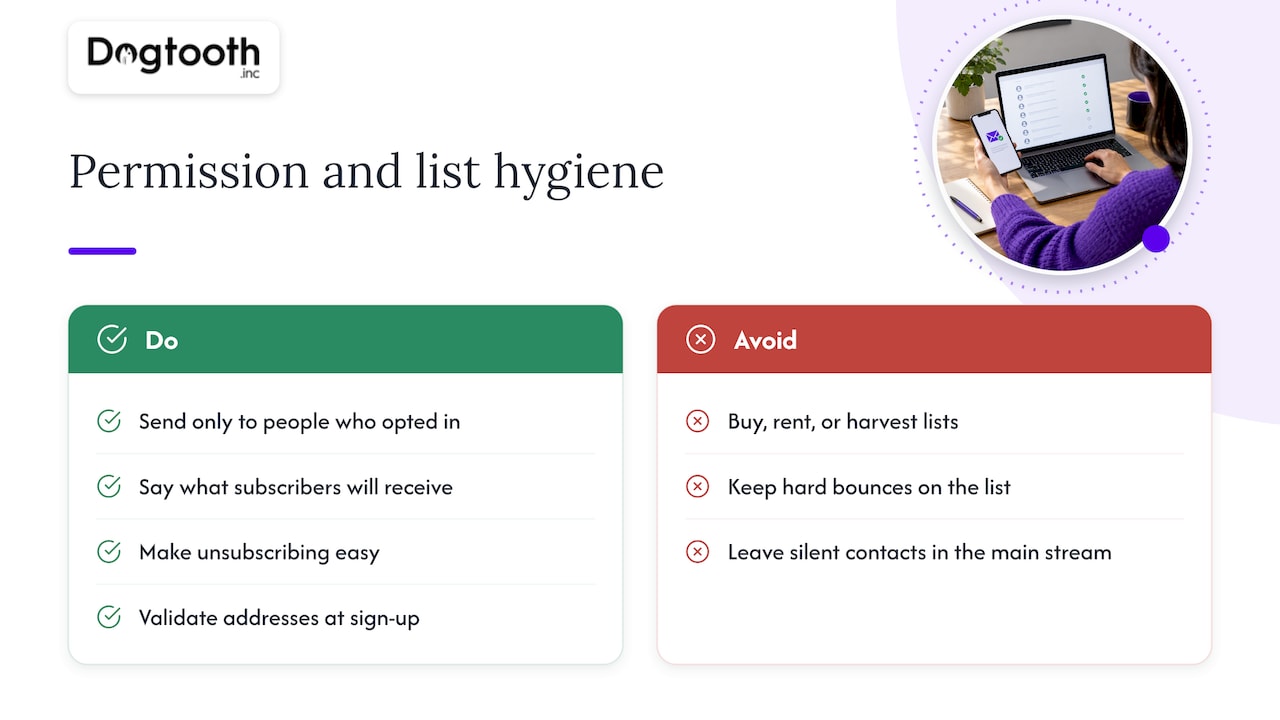
Get permission. Send to people who opted in, say what they will receive, and make unsubscribing easy. Purchased, rented and harvested lists are, per Spamhaus, among the most common sources of spam trap hits, and hitting traps is one of the fastest routes to a listing. If you are building from scratch, a good primer on how to with consented sign-ups keeps you on the right side of this from day one.
Remove what hurts you. Hard bounces should come off the list immediately. Addresses that have not engaged in months should move to a re-engagement flow and then a suppression list if they stay silent. Keeping them in the main stream drags your engagement down, and engagement is a signal providers read.
Validate at the door. Catch typos and fake addresses at sign-up rather than after the first bounce. Double opt-in is a stronger version of the same idea for higher-risk sources.
We go deeper on thresholds and automation in email list hygiene and keeping hard bounces under 2%, including how to automate the repair work so it does not depend on someone remembering to run an export.
3. Warm up new domains and IPs, then manage volume
A new domain or IP has no history. Blasting a large list on day one looks exactly like what a spammer does, so providers throttle or junk it.
Google’s guidance for new IPs is to increase volume gradually, by no more than twice the previous volume, while following the usual best practices. In practice:
- Start with your most engaged recipients: recent purchasers, recent clickers, people who just signed up.
- Double volume at most from one send to the next, and hold if you see deferrals or rising complaints.
- Keep cadence consistent. Long silences followed by sudden spikes look unnatural.
- Add less engaged segments last.
If you hit deferrals, Google’s guidance is to pause sending for 15 minutes and send a test email. If it is delivered as expected, resume below the volume where the deferral began, hold that for 24 hours, and then increase by 25% to 100% daily. The same logic applies to volume management in general: sudden jumps, such as a big promotion to your whole list, are a common cause of inbox placement dips.
For a week-by-week plan, see our email domain warming plan for the first 8 weeks.
4. Send content people want, in a form providers trust
Content matters less than authentication and reputation, but it still tips borderline messages the wrong way.
- Match what you promised. If people signed up for a weekly product digest, a surprise discount blast generates complaints.
- Avoid spam-style phrasing and all-caps, exclamation-heavy subject lines.
- Use full, working links on a domain you control. Shortened URLs, broken or invalid links and URLs with multiple redirects can lead receiving servers to junk a message or reject it.
- Keep HTML clean and include a plain-text version and a physical mailing address.
- Segment. Relevant mail earns clicks and replies, which are positive signals. Irrelevant mail earns deletes and complaints.
Make unsubscribing easy
A visible unsubscribe link protects you better than hiding it. Gmail recommends one-click unsubscribe and honoring unsubscribe requests. Someone who cannot find the link will hit the spam button instead, and complaints do far more harm than unsubscribes. Process opt-outs promptly and make sure every email system you use shares the same suppression list.
5. Monitor the numbers that matter
You cannot manage what you cannot see. At minimum:
| Signal | Where to find it | What to watch |
|---|---|---|
| Spam rate | Google Postmaster Tools | Keep it below 0.1% |
| Authentication pass rates | Postmaster Tools, DMARC reports | SPF, DKIM and DMARC should pass on essentially all mail you send |
| Delivery errors | Postmaster Tools, your mail logs | Deferrals, blocks, and rejection codes |
| Bounce rate | Your sending platform | Hard bounces should stay low and be removed immediately |
| Complaint rate | Feedback loops, platform reports | Rising complaints on any segment |
| Engagement | Clicks, replies, conversions | Trends by segment, not single sends |
Google’s own guidance is to monitor configuration, spam rates, authentication rates and delivery errors in Google Postmaster Tools, and to keep the reported spam rate under 0.1%. One limit worth knowing: those dashboards may not show data for domains that send too little mail to personal Gmail accounts, a privacy protection. Small senders may need to lean more on seed tests and their own logs.
Treat open rates carefully. Automated activity such as Apple Mail Privacy Protection opens and bot clicks inflate them, so look at clicks, replies and downstream conversions alongside opens, and do not use opens alone to decide who is “engaged.”
Test placement directly
A seed test sends your message to test mailboxes at the major providers and shows where each one lands. It will not mirror every real recipient, but it turns “I think we are in spam” into evidence. Our guide to inbox placement testing explains how to run one and how to read the results without over-trusting a single test.
6. Diagnose and fix an existing problem
When inbox placement drops, work through it in a fixed order so you do not change five things at once and learn nothing.
- Read your mail logs. Errors will usually point to authentication failures, blocklisting or content problems. This tells you where to focus.
- Check authentication. Confirm SPF, DKIM and DMARC pass for every system sending as your domain. A new tool added without updating DNS is a very common culprit.
- Check blocklists. If your domain or IP is listed, find and remove the cause first (an infected account, a compromised form, a bad list source), then request delisting. Requesting delisting before fixing the cause usually fails or relists you.
- Audit the list. Look for a recent import, a new acquisition source or a segment with a spike in bounces.
- Analyze the last campaigns. Review why messages bounced, were marked as spam or drew unsubscribes, and correct what you find.
- Reduce and rebuild. Send temporarily only to your most engaged segment, then widen back out in stages, as you would in a warm-up.
Recovery is usually measured in weeks, not days, because providers need to see consistent good behavior. Resist the urge to switch tools or domains as a first move. A new domain without the underlying fix just inherits the old habits and loses its clean start.
Transactional and marketing mail need different handling
Password resets, receipts and booking confirmations are the mail your customers genuinely cannot do without, and they share infrastructure with promotions on many setups. If a marketing campaign damages that shared reputation, your order confirmations land in spam too. Separating streams, for example by using different subdomains for transactional and promotional sending, keeps one from dragging the other down. We cover this in our practical guide to transactional email deliverability.
A deliverability checklist you can run this week
- SPF record valid, under 10 lookups, covers every sender.
- DKIM enabled on every platform, keys of 2048 bits where supported.
- DMARC published, with a documented plan to reach enforcement.
- Postmaster Tools verified for your sending domains.
- Hard bounces suppressed automatically after the first failure.
- Unengaged contacts moved to a re-engagement flow, then suppressed.
- One-click unsubscribe in place and honored quickly.
- Warm-up schedule written down for any new domain or IP.
- Transactional and marketing mail separated.
- A monthly seed test and review of complaint trends.
Perspective
Most deliverability advice is a list of tips. The teams that keep good inbox placement treat it as an operating system: someone owns it, it is measured weekly, and the routine checks do not depend on memory.
That is how we run our own email operation. We use an in-house AI campaign manager that drafts on-brand emails, runs compliance checks, tests inbox delivery and schedules the send on a single approval. The point is not to remove people from the process. It is that the boring, high-stakes checks happen every time, before anything goes out.
We also build the same thing for clients, through our email infrastructure and deliverability work and our proprietary MailFurnace software for high-volume senders. Our view is that a senior team should wire authentication, list repair and monitoring into the way you already work, then stay on after launch to tune it as your volume and providers’ rules change.
Chase Weir
How Dogtooth can help
If your volume has outgrown spreadsheets and manual checks, or you are untangling a damaged sender reputation across several tools, we build and run the infrastructure behind it: authentication, list hygiene automation, monitoring and deliverability tooling, including MailFurnace for high-volume senders. A senior-led team handles the work and stays on after launch.
See what we build on the Dogtooth Inc site, or read how we built and monetized a pet-niche email list for a client.
FAQ
How do I improve email deliverability quickly?
Start with authentication: confirm SPF, DKIM and DMARC pass for every system that sends as your domain. Then remove hard bounces and long-inactive contacts, and send only to your most engaged segment for a couple of weeks. Check Google Postmaster Tools to see whether your spam rate is under 0.1%. Reputation recovers over weeks, so expect gradual rather than overnight change.
What is the difference between email delivery and email deliverability?
Delivery is whether the receiving server accepted your message instead of bouncing it. Deliverability is whether it then reached the inbox rather than spam or another folder. A campaign can show a very high delivery rate and still perform poorly because most of it went to junk.
What hurts email deliverability the most?
The biggest factors are unauthenticated domains, poor list quality, high bounce and complaint rates, and low engagement. Purchased or rented lists are especially risky because they commonly contain spam traps. Spam-style content and broken or redirected links can add to the problem.
How long does it take to warm up a new domain or IP?
There is no single number, because it depends on your volume and how recipients respond. The principle is to start with engaged recipients and raise volume gradually, by no more than double each step according to Google’s guidance for new IPs. Many senders plan for several weeks, and our 8-week domain warming plan shows one way to structure it.
Sources
- Top 10 Gmail sender issues, Gmail Help
- Sender Guidelines, Spamhaus
- A guide to improving and maintaining email deliverability, Spamhaus
- Email Delivery vs. Email Deliverability, Litmus