A marketing data pipeline is the automated system that pulls data out of your ad platforms, CRM, email tools, website analytics and store, cleans it, and delivers it to a place where your team can report on it, attribute revenue to it and act on it. It replaces the weekly ritual of exporting CSVs and pasting them into a spreadsheet. Done well, every channel reports in the same format, the numbers match across dashboards, and nobody has to ask which version is right.
This guide covers what a pipeline contains, the four stages most of them follow, how it differs from ETL, what breaks in practice, and how to decide between building and buying.
TL;DR
- A marketing data pipeline extracts data from marketing sources, loads it into storage such as a warehouse, transforms it into consistent metrics and serves it to dashboards, attribution models and activation tools.
- “Data pipeline” is the broad category. ETL is one pattern inside it, where transformation happens before loading.
- Most failures are quiet: API changes, schema drift and bad joins produce wrong numbers without an error message. Monitoring matters as much as the build.
- Build when your sources, identity logic or attribution rules are unusual. Buy when your needs are standard and speed matters most. Many teams do a mix.
- Privacy is a design input, not a cleanup task. Plan access control and PII handling before data lands.
Table of Contents
- What a marketing data pipeline is
- The four stages of a marketing data pipeline
- Data pipeline vs. ETL
- What a pipeline makes possible
- A pipeline maturity path
- What breaks, and how to plan for it
- Build vs. buy
- Our perspective
- How we can help
- A practical starting checklist
- FAQ
- Sources
What a marketing data pipeline is
The definitions across the industry agree on the core idea. HubSpot describes a data pipeline as a combination of actions and tools that moves data between a source and a destination, often transforming it along the way to improve quality and enable analysis. A marketing data pipeline applies that to one domain: the process or system that moves marketing data from sources such as web analytics, search advertising, social advertising and display advertising to a central destination, often a data warehouse.
The practical value is simple. Each platform reports its own version of the truth, in its own format, with its own definition of a conversion. A pipeline standardizes that. HubSpot also points out that pipelines reduce manual engineering work and human error and give you visibility that single-source reports cannot, because combined data shows the whole picture instead of a partial view.
The sources a pipeline usually connects
Marketing integration commonly connects ad platforms, web analytics, email systems, CRM platforms and e-commerce tools, and each captures a different part of customer behavior or performance. In a typical mid-size brand that looks like this:
| Source type | What it tells you | Typical data |
|---|---|---|
| Ad platforms | Spend, reach, clicks, platform-reported conversions | Campaign, ad set, creative, cost |
| Web analytics | On-site behavior and sessions | Events, sources, landing pages |
| Email and SMS tools | Sends, opens, clicks, unsubscribes, bounces | Campaign and subscriber-level activity |
| CRM | Leads, deals, lifecycle stage | Contacts, owners, pipeline stages |
| E-commerce and payments | Orders, refunds, customer value | Order lines, discounts, customer IDs |
The join between these is where the value sits. Ad spend alone does not tell you what a customer was worth. An order alone does not tell you what brought them in. The pipeline is what lets those two facts meet in one table.
Where the data goes
The destination is usually a cloud warehouse, with BigQuery, Snowflake and Redshift as common examples, feeding BI tools such as Looker and Tableau. Increasingly there is a second destination: activation, meaning the data goes back into the tools that run campaigns.
The four stages of a marketing data pipeline
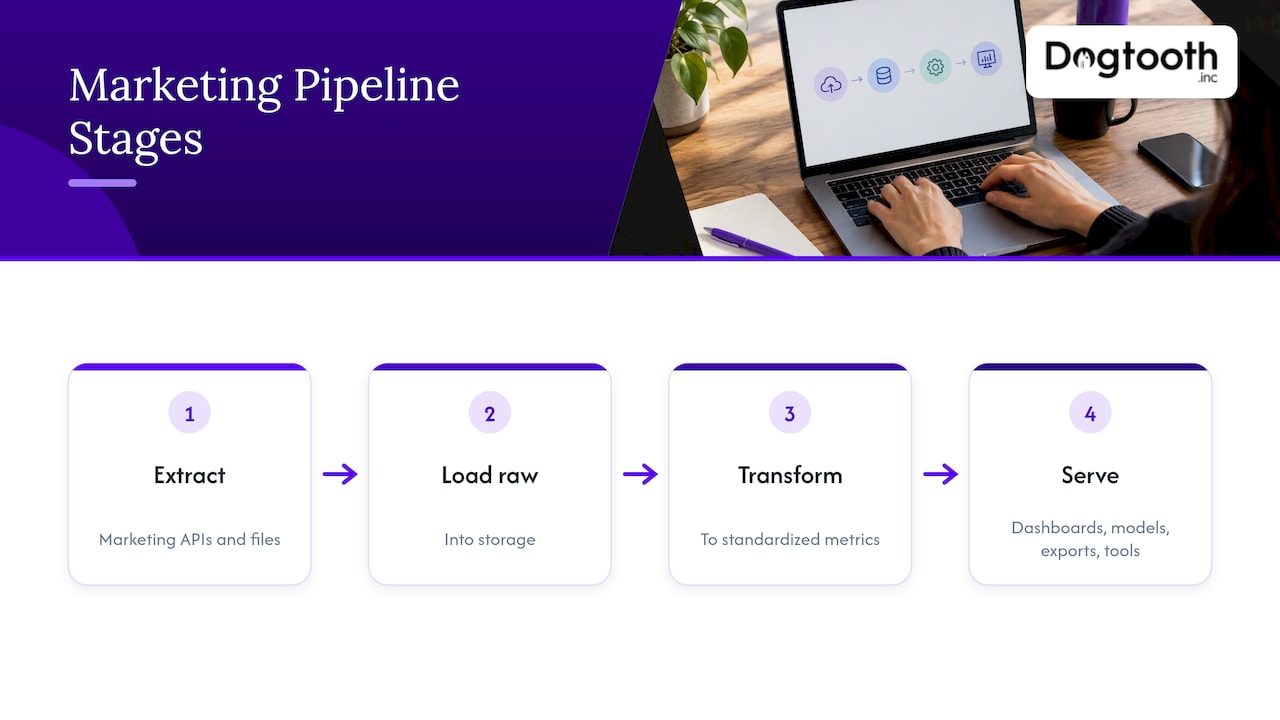
Most modern marketing pipelines follow four stages: extraction, loading, transformation and serving. Here is what each one involves and where it tends to go wrong.
1. Extraction
Extraction pulls data from source APIs or file exports. The questions to settle here are how often each source needs to refresh (hourly for spend pacing, daily for most reporting), how far back you need history, and what happens when an API rate-limits you or changes a field name.
2. Loading
Loading lands the data in storage, ideally untouched. Keeping a raw copy is a habit worth defending. When a transformation turns out to be wrong, you can rebuild from raw instead of begging a platform for last quarter’s data again. AWS’s reference architecture for advertising and marketing analytics follows this pattern: data from SaaS applications, databases or file storage is landed in raw cloud storage, transformed, and stored and cataloged in a clean zone before it reaches analytics and query services.
3. Transformation
Transformation is where raw rows become metrics. You standardize date formats and time zones, map campaign names to a consistent taxonomy, convert currencies, deduplicate, and join sources on shared keys such as customer ID, email hash or order number. This is the stage that decides whether anyone trusts the output. Practitioners describe the main risk as data that is “quietly wrong”, for example an incorrect join that inflates revenue, and nothing fails loudly enough to catch it.
4. Serving and activation
Serving makes the data usable: dashboards, models, exports, or feeds into operational tools. Activation goes a step further. Salesforce’s training material describes activation as making data available to marketing tools for audience filtering, personalization, journey branching and form prefilling, with stages that run through ingestion, field mapping and identity resolution.
Data pipeline vs. ETL
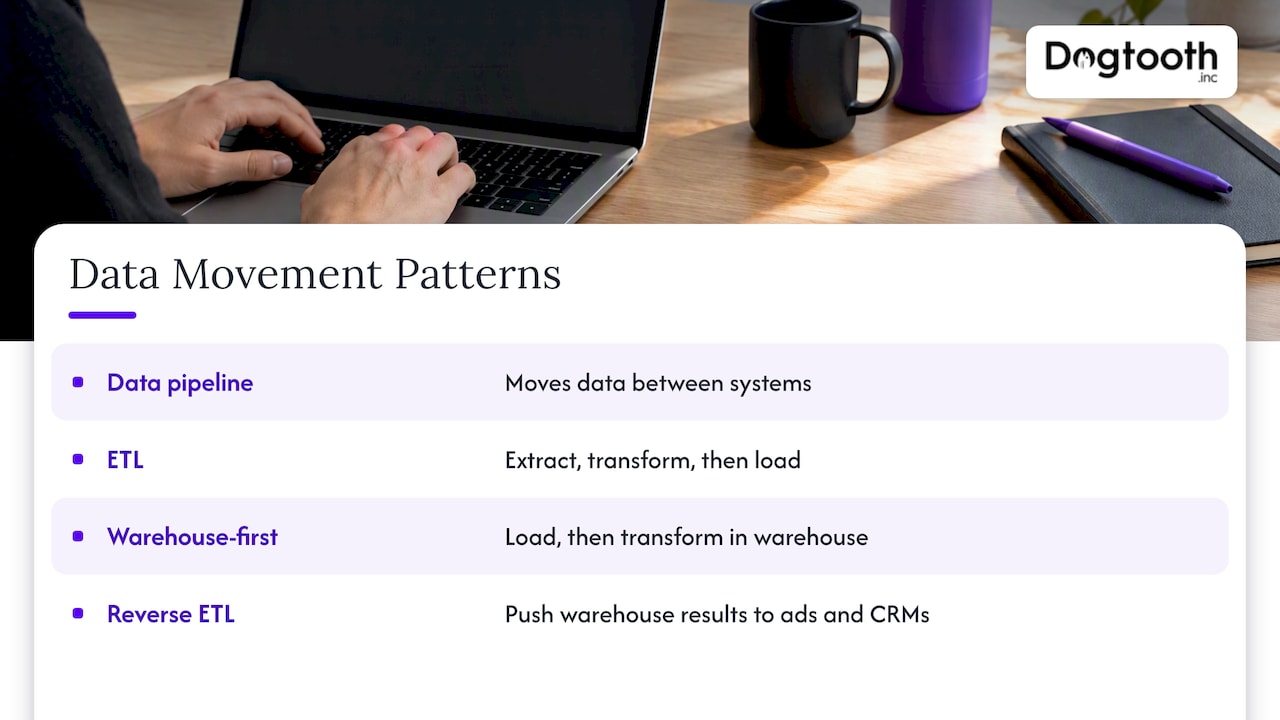
People use the terms interchangeably, and they are not the same thing. A data pipeline is the broader idea: moving data between systems. It may skip transformation, run in real time, or trigger further actions after delivery. ETL is a specific pattern in which data is extracted, transformed and only then loaded.
The pattern most marketing teams use today flips the last two steps: load first, transform inside the warehouse. That keeps raw data available and makes transformations easier to version and rerun. A third pattern, often called reverse ETL, pushes warehouse results back into ad platforms and CRMs. None of this changes the goal. It changes where the logic lives and how easily you can fix it.
What a pipeline makes possible
Reporting you can defend
When spend, sessions and revenue sit in one warehouse with standard definitions, a report is a query, not a project. Integrated data supports unified metrics, cross-channel analysis such as multi-touch attribution and customer lifetime value, and fewer silos, through standardized fields and automated collection.
Attribution that goes beyond platform reports
Every ad platform grades its own homework. A pipeline lets you compare platform-reported conversions with what your store or CRM actually recorded, and build your own view of which touches mattered. If you want to see how that logic is designed, our guide to a privacy-aware custom attribution model walks through it step by step. For the broader case that unified data and attribution improve decisions, see this overview of .
Attribution is only as good as the events feeding it. Browser-based tracking loses conversions to blockers and consent choices, which is why many teams capture payment events on the server. We cover that in server-side tracking for marketers. If a Meta-heavy store is your situation, this breakdown of Facebook Ads attribution and CAPI shows why platform numbers and analytics numbers rarely agree, and why a pipeline helps you reconcile them. For store analytics setup specifically, see GA4 ecommerce tracking.
Email and lifecycle that respond to real behavior
Email is a source and a destination. Engagement and bounce data flow in; segments built from purchase and attribution data flow back out. List quality is a pipeline concern too: bounces and invalid addresses that never get fed back to your sending logic erode deliverability. Our guide to email list hygiene covers the repair loop.
Automation on top of clean data
Once data is consistent, AI agents and automations have something reliable to work from: drafting, checking, booking and reporting steps that read from the same source of truth. If you are exploring that, start with AI workflow automation.
A pipeline maturity path
You do not need a full warehouse on day one. A sensible progression looks like this:
- Manual exports and spreadsheets. Fine for one or two channels. Breaks when the number of sources or the number of people reading reports grows.
- Connector-fed dashboards. Data flows automatically into a reporting tool, but definitions live inside each dashboard and nobody owns them.
- Central warehouse with modeled data. One place, shared metric definitions, history preserved, raw data retained.
- Identity and attribution layer. Customers are matched across channels, and revenue is attributed using logic you control.
- Activation and automation. Warehouse outputs feed ad audiences, lifecycle messaging and AI-driven workflows, with monitoring on every step.
Most teams that call us are somewhere between stages 2 and 3, with dashboards that disagree and no one sure why.
What breaks, and how to plan for it
Silent failures
Source APIs evolve, schemas change and services fail. Unmonitored, these create data gaps or “silent” errors in reporting. Your plan should include:
- Row-count and freshness checks on every source, with alerts when a load is late or empty.
- Schema-change detection, so a renamed field fails loudly.
- Reconciliation against a known total, such as comparing warehouse revenue to your payment processor each day.
- A named owner for each source.
AWS’s guidance treats this as part of the design, noting that a dependable pipeline needs observability, security and access controls, including encryption, least privilege, PII protection and monitoring.
Privacy and personal data
Marketing data is full of personally identifiable information. The U.S. National Institute of Standards and Technology’s guide on protecting PII supports practices such as data minimization, access control and anonymization. In practice that means hashing identifiers where you can, limiting who can query raw customer tables, and dropping fields you do not need. NIST’s privacy framework guidance also frames privacy risk management as essential for trust and legal compliance, beyond security alone. Questions about what your specific consent and state-law obligations are belong with your privacy counsel.
Privacy-safe analysis environments add their own quirks. In Google’s Ads Data Hub, privacy checks can filter query results, and Google advises teams to account for filtered rows when reading output. If your numbers come from a clean-room style tool, build that expectation into the report.
Definitions nobody agreed on
The most common source of distrust is not technical. Marketing counts a lead one way, sales another, finance a third. Write definitions down, put them in the transformation layer, and treat changes to them like code changes.
Legacy systems in the middle
Sometimes the hard source is an old database or a custom internal tool with no usable API. Then the pipeline project becomes partly a modernization project. Our posts on database migration strategy and API modernization without a big bang cover how to expose that data without a risky cutover.
Build vs. buy
The real question is not which is better. It is which fits your sources, your team and your tolerance for maintenance. Compare the options on five things: time to value, total cost, features, expertise and risk.
| Factor | Building custom | Buying a packaged tool |
|---|---|---|
| Time to first report | Longer: scoping, development, testing, integration | Faster for standard sources |
| Cost shape | Upfront engineering plus maintenance | Ongoing subscription |
| Fit | Handles unusual sources, identity rules and attribution logic | Best for common platforms and standard metrics |
| Expertise needed | Skilled data engineers, in-house or partner | Less engineering, some configuration |
| Main risk | Maintenance burden as APIs change | Limits when your needs outgrow the product |
Supermetrics’ comparison reaches the same conclusion: building offers control and customization but demands skilled engineers and ongoing upkeep, while buying deploys faster and brings maintained integrations and support.
A rule of thumb we use with clients:
- Buy the commodity. If a connector for your ad platform exists and your reporting needs are standard, do not rebuild it.
- Build the differentiator. Custom attribution, identity matching across brands, internal operational data, e-commerce quirks and anything touching proprietary systems usually justify custom work.
- Own the model either way. Even with purchased connectors, keep the transformation logic and definitions in a repository your team controls.
Our perspective
We build pipelines the way we run our own operation. Our in-house AI campaign manager drafts on-brand emails, runs compliance checks, tests inbox delivery and schedules sends on a single approval. That only works because the data underneath it is consistent and monitored.
Our view is that the pipeline is not the project. The decision it enables is. Teams that start with “which tool should we buy” end up with a dashboard nobody trusts. Teams that start with “which five decisions do we make every week, and what number would change each one” end up with a pipeline that gets used.
We also think the unglamorous work matters most: reconciliation checks, schema alerts, written metric definitions and a senior engineer who stays after launch to keep it healthy. Sources change constantly. A pipeline without someone watching it is a slow-motion reporting error.
Finally, we treat the pipeline as the foundation for automation. Once drafting, checking, booking and reporting agents read from clean, current data, they stop being demos and start working inside real workflows. That is the same approach we took building an AI booking system for three combat sports brands, and the same one we bring to client data stacks.
Chase Weir
How we can help
If your reporting depends on exports, your platforms disagree about revenue, or an old system holds data you cannot reach, that is the work we do. Dogtooth builds custom platforms, integrations and APIs, attribution systems, AI agents and email infrastructure, with a senior team that ships regularly and stays on after launch to maintain what we built.

For a concrete example of connecting commerce and operational data, see our craft brewery POS and Shopify integration. To talk through your own sources and goals, start at Dogtooth Inc. For high-volume email senders, our MailFurnace deliverability software is also part of the same stack.
A practical starting checklist
Before you pick tools or write code, work through these in order:
- List the decisions. Write down the recurring decisions, such as budget shifts, creative cuts and lifecycle triggers, and the metric each needs.
- Inventory sources. For each, note the owner, API availability, refresh needs and whether it contains PII.
- Define the metrics. Agree on what counts as a lead, a conversion, a new customer and revenue. Record it.
- Pick the destination. A warehouse you can query is the default. Choose based on your team’s skills and existing cloud.
- Keep raw data. Land it before you change it.
- Add checks from day one. Freshness, volume, schema and a daily reconciliation to a financial source of truth.
- Limit access. Apply least privilege and minimize personal data before analysts touch it.
- Ship one report end to end. Prove the path from source to a decision before you add the tenth connector.
FAQ
What is a marketing data pipeline in simple terms?
It is an automated route that collects data from your marketing and sales tools, standardizes it and delivers it to a warehouse, dashboard or activation tool. Instead of exporting and merging reports by hand, the data arrives on a schedule and in a consistent format.
What is the difference between a data pipeline and ETL?
A data pipeline is any automated movement of data between systems, and it can include real-time flows or follow-up actions. ETL is one pattern in which data is transformed before it is loaded. Many marketing teams now load first and transform in the warehouse.
How often should a marketing data pipeline refresh?
It depends on the decision. Daily refreshes suit most reporting and attribution work. Spend pacing and triggered messaging may need hourly or near-real-time updates. Set the cadence per source, based on how quickly someone would act on the data.
Do I need a data warehouse?
Not at the start. With one or two channels, direct connections to a dashboard can work. Once you need to join sources, keep history, build your own attribution or feed data back into campaigns, a warehouse becomes the practical center of the stack.
Sources
- HubSpot: What Is a Data Pipeline?
- TapClicks: Marketing Data Pipeline
- NetSuite: Marketing Data Integration
- Funnel: How to build a marketing data pipeline
- SightShark: What a Marketing Data Pipeline Is
- AWS: Guidance for Connecting Data Sources for Advertising and Marketing Analytics
- Salesforce Trailhead: Activate customer data
- Fivetran: What is data pipeline architecture?
- NIST SP 800-122: Guide to Protecting the Confidentiality of PII
- NIST: Getting Started with the NIST Privacy Framework
- Google for Developers: Ads Data Hub best practices
- Supermetrics: Build vs. buy for marketing data pipelines
- Facebook Ads attribution and CAPI