Moving from SQL Server to PostgreSQL is mostly not a data-copy problem. Rows move easily. The hard parts are the things around the rows: T-SQL stored procedures, Agent jobs, linked servers, data type semantics and the application queries that quietly depend on SQL Server behavior. A good plan treats the move as five jobs: assess, convert, move data, validate, cut over. Each one has its own risks and its own owner.
This guide walks through that plan in the order we would run it, with the decisions that tend to decide whether a migration ships in weeks or drags on for quarters.
TL;DR
- Inventory everything before you convert anything: tables, procedures, triggers, Agent jobs, SSIS packages, linked servers, reports and the SQL inside your application.
- Convert in layers (tables and constraints, then views, functions, procedures, triggers) and test each layer before starting the next.
- Pick the data movement method from your downtime tolerance: a one-time batch load if you can afford a maintenance window, change data capture (CDC) if you cannot.
- Validate with row counts, checksums, functional tests and performance against a baseline captured on SQL Server.
- Rehearse cutover more than once and keep a written rollback path until the new system has proven itself.
Table of Contents
- Start with an assessment, not a tool
- Decide whether this is the right time and scope
- Convert the schema in layers
- Choose how to move the data
- Validate before anyone switches over
- Plan the cutover and the way back
- Perspective: why we keep the database project close to the application
- When to bring in a team
- FAQ
- Sources
Start with an assessment, not a tool
The first deliverable is a list. Before you pick a converter or a replication product, inventory what the SQL Server estate actually contains:
- Database size and growth rate
- Tables, relationships, indexes and constraints
- Stored procedures, functions, views and triggers
- SQL Server Agent jobs and SSIS packages
- Linked servers and cross-database queries
- Reporting dependencies (SSRS, BI tools, exports)
- Security mappings, logins and roles
- Ad hoc and ORM-generated SQL inside the application
The last item is the one teams skip. Application code often contains hundreds of queries using TOP, ISNULL, GETDATE(), bracketed identifiers or NOLOCK hints. If you only convert the database, the application breaks on day one.
Score each object for conversion effort. Automated assessment reports help here: AWS documents a conversion complexity score from 1 to 10 in its schema conversion tool, based on convertible code objects, storage objects and syntax elements. Lower scores flag easy candidates. Higher scores flag databases that need hand conversion and a bigger budget. Treat the score as a sorting aid, not a quote.
Capture performance baselines at the same time: the slowest queries, peak-hour throughput, batch job runtimes. You will need those numbers to prove the new system is as fast as the old one. If your wider program also involves moving workloads to the cloud, an Azure migration strategy can help you sequence the infrastructure decisions alongside the database work.
Finally, decide what you are migrating to. Self-managed PostgreSQL, a managed cloud service and a SQL Server-compatibility layer are different projects with different operational loads. A compatibility layer can shorten application changes, but it does not remove the need for the inventory above.
Decide whether this is the right time and scope
A SQL Server to Postgres move usually has one of three motives: licensing cost, a desire for open tooling and extensions, or a wider platform modernization. Each points to a different scope.
- Licensing-driven: move the database, change as little application logic as possible, and defer redesign.
- Platform-driven: use the move to retire Agent jobs, linked servers and nightly batch scripts in favor of cleaner services.
- Modernization-driven: the database is one piece of a larger legacy replacement. Our write-up on legacy system migration in five phases covers how to avoid a risky big bang in that case.
Write the scope down. Teams that try to redesign the schema, change the application framework and switch databases in one release lose the ability to tell which change caused which bug.
Convert the schema in layers
Convert objects in dependency order. Tables and constraints first, then views, functions, procedures and triggers. Test each layer before building on it. Automated tools do a reasonable first pass on tables and simple views. They do much less with procedural code.
Data types that need a decision
Most type mappings are mechanical, but several carry business meaning and need a human decision. PostgreSQL’s own data type reference lists the native types you are mapping to, including boolean, uuid, bytea, numeric and the date and time family.
| SQL Server | Typical PostgreSQL target | What to check |
|---|---|---|
BIT |
boolean |
Code that compares to 1 and 0 |
UNIQUEIDENTIFIER |
uuid |
Default generators such as NEWID() |
MONEY |
numeric with a fixed scale |
Rounding behavior in calculations |
NVARCHAR |
text or varchar |
PostgreSQL strings are Unicode already, so the N prefix goes away |
DATETIME / DATETIME2 |
timestamp or timestamptz |
Time zone assumptions in stored values |
TIMESTAMP (rowversion) |
bytea, or drop it |
It is a version counter, not a date |
TINYINT |
smallint |
Range and downstream constraints |
IDENTITY |
identity column or sequence | Seed values after the data load |
Two traps appear in nearly every project. First, TIMESTAMP in SQL Server has nothing to do with time. If it exists only for optimistic concurrency, decide whether the application still needs it. Second, identifier casing and collation: PostgreSQL folds unquoted identifiers to lower case, and string comparison and sort order depend on collation. A query that returned rows in a certain order on SQL Server may return them differently on Postgres.
Stored procedures and T-SQL
T-SQL does not translate line by line into PL/pgSQL. Temporary tables, table variables, TRY...CATCH, cursors, @@IDENTITY, MERGE patterns, string functions and procedures that return multiple result sets all need rework. There is no shortcut for this layer, and it is where timelines slip.
A workable approach:
- Rank procedures by how often they run and how critical they are.
- Convert the simple ones with tooling, then review the output by hand.
- Rewrite the complex ones deliberately, with unit tests that compare outputs between the two systems for the same inputs.
- Keep a living document of T-SQL patterns that require application changes, so developers fix them once, consistently.
Sometimes the right call is to move logic out of the database entirely and into application services. Forty-page procedures that no one wants to touch are a good candidate.
Jobs, linked servers and reporting
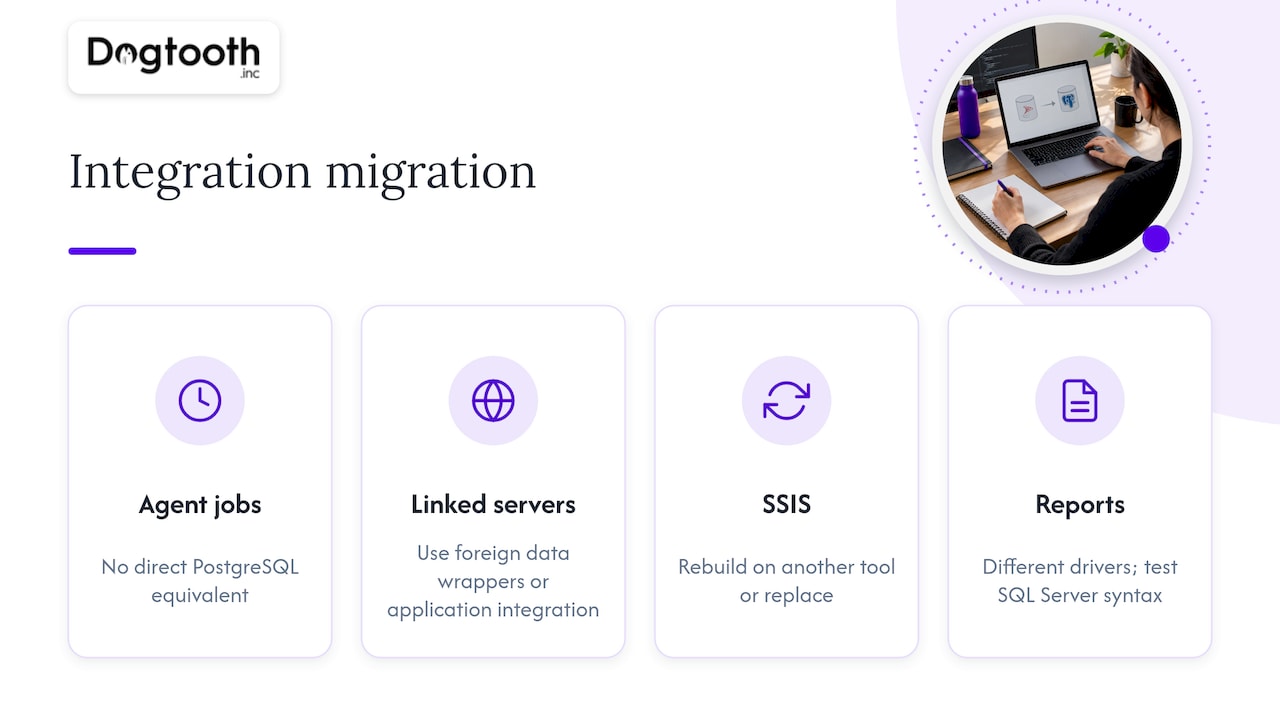
SQL Server Agent jobs have no direct equivalent inside PostgreSQL, so you will need a native extension or an external scheduler. Linked servers need redesign, using foreign data wrappers such as postgres_fdw or an application-level integration. SSIS packages either get rebuilt on another integration tool or replaced. Reports connect through different drivers and often rely on SQL Server-specific syntax, so give them their own test pass.
If your integrations are tangled, an API layer between the database and its consumers makes the migration far less painful, because consumers stop caring which engine sits behind it.
Choose how to move the data
There are two broad patterns. Choose based on downtime tolerance and database size.
| Batch load | Continuous replication (CDC) | |
|---|---|---|
| How it works | Export, transform, load during a window | Initial load, then stream changes until cutover |
| Downtime | Minutes to hours, sized to data volume | A short write pause |
| Best for | Smaller databases, internal tools, off-hours windows | Large or always-on systems |
| Complexity | Lower | Higher: lag monitoring, ordering, schema drift |
| Typical tooling | SSIS, bulk export and COPY |
CDC-based replication services |
A batch load is the right answer more often than people expect. If your business can tolerate a Saturday-night window and the dataset loads inside it with margin, the simpler method has fewer moving parts to break. Rehearse the load on production-sized data to get a real runtime, not an estimate.
With CDC, the sequence is: take an initial snapshot and load it, apply ongoing changes while monitoring lag, pause writes briefly once lag is near zero, apply the final changes, validate, then switch connections. Industry guidance tends to point larger databases (over roughly 100 GB) toward this approach, because a full reload inside one window becomes impractical. Our deeper treatment of near-zero-downtime sequencing, written from the Oracle side but applicable here, is in zero downtime migration workflows and cutover checks.
Whichever method you use, reset sequences and identity values after loading. Forgetting this produces duplicate key errors on the first insert after cutover.
Validate before anyone switches over
Validation is a gate, not a phase you squeeze in at the end. Define pass criteria before testing starts.
- Structure: compare tables, columns, constraints, indexes and object counts between source and target.
- Data: row counts per table, then checksums or hashed samples for content. Count equality alone hides truncation and encoding errors.
- Application behavior: run functional tests against the Postgres-backed application, including edge cases around nulls, dates, case sensitivity and sorting.
- Performance: replay a realistic workload at production volume and compare to your SQL Server baseline. Query plans differ, and some queries need new indexes.
- Operations: test backups and restores, monitoring, alerting and failover. A database you cannot restore is not migrated.
- Compliance: confirm encryption, access controls and audit logging meet your obligations.
Run this in a production-like environment. Testing on a laptop-sized sample finds syntax errors but misses the performance and locking problems that hurt you on launch day.
Plan the cutover and the way back
Cutover is a sequence of small, reversible steps, not a single moment. A sound sequence looks like this:
- Freeze schema changes on the source.
- Announce a maintenance window sized from your rehearsals, with a margin.
- Stop or pause writes. Confirm no active sessions are writing.
- Apply final changes (CDC) or run the final batch load.
- Run the validation suite against the target.
- Switch application connection strings, or flip DNS or a proxy.
- Run smoke tests on the critical user journeys.
- Hold a go or no-go checkpoint at each stage, with a named person who can call it.
Stage the move in waves where you can: development, then test, then low-criticality systems, then the production systems that matter most. Each wave teaches you something cheaper than a production mistake would.
Rollback
Write the rollback plan before the cutover plan, and define the point of no return explicitly. Until you accept writes on Postgres, rolling back is easy: point the application back at SQL Server. After that, writes exist only in the new database. The usual protections are:
- Keep SQL Server intact and read-only (not decommissioned) for an agreed period.
- Where the business cannot lose post-cutover transactions, capture them so they can be replayed or synced back.
- Pre-define the rollback triggers: error rate, latency thresholds, failed reconciliation. Deciding in advance prevents debate at 3 a.m.
- Rehearse the rollback at least once. An untested rollback is a hope.
Monitoring matters most in the first hours. Set up downtime alerting with sensible thresholds and routing before cutover so the right people hear about failures before customers do.
Perspective: why we keep the database project close to the application
We build and migrate platforms for brands doing real volume, and the pattern is consistent: database migrations fail at the seams. The schema converts. The data loads. Then a report, a nightly job or an ORM query nobody documented breaks, and the team discovers the database was never the whole system.
That is why we scope the application, jobs and integrations in the same assessment as the schema, and why we run our own operations the same way we run client projects. We ship weekly, which forces small, reversible steps instead of one heroic weekend.
We also stay after launch. The first month on a new database is when the performance tuning and the surprises happen, and a senior team that already knows the codebase is the cheapest insurance you can buy.
Chase Weir
When to bring in a team
If you have a handful of tables and a tolerant maintenance window, your own developers can run this plan. If you have hundreds of procedures, several consuming applications, or no tolerance for downtime, the coordination load is what hurts, and it is where outside help pays for itself.
Dogtooth Inc. handles platform builds and migrations, integrations and APIs, and custom web apps, with a senior-led team that stays on after launch. We can run the assessment, convert the schema and application queries, rehearse the cutover and support the system afterward. Our guides on database migration strategy and moving from Oracle to Postgres show how we approach the same problem from other starting points.
To talk through your SQL Server estate, start with our platform builds and migrations services.
FAQ
How long does a SQL Server to PostgreSQL migration take?
It depends far more on the amount of T-SQL code and number of integrations than on data volume. A small database with few procedures can move in weeks. A large estate with heavy stored procedure logic, Agent jobs and several consuming applications is a multi-month project. The assessment is what turns that range into an estimate.
Can I migrate with no downtime?
Near-zero downtime is possible with an initial load followed by continuous change capture, then a brief write pause for the final sync and connection switch. It adds complexity, so it makes sense for large or always-on systems. If you can accept a planned window, a batch load is simpler and easier to verify.
Do I have to rewrite all my stored procedures?
Most of them, yes, because T-SQL and PL/pgSQL differ in syntax and behavior. Tools convert simple procedures well and need review on the rest. Some teams use the migration to move business logic into application code, which also makes it easier to test.
What breaks most often after cutover?
The usual suspects are sequences not reset after the data load, case and collation differences in comparisons and sorting, date and time zone handling, and queries whose plans differ on Postgres and need an index. Undocumented reports and scheduled jobs come next, which is why the inventory comes first.