
An email deliverability audit is a structured check of everything that decides whether your messages reach the inbox: authentication records, sending infrastructure, sender reputation, list quality, content, and real inbox placement. You run it when engagement drops without explanation, when bounces or complaints climb, or after you change platforms or sending volume. This guide gives you the order of work, the numbers to watch, and a way to turn findings into a fix plan.
TL;DR
- An audit covers five areas: technical authentication (SPF, DKIM, DMARC), infrastructure and blocklists, list health, content, and inbox placement by mailbox provider.
- Run one when opens, clicks, or email revenue fall for weeks, when bounces or spam complaints rise, or after a platform migration or a big jump in volume.
- Key thresholds: delivery rates below 95% are generally low, and Gmail’s sender program expects user-reported spam rates under 0.3%.
- Rank findings by impact and effort, assign an owner and deadline to each fix, and keep timestamped before-and-after evidence.
- Repeat the audit on a schedule that fits your volume, and monitor bounces, complaints, and blocklists in between.
Table of Contents
- What an email deliverability audit actually covers
- Signs you need an audit now
- Step 1: Define scope and prepare access
- Step 2: Audit authentication
- Step 3: Review infrastructure and sender reputation
- Step 4: Audit list quality, consent, and suppression
- Step 5: Read the metrics by mailbox provider
- Step 6: Test content and inbox placement
- Step 7: Prioritize findings and build the action plan
- Our perspective
- Where Dogtooth fits
- A practical audit checklist
- FAQ
- Sources
What an email deliverability audit actually covers
Deliverability is not the same as delivery. A message can be accepted by the receiving server and still land in spam. Delivery rate tells you whether the server accepted the message. Deliverability is about inbox placement, and an audit exists to find the gap between the two.
A thorough audit looks at five layers:
- Authentication: SPF, DKIM, and DMARC records, and whether they align with the domain in your From address.
- Infrastructure: the sending servers, IP addresses, and domains you actually use, including any you forgot about.
- Reputation: how mailbox providers and blocklist operators see your domain and IPs.
- List and consent: where addresses come from, how old they are, and how you handle bounces, unsubscribes, and complaints.
- Content and placement: whether templates trigger filtering, and where messages land at each major provider.
The layers depend on one another. A perfect template will not rescue a domain with broken authentication, and clean authentication will not save a list full of dead addresses. That is why the order below matters.
Signs you need an audit now
You do not need to wait for a crisis. Opens, clicks, bounces, unsubscribes, and spam complaints together tell you how your email program is performing, and the warning signs are specific:
- Falling opens, clicks, or email-attributed revenue and conversions.
- Spikes in unsubscribes, complaints, or bounces.
- Customers or colleagues telling you your emails are missing or sitting in the spam folder.
Add the trigger events. Audit after you switch email platforms, change your sending infrastructure, add a new sending domain, or significantly increase volume. Each of these resets some part of the reputation mailbox providers have built for you, so you want a baseline before problems compound.
One caution on reading the data: a drop at a single mailbox provider is a stronger clue than a drop everywhere. Significantly lower engagement at one provider than at others may indicate spam placement, while an across-the-board decline often points to content, offer, or list-fatigue problems.
Step 1: Define scope and prepare access
Before you open a single DNS record, decide what question the audit answers. “Why did Gmail inbox rates fall after our migration?” is a better scope than “check everything.” Then gather what you need:
- A written goal and scope, plus a decision on which programs are in or out (marketing, transactional, cold outreach).
- Named people with the right access: DNS, your email platform, analytics, and any sending servers.
- Comparable reporting periods, with the same definitions of open, click, and bounce on both sides of the change you are investigating.
- An inventory of every sending domain, subdomain, platform, campaign, and automated journey. Forgotten systems that send on your behalf, such as a billing tool or a support desk, are a common source of authentication failures.
- A history of business changes: migrations, new tools, list imports, volume spikes, and any reports from your provider.
- Named owners for implementation and follow-up.
If you can, pause automated and cold sends while the audit runs so your test data is not muddied by new variables. If you cannot pause transactional mail, and you usually cannot, log exactly what changed and when.
Step 2: Audit authentication
Start here because it is binary and fast. Pull the DNS records for every sending domain and check:
- SPF lists every service that sends mail for the domain, without exceeding the ten-lookup limit and without duplicate records.
- DKIM signs messages with your domain, not only the vendor’s shared domain.
- DMARC exists, reports somewhere you actually read, and aligns with the From domain.
Google makes the baseline concrete in its sender program: the sending domain must have SPF configured and messages must be DKIM signed by that domain. Treat that as the minimum, not the goal.
DMARC deserves its own line in your report. Many domains sit at a monitoring-only policy for years. Moving from p=none toward enforcement is a project with its own risks, since a rushed move can block legitimate mail from a forgotten sender. Our walkthrough on moving from p=none to p=reject covers the staging. For the audit, record the current policy, the percentage of mail passing alignment, and the list of senders failing it.
Send a real message from each system to a test mailbox and inspect the headers. Records that “look right” in DNS can still fail in practice. Capture the header results as evidence.
Step 3: Review infrastructure and sender reputation
Next, look at what actually sends. Document the SMTP servers, sending IPs, and domains in use, whether they are shared or dedicated, and how traffic is split across them. Then check reputation:
- Run blocklist checks on your sending domain and each sending IP, and record which lists matter to your recipients’ providers and which are minor.
- Review the reputation dashboards the major mailbox providers offer for domain and IP.
- Compare current volume with historical volume. Sudden spikes from a quiet domain look like abuse to filters.
If you recently launched a new domain or IP, your problem may be a missing ramp-up rather than a defect. Our 8-week domain warming plan shows what a sensible ramp looks like. Transactional mail also has its own failure patterns, such as password resets landing in spam because they share reputation with promotions. We cover that in our guide to transactional email deliverability.
Step 4: Audit list quality, consent, and suppression
Most serious deliverability problems start at the list. Work through these questions:
- Sources: where did each segment come from? Review list sources and flag anything purchased, scraped, or imported without clear permission.
- Hygiene: remove invalid addresses, bounced contacts, and long-inactive subscribers.
- Opt-in: consider double opt-in for new signups so typos and bot signups never reach your main list.
- Unsubscribe: make leaving easy. Google recommends that sender program participants use one-click unsubscribe and honor unsubscribes.
- Suppression: confirm hard bounces and complaints are suppressed automatically and across every platform that sends to the same people.
On bounces, set a tripwire. We treat a hard bounce rate above 2% as a signal that list quality needs immediate attention. Our piece on email list hygiene and keeping hard bounces under 2% explains how to automate the cleanup so it does not depend on someone remembering.
If the audit shows your list is simply too small or too stale, the long-term fix is acquisition that brings in people who want your mail. This overview of is a reasonable starting point for that rebuild.
Step 5: Read the metrics by mailbox provider
Aggregate numbers hide the problem. Break every metric down by provider (Gmail, Outlook, Yahoo, Apple, and corporate domains) and by sending stream. The core set:
| Metric | What to look at | How to read it |
|---|---|---|
| Delivery rate | Accepted vs. sent, by provider | Below 95% is generally low and often signals rejections |
| Bounce reasons | Hard vs. soft, with the error text | Reputation blocks read differently from dead addresses |
| Open and click rates | By provider | One provider far below the rest suggests spam placement |
| Spam complaints | User-reported rate, rolling average | Gmail’s sender program expects under 0.3% over a rolling 14-day average |
| Unsubscribes | By segment and campaign | Spikes point to relevance or frequency problems |
Two cautions. Open rates are noisy because privacy features inflate them at some providers, so lean on clicks, replies, and conversions when you judge engagement. And always compare like with like: the same weeks, the same definitions, the same segments.
Step 6: Test content and inbox placement
Once the technical foundation and the list are sound, test content.
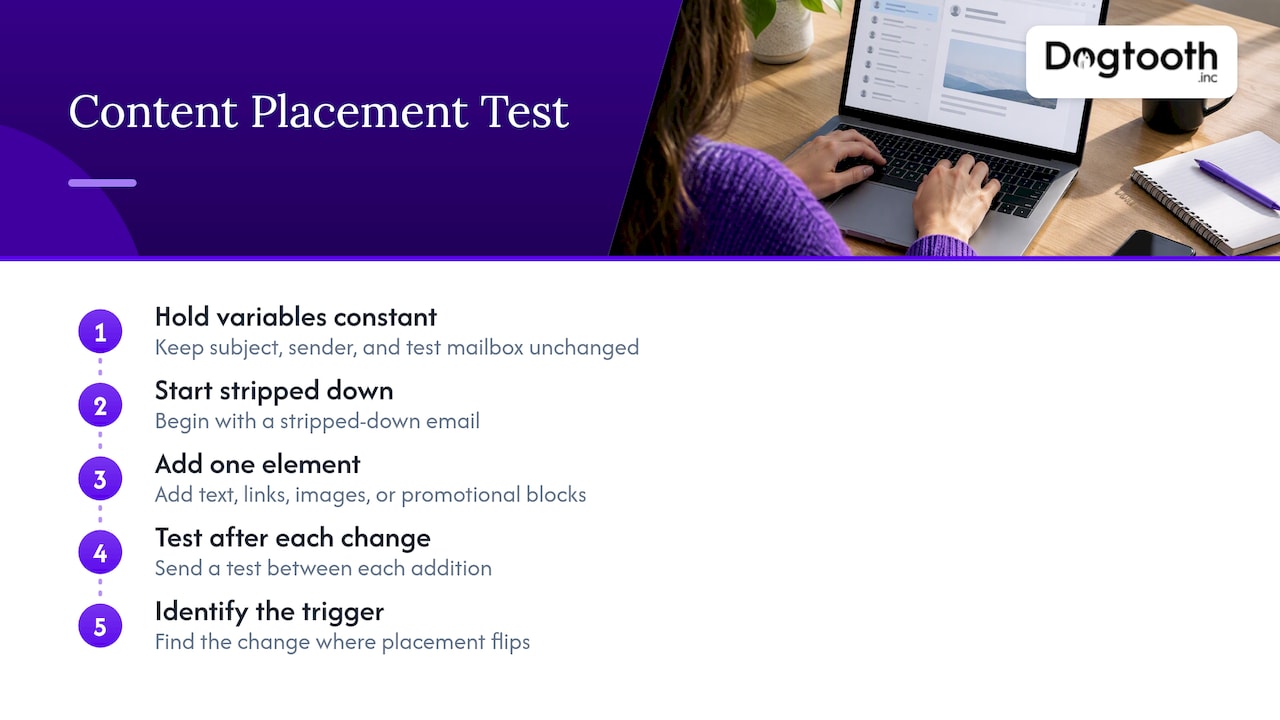
Isolate the trigger. A reliable method from an ESP’s own documentation: use a test account at the mailbox provider you are testing, keep the subject, sender details, and test mailbox unchanged, start with a stripped-down email, then add text, links, images, and promotional blocks one at a time, sending a test between each change. When placement flips, you know what did it. The same source warns that a preview’s placement does not guarantee the same result for your actual audience, so treat tests as directional.
Measure placement. Inbox placement testing sends a sample of the planned message to seed addresses across providers. One cloud provider’s service, for example, sends to addresses at over 95 major providers and reports inbox, spam, missing, DKIM, and SPF percentages after about 24 hours. Whatever tool you use, run the test on the actual template, from the actual sending domain, at a realistic time. Our guide to running and reading inbox placement tests walks through interpreting the results, including what to do when seed results and real-world engagement disagree.
After any template change, especially dynamic content, re-test. A conditional block that renders a spammy link for one segment will not show up in a single preview.
Step 7: Prioritize findings and build the action plan
An audit that ends in a 40-item list gets filed and forgotten. Make the output usable:
- Sort by impact and effort. Fix the severe issues first, such as failed authentication, a blocklisted IP, or a hard bounce rate above your threshold. Then take the quick wins: a missing unsubscribe header, an unsuppressed bounce list, a stale DMARC reporting address.
- Write each fix as an action: what changes, how to apply it, who owns it, and the deadline.
- Keep evidence. Record timestamps, specific error logs, and before-and-after states for each fix. “The configuration looks good” is an opinion. A header showing DKIM pass on a given date is evidence another operator can follow.
- Make it handoff-ready. If a colleague or an outside team had to repeat the work next quarter, could they?
Then decide the cadence. Programs differ: a monthly newsletter and a high-volume sender running many campaigns a week should not audit on the same schedule. Whatever you pick, keep light monitoring running between audits on bounce rate, spam complaints, and blocklist status, so you catch drift when it starts.
Our perspective
We run our own email operation the way we build for clients. An in-house AI campaign manager drafts on-brand emails, runs compliance checks, tests inbox delivery, and schedules sends on a single approval. That setup taught us that a deliverability audit should not be a one-off document.
The checks that matter, authentication, list hygiene, placement tests, and complaint tracking, are repeatable. Once you can describe them precisely enough to audit, you can usually automate most of them and keep a human on the judgment calls.
That is the thinking behind MailFurnace, our proprietary deliverability software for high-volume senders, and behind the senior-led team that stays on after launch to apply fixes rather than hand over a PDF. An audit tells you what is wrong. The value comes from fixing it, proving it stayed fixed, and catching the next problem before your subscribers do.
Chase Weir
Where Dogtooth fits
If your audit turns up work you would rather not carry yourself, such as authentication rebuilds, a migration between platforms, list repair, or monitoring that runs without anyone babysitting it, that is the kind of project we take on. We design email infrastructure and deliverability systems for brands with real sending volume, and we stay on after launch to support them.

See what we build and how to start a project at Dogtooth Inc. For a worked example of what list and email work looks like in practice, read how we built and monetized a pet niche email list.
A practical audit checklist
Use this as a one-page version of the steps above:
- Scope written down, owners named, access granted.
- Inventory of every sending domain, platform, and journey.
- SPF, DKIM, and DMARC verified on real message headers for each sender.
- Sending IPs and domains checked against blocklists and provider reputation tools.
- List sources reviewed; invalid, bounced, and inactive contacts removed.
- One-click unsubscribe working; complaints and hard bounces suppressed everywhere.
- Metrics broken out by mailbox provider, with delivery, bounce, complaint, and click thresholds noted.
- Templates tested in stages; inbox placement tested on the live template.
- Findings ranked by impact and effort, with owner and deadline on each fix.
- Evidence saved, monitoring set, next audit scheduled.
FAQ
How long does an email deliverability audit take?
The technical checks of authentication, blocklists, and header tests can be done in a day for a single domain. Metrics analysis by provider, list review, and placement testing add more time, especially if you send from several platforms. Placement tests alone take about a day to return results with some tools, so plan a few days end to end.
What is the difference between an audit and a spam test?
A spam test scores one message or one sending setup at a point in time. An audit looks at the whole system: authentication, infrastructure, reputation, list practices, content, and metrics over time. Use spam and placement tests as inputs to the audit, not replacements for it.
Can I do an email deliverability audit myself?
Yes, if you have DNS and email platform access and can read headers and provider-level reporting. Many teams do the first pass internally and bring in specialists when the findings involve infrastructure rebuilds, DMARC enforcement, or high-volume sending where mistakes are costly.
What should I fix first?
Start with anything that blocks delivery outright: failing authentication, a blocklisted sending IP, or a hard bounce rate above your tolerance. Next, handle list hygiene and suppression. Content changes come last, because they only help once the foundation is sound.
Sources
- Email deliverability monitoring basics, ESP help center
- How to test your email content to identify spam triggers, ESP help center
- Gmail Verified Sender Program eligibility and policies, Google
- Inbox placement tests, AWS documentation
- Troubleshooting email deliverability, Iterable support