The List-Unsubscribe header is a line of hidden email metadata that gives mailbox providers a mailto address, an HTTPS URL, or both, so they can show a native unsubscribe button next to your From address. For one-click unsubscribe you add a second header, List-Unsubscribe-Post, and sign both with DKIM. If you send more than 5,000 messages a day to Gmail accounts, Google requires it for marketing mail.
This guide covers what the header contains, how it differs from the link in your footer, what RFC 8058 and Gmail demand, how to implement and test it, and how it fits with a preference center and your suppression list.
TL;DR
- The List-Unsubscribe header lets mail clients show their own unsubscribe button. It supplements the unsubscribe link in the message body and never replaces it.
- One-click unsubscribe needs both List-Unsubscribe (with an HTTPS URI) and List-Unsubscribe-Post: List-Unsubscribe=One-Click, and both headers must be covered by your DKIM signature.
- Gmail requires one-click unsubscribe for marketing and subscribed messages from senders exceeding 5,000 messages per day to Gmail accounts, and expects requests to be honored within 48 hours.
- Your endpoint must act on POST requests only. A GET request, which anti-spam scanners can trigger, should never silently unsubscribe someone.
- A preference center is fine alongside one-click, as long as there is also a way to stop all marketing mail from you.
Table of Contents
- What the List-Unsubscribe header actually is
- Header versus the unsubscribe link in the body
- One-click unsubscribe and RFC 8058
- What Gmail requires
- Implementation checklist
- Preventing accidental unsubscribes
- Preference centers and unsubscribe management
- Perspective
- Work with a team that builds this end to end
- FAQ
- Sources
What the List-Unsubscribe header actually is
Every email carries headers the recipient rarely sees: routing data, authentication results, the subject line. List-Unsubscribe is one of them. Its value is an unsubscribe mailto address, an HTTPS URI, or both. When a mail client supports the header, it reads that value and shows an unsubscribe control in its own interface, usually next to the sender name or in a menu. AWS describes these controls as a button or menu item that capable clients and mailbox providers display natively.
A typical header looks like this:
List-Unsubscribe: <https://mail.example.com/u/abc123>, <mailto:unsub@example.com?subject=unsubscribe-abc123>
List-Unsubscribe-Post: List-Unsubscribe=One-Click
The two methods work differently:
| Method | What the client does | Where the request lands |
|---|---|---|
| mailto | Sends an email to the address you list | Your inbound mailbox or a parser that reads it |
| HTTPS URI | Makes a web request to the URL you list | Your unsubscribe endpoint |
Twilio SendGrid’s documentation recommends including both because client support differs. If you want one-click behavior, the HTTPS URI is mandatory, as the next sections explain.
The reader benefit is simple. Someone who no longer wants your mail finds the button without hunting through a footer. Compare that to the alternative: they click “Report spam,” which is faster for them and far more damaging to you. An easy, visible exit protects your sender reputation.
Header versus the unsubscribe link in the body
The two are not interchangeable. The header can put a button or link beside the From address, but it does not replace the standard unsubscribe function inside the message. Not every client surfaces the header, and some only show it under certain conditions, so the body link remains your guaranteed route.
Google’s rules reflect this. Qualifying bulk senders must include the headers and a clearly visible unsubscribe link in the message body. Treat them as a pair:
- Header: serves mail clients and mailbox providers that render a native control.
- Body link: serves every reader, in every client, including those who have images or header features turned off.
- US law: the FTC’s CAN-SPAM guide says commercial email must clearly and conspicuously explain how to opt out, using a return email address or another easy Internet-based method. A visible body link is the usual way to satisfy that.
Both paths should end in the same place: one suppression record that every system you send from respects.
One-click unsubscribe and RFC 8058
The original header only told a client where to send a request. It did not say whether the request would be honored instantly, and it left a gap: if a client simply fetched the URL, spam filters that pre-fetch links could unsubscribe people by accident. RFC 8058, published in January 2017, closed that gap by defining one-click unsubscribe as an HTTPS POST that the receiving mail system sends after the user consents in the mailbox interface. The person never leaves their mail client.
The mechanics:
- The user clicks unsubscribe in the mail client and confirms.
- The receiver POSTs to the HTTPS URI in your List-Unsubscribe header.
- The body of that POST contains List-Unsubscribe=One-Click.
- Your endpoint removes the recipient immediately and returns a success response.
What the RFC requires of the sender, per the specification:
- Exactly one HTTPS URI in the List-Unsubscribe header. You may add mailto or other non-HTTP/S URIs alongside it.
- A List-Unsubscribe-Post header with the exact value List-Unsubscribe=One-Click.
- DKIM signatures that cover both the List-Unsubscribe and List-Unsubscribe-Post headers.
That last point is where many implementations fail quietly. If your sending platform adds the headers after signing, or your DKIM configuration does not list them among the signed headers, mailbox providers may ignore the one-click signal. Authentication is the foundation here, and our note on SPF, DKIM and DMARC setup and monitoring covers the groundwork. If you are also tightening policy, see our guide to moving DMARC from p=none to p=reject.
What Gmail requires
Gmail turned one-click from a best practice into a requirement for large senders. Google’s sender guidelines say that, beginning February 1, 2024, senders exceeding 5,000 messages per day to Gmail accounts must support one-click unsubscribe for marketing and subscribed messages. Concretely, those messages need:
- A List-Unsubscribe-Post: List-Unsubscribe=One-Click header
- A List-Unsubscribe header
- A clearly visible unsubscribe link in the body
The same page pairs easy opt-out with authentication, low spam rates, and opt-in and confirmation practices. The header is one piece of a deliverability posture, not a standalone fix.
Which messages count
The requirement applies to subscription mail, not every message you send. Google’s subscription guidance defines subscription messages as promotional mail, marketing-list mail, newsletters and some notification messages. Password resets, receipts and one-time passwords are its examples of transactional mail. If you run both streams, keep them clearly separated, which also helps reputation. We cover that split in our transactional email deliverability guide.
The 48-hour clock
Google says senders should process and honor Gmail unsubscribe requests within 48 hours. Treat that as a ceiling. A one-click POST should write to your suppression list in seconds, and every sending tool should read that list before the next send.
Implementation checklist
Whether you send through an email service provider or your own infrastructure, the work breaks down the same way.
- Build the endpoint. Create an HTTPS URL per recipient (or per recipient and list) that accepts POST and records the opt-out. Use a signed or unguessable token in the URL so no one can unsubscribe other people by guessing addresses.
- Respond correctly. Return a success status quickly. Do the heavy work, such as syncing to your CRM, asynchronously after the suppression record is written.
- Add the headers. Insert List-Unsubscribe with the HTTPS URI, optionally a mailto address, and List-Unsubscribe-Post with the exact one-click value.
- Sign them. Confirm your DKIM configuration includes both headers in the signed set.
- Keep the body link. Place a clearly visible unsubscribe link in the message, pointing to a page that completes the opt-out in one step or offers a preference menu with an “all marketing” option.
- Handle mailto too. If you list a mailto address, make sure something reads that inbox and applies the request.
- Sync everywhere. Push every opt-out to every platform that can send to that address: your ESP, your CRM, your e-commerce platform, any scheduled automations.
If you use a major ESP, much of this may be a setting. Amazon SES, for example, supports the headers through its own configuration, as AWS describes. On custom stacks, the endpoint and header injection are yours to build.
Testing before you scale
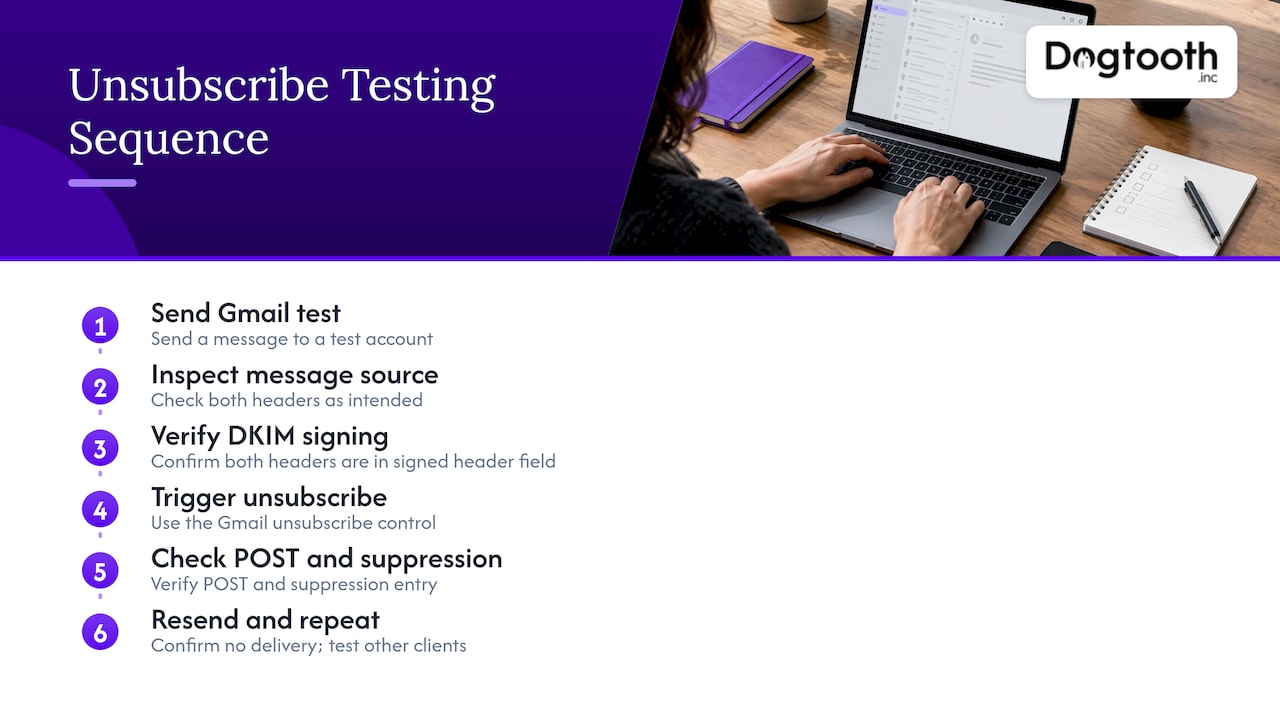
Send a message to a Gmail test account and open the original message source. Check that both headers appear exactly as intended, then confirm the DKIM-Signature header lists them in its signed header field. Trigger the unsubscribe control in the Gmail interface, and verify that your endpoint received a POST and that the address landed in suppression. Then send again and confirm nothing arrives. Repeat for other clients you care about, since display behavior varies.
Preventing accidental unsubscribes
Security gateways and link scanners often fetch every URL in a message to check for threats. If a plain GET to your unsubscribe URL removes the subscriber, those scanners will quietly unsubscribe your audience. Twilio SendGrid’s documentation warns that GET requests may be generated by anti-spam software, so the one-click endpoint should use POST for immediate removal, while a GET should not silently unsubscribe anyone.
A sound pattern:
- POST to the header URL: unsubscribe immediately, no further interaction, as RFC 8058 describes.
- GET to the same URL, or the body link: show a page asking the person to confirm, or let them choose preferences. Nothing changes until they act.
This is also why the body link and the header URL can share a token but should behave differently depending on the request method.
Preference centers and unsubscribe management
One-click unsubscribe is the emergency exit. A preference center is the dimmer switch. Used together, they keep subscribers who want less mail while giving everyone else a clean way out.
The FTC’s CAN-SPAM guidance is clear about the boundary. A preference menu may let recipients opt out of selected message types, but it must also offer an option to stop all marketing messages from the sender. Build around that rule:
- Put “unsubscribe from all marketing” first or equally prominent, not buried under category toggles.
- Keep the header action simple. The one-click POST should mean what the user thinks it means. For marketing mail, that is usually removal from all marketing, or at minimum from the list that message belongs to, stated clearly on any confirmation page.
- Offer frequency and topic choices (weekly digest instead of daily, product news but not promotions) for people who land on the page through the body link.
- Confirm what happened. Show a plain message saying the address will no longer receive marketing, and when.
- Keep transactional mail separate, so opting out of promotions does not cut off receipts and password resets.
Suppressions and unsubscribes are different lists
Teams often lump every blocked address together, but the reasons matter. Unsubscribes are choices. Hard bounces and spam complaints are signals. Each should feed a suppression list that every sending system checks before a send. Over time, a clean list is a deliverability asset: our guide to email list hygiene and automated repairs shows how to keep bounce rates down, and our domain warming plan matters when you add new sending infrastructure.
The most common failure is fragmentation: a person unsubscribes in one tool and keeps receiving mail from another. A single source of truth, with every platform reading from it, prevents that.
Perspective
We treat the unsubscribe header as infrastructure, not decoration. Most of the broken implementations we see have the same cause: the header was added in one place, the DKIM signature was configured in another, and the opt-out was recorded in a third. Each piece looks fine alone, and the whole thing fails when a mailbox provider tests it.
Our approach is to design the opt-out path end to end. The endpoint, the headers, the signature, the suppression record and every downstream system that can send to that address are one workflow, and we test it as one workflow. That is how we run our own sending operation, where an in-house AI campaign manager drafts emails, runs compliance checks, tests inbox delivery and schedules sends on a single approval.
For high-volume senders, we built MailFurnace, our proprietary deliverability software, because this kind of work needs to be continuous rather than a one-time checklist. Clean opt-outs and fast suppression are cheaper than any recovery campaign, and a senior team that stays on after launch keeps them that way.
Chase Weir
Work with a team that builds this end to end
If your unsubscribe flow spans several platforms, or you are migrating between email systems and cannot afford to lose suppression data, that is the kind of project we take on. Dogtooth Inc builds custom integrations, email infrastructure and deliverability systems for brands doing real volume, and MailFurnace is our deliverability software for high-volume senders. We have also migrated email platforms for clients, such as three Keap accounts moved to Maropost.
Talk to us through the Dogtooth site about your sending setup, and we will tell you where the opt-out path leaks.
FAQ
Is the List-Unsubscribe header required?
For bulk marketing mail to Gmail, yes. Google requires senders exceeding 5,000 messages per day to Gmail accounts to support one-click unsubscribe, which means including both List-Unsubscribe and List-Unsubscribe-Post headers. Smaller senders are not bound by that threshold, but adding the headers is still good practice because it gives subscribers an easy exit that does not involve a spam report.
Does the header replace the unsubscribe link in my email?
No. The header supplements the body link and does not replace it. Gmail’s rules for qualifying senders call for a clearly visible unsubscribe link in the message, and CAN-SPAM requires a clear explanation of how to opt out. Keep both.
What exactly goes in List-Unsubscribe-Post?
The value must be exactly List-Unsubscribe=One-Click, per RFC 8058. It goes alongside a List-Unsubscribe header containing one HTTPS URI, and both headers need to be covered by your DKIM signature. A typo or an unsigned header can cause providers to ignore the one-click signal.
How fast do I have to process an unsubscribe?
Google says to honor Gmail unsubscribe requests within 48 hours. In practice, a one-click POST should update your suppression list almost immediately, and every platform you send from should check that list before the next message goes out.
Can I use a preference center instead of one-click unsubscribe?
Use both. The one-click header gives mail clients a direct, no-friction action, while a preference center on your body link lets people reduce frequency or choose topics. Under CAN-SPAM, any preference menu must still include an option to stop all marketing messages from you.
Sources
- Twilio SendGrid: List-Unsubscribe
- AWS Messaging and Targeting: Using one-click unsubscribe with Amazon SES
- IETF RFC 8058: Signaling One-Click Functionality for List Email Headers
- Gmail Help: Email sender guidelines
- Gmail Help: Email subscription guidelines for senders
- FTC: CAN-SPAM Act, A Compliance Guide for Business