The Facebook Conversions API (CAPI) sends your conversion events, such as purchases, leads and sign-ups, from your own server straight to Meta, instead of relying only on a script running in the visitor’s browser. For a brand spending real money on Meta ads, the practical answer is to run it next to the Pixel, share one event ID between them so nothing is counted twice, and send clean customer data so Meta can match events to people. We build custom attribution and integrations for this kind of work, so the details below come from the same problems that show up in real stores and lead funnels.
TL;DR
- The Conversions API sends events from your server to Meta. The Pixel sends them from the browser. Running both gives Meta the most complete picture.
- Deduplication is the part that breaks most setups: the browser and server copy of an event must share the same event name and event ID.
- Meta’s one-click and Gateway options cost little or nothing in software fees, but a custom server-side build is what lets you control data quality, consent and attribution.
- Hash customer fields with SHA-256, send events quickly, and check everything in Events Manager’s Test Events tool before you trust the numbers.
- In the US, server-side tracking still falls under consent and privacy rules, including California’s, and under HIPAA for health businesses.
Table of Contents
- What the Conversions API actually does
- Facebook server-side tracking vs. the Meta Pixel
- How deduplication works (and where it goes wrong)
- What Meta requires in each event
- Setup options and what each one costs
- Setting up Facebook CAPI step by step
- Privacy, consent and compliance in the US
- Why tracking quality drives conversion results
- Our perspective
- Get server-side tracking built into your stack
- FAQ
- Sources
What the Conversions API actually does
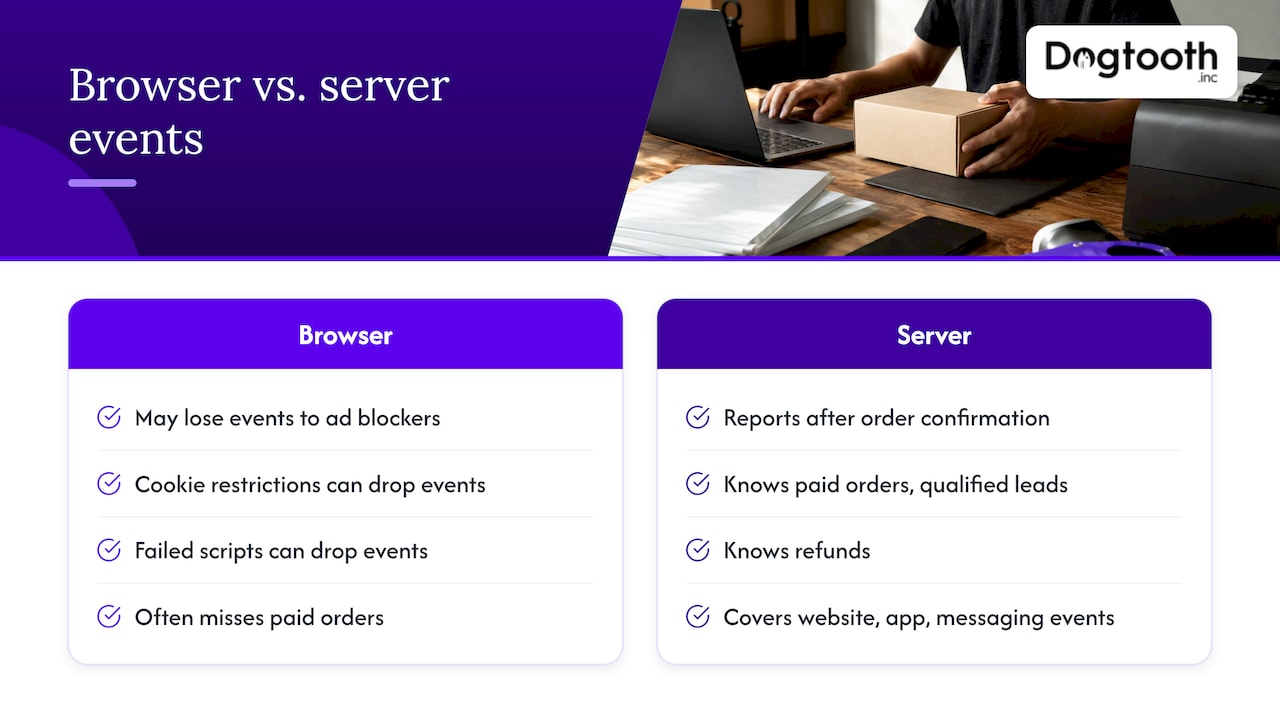
Meta describes the Conversions API as a connection between your marketing data and its ad optimization systems, covering website events, app events and business messaging events. Instead of a visitor’s browser reporting “purchase completed”, your server reports it after it confirms the order.
That difference matters because browser tracking is fragile. Moving the data flow off the browser avoids ad blockers, cookie restrictions and failed script loads that can silently drop client-side events. Your server already knows which orders were paid, which leads were qualified and which refunds happened. The browser often does not.
The result Meta cares about is signal. Meta’s ad system learns from the events you send. Fewer lost events and better customer matching mean better optimization and more reliable reporting. Meta says advertisers with a Conversions API setup for web events saw an average 17.8% lower cost per result. That is Meta’s own aggregate figure, not a promise for your account, but it shows why the platform pushes the setup.
Facebook server-side tracking vs. the Meta Pixel
The two are not rivals. The Pixel tracks events from the browser, while the Conversions API sends them from the server, and Meta recommends using both together so the server copy recovers what the Pixel misses. Adobe’s documentation for its own Meta extension gives the same advice: send the same events from client and server.
| Meta Pixel | Conversions API | |
|---|---|---|
| Where it runs | Visitor’s browser | Your server or a server container |
| Weak spot | Ad blockers, cookie limits, script failures | Needs correct setup, consent handling and matching data |
| Strength | Page behavior, easy to install | Confirmed outcomes such as paid orders and qualified leads |
| Best use | Browsing and on-site events | Purchases, leads, offline and CRM events |
The catch with running both is that Meta now receives each conversion twice. That is where deduplication comes in.
How deduplication works (and where it goes wrong)
Meta’s rule is simple. If it finds the same event name and event ID from the browser and the server, sent to the same Pixel ID, within 48 hours, it keeps one event and discards the duplicate.
Three mistakes cause most double counting:
- Each side invents its own ID. A theme generates one ID for the browser event and the server integration generates another. Meta sees two purchases. The fix is to derive the ID from something both sides know, such as the order number, and pass it to both.
- Event names differ. “Purchase” in the browser and “purchase” or “OrderCompleted” on the server will not match.
- The server event arrives too late. Meta only deduplicates when the server event lands within 48 hours of the browser one.
A worked example: a customer pays $120 for an order numbered 10482. The browser fires Purchase with event ID order-10482. Your server, after payment confirmation, sends Purchase with the same order-10482. Meta shows one purchase worth $120. If the IDs differ, your reported revenue for that order is $240, and your ad platform optimizes against numbers that are wrong.
This is also why we treat server-side tracking as an engineering job, not a plugin toggle, when order data flows through a custom platform, a headless store or several systems at once. Our own walkthrough on server-side tracking for payment events covers how paid events leave the server cleanly.
What Meta requires in each event
A valid server event needs the right fields, or it is rejected or matched poorly.
- Action source. The
action_sourceparameter is required on every event and says where the conversion happened. When it is set to website,client_user_agentandevent_source_urlare also mandatory. - Hashing. Meta requires email, phone, name and address fields to be hashed with SHA-256 before sending. IP address, user agent,
fbcandfbpmust not be hashed, according to a detailed setup guide. Hashing a field that must stay raw, or sending a raw email, are both common errors. - Timing. Meta recommends sending events within one hour. Events can carry an
event_timeup to seven days in the past, and if any event in a request is older than that, Meta rejects the whole request. A batch job that retries a stale queue can therefore lose good events along with bad ones. - Matching data. Event match quality improves when events include privacy-safe customer information and click identifiers where permitted and properly handled. The
fbpandfbcvalues come from the browser, so your site has to capture them and carry them through to the server, for example by storing them with the order.
Setup options and what each one costs
The question “is the Facebook Conversions API free?” has two answers: the API itself, yes, and the setup, depends on the route.
One-click setup from Meta
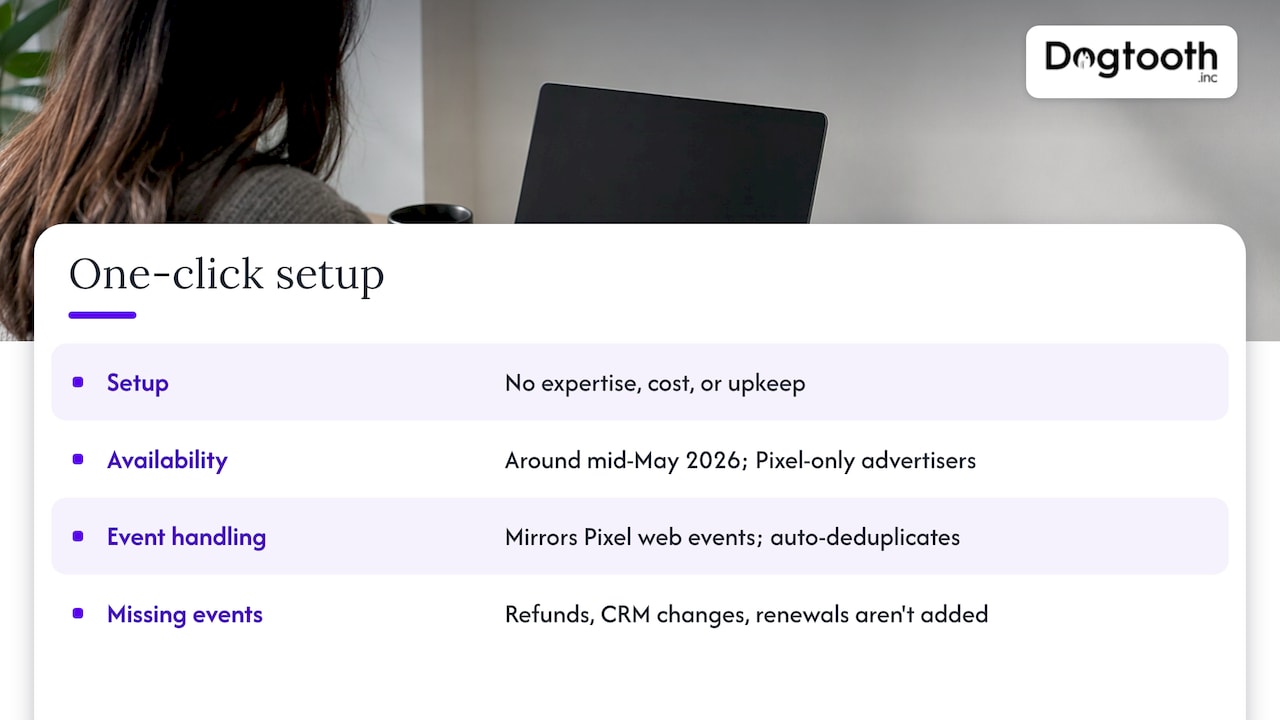
According to Meta’s announcement coverage, its one-click Conversions API setup requires no technical expertise, costs or ongoing maintenance. A 2026 write-up reports that, starting around mid-May 2026, Meta activated it for Pixel-only advertisers. It mirrors the web events the Pixel already sends and handles deduplication automatically.
That is a sensible baseline. Because it mirrors Pixel events, it carries over whatever the Pixel already knows. It does not add events your Pixel never sent, such as a refund, a CRM stage change or a subscription renewal.
Conversions API Gateway
Meta’s Gateway is a self-service option in Events Manager that, in Meta’s words, cuts integration time from weeks to hours. The software is free. Its only cost is cloud resources or partner fees: self-hosting on AWS or Google Cloud commonly runs tens of dollars a month, and managed hosting starts at $10 per month per pixel.
Server-side Google Tag Manager
Teams that run CAPI through server-side Google Tag Manager or a serverless function typically spend $20 to $200 per month in compute, depending on event volume. Another estimate puts server hosting at $50 to $300 per month, plus maintenance time or consultant fees, with initial setup taking one to three days for an experienced consultant.
A direct, custom integration
This is the route we recommend when your events live in your own backend: a custom platform, a multi-brand setup, a subscription billing system or a CRM that decides what counts as a qualified lead. Meta’s own help pages say that direct integrations are more customized and require developer resources, compared with the Gateway or a partner integration. The payoff is control. You decide which events are sent, with which values, from which system of record, under which consent state.
| Route | Software cost | Best fit | Control over events |
|---|---|---|---|
| Custom integration | Development plus hosting | Custom platforms, multiple systems, CRM-driven events | Full |
| Server-side GTM | About $20 to $200 per month hosting | Marketing-led teams with GTM skills | High |
| Gateway | Free software, hosting fees | Standard sites that need a fast start | Moderate |
| One-click | None | Pixel-only advertisers | Limited to Pixel events |
Setting up Facebook CAPI step by step
Whichever route you choose, the sequence is the same.
- List the events that matter. Start with the ones that drive money: Purchase, Lead, CompleteRegistration, and any downstream stage such as a qualified lead. Decide which system is the source of truth for each. In a Shopify or WooCommerce store, that is usually the order record. Our guide on GA4 ecommerce tracking shows how to define those events once so every tool reads the same names.
- Create or confirm your dataset. In Events Manager, open your Pixel or dataset, choose Add Events, then Add new integration, and pick Conversions API. Meta’s guided flow offers a manual path for developers.
- Generate one event ID per action. Create it once, derive it from the order or lead record, and give it to both the Pixel call and the server call.
- Capture
fbp,fbcand the user agent in the browser and store them with the order or lead, so the server can send them later even when the purchase is confirmed minutes or days afterward. - Build the server payload. Include
event_name,event_time,event_id,action_source,event_source_url, hashed customer fields, and value and currency for revenue events. - Send promptly and handle failures. Aim to send within an hour. Log rejected requests, and never retry a batch older than seven days without removing the stale events.
- Test. Use the Test Events tool in Events Manager with a test event code. Healthy events are marked as Browser + Server, and the real-time log shows what arrived. If you see a Browser event and a separate Server event for the same action, your IDs or names do not match.
- Watch diagnostics for two weeks. Check match quality, missing parameters and duplicate warnings. Compare Meta’s purchase count and revenue against your order system for the same dates. They will not match exactly because of attribution windows, but a 2x gap points to deduplication failure.
A tip on revenue events: send the value after discounts and before shipping only if that is how you evaluate ad spend, and keep the rule identical in the browser and server events. Mismatched value logic makes your return on ad spend swing without any real change.
Privacy, consent and compliance in the US
Server-side tracking changes where data leaves your systems, not whether you need permission to send it. Businesses must obtain valid, informed consent before sharing personal data with Meta, and email and phone are hashed on the way. Sending only what matching needs, not everything you hold, is the safer pattern.
Three US points to build in from the start:
- California. Under CPRA, a Meta Pixel that passes identifiers to an ad network counts as sharing. Covered businesses must offer opt-outs and honor Global Privacy Control signals, and the state’s privacy agency fined Tractor Supply $1,350,000 in September 2025, partly for an ineffective opt-out. Your server must respect the same consent state as your browser, so pass the consent flag into the server event logic. Meta’s limited data use setting can restrict processing for California users. Have your privacy counsel confirm how it applies to your business.
- Privacy policy. Meta-enabled CAPI and AI enrichment features collect and transmit more data than a standard Pixel. Update your policy to disclose server-side tracking, confirm your consent tool covers it, and review which enrichment data categories are sent.
- Health data. For HIPAA-covered entities, Meta does not sign Business Associate Agreements for CAPI, so the pathway runs through an intermediary that signs one and strips protected health information before forwarding de-identified events. If you are a covered entity, involve your compliance counsel before you send any event, and use neutral event names.
If you also want to see how consent-aware tracking feeds into reporting, our privacy-aware custom attribution model guide shows the structure.
Why tracking quality drives conversion results
Better signal does not help if the site loses buyers before the event fires. CAPI improves what Meta learns from the conversions you have. Lifting the conversion rate itself is a separate task, and now sits alongside Meta’s simplified CAPI setup and server-side tracking as part of the same measurement picture. For stores, our pieces on Shopify conversion rate and Shopify checkout optimization cover the checkout side, and cross-channel attribution covers how Meta’s numbers sit next to every other channel’s.
Our perspective
Most CAPI problems we see are not about Meta. They are about the business’s own data: orders in one system, leads in another, consent in a third, and no single place that says “this event is real, and we may send it.”
That is why we build server-side tracking as part of the platform, not as an add-on. When the event is created at the moment the order is confirmed, with one ID, one consent state and one definition of value, the browser copy, the server copy and your reports all agree.
The same thinking applies to our own operation. We run AI agents inside live workflows, and each one only works because the data underneath it is trustworthy. Ad platforms are no different: the model optimizes whatever you feed it. Feed it clean, deduplicated, consented events, and you get an algorithm learning from your real customers.
Meta’s one-click setup is a good floor. A custom integration is how you go beyond it: refunds, subscriptions, qualified-lead stages, multi-brand accounts, and attribution you can reconcile with finance. We stay on after launch, because tracking needs maintenance every time a checkout, a theme or a consent rule changes.
Chase Weir
Get server-side tracking built into your stack
If your events come from a custom platform, a Shopify or WooCommerce store, or several systems at once, we design the server-side layer as part of our e-commerce engineering and integrations work. That includes custom attribution systems and API integrations, delivered by a senior team that stays on after launch.
If you are also moving platforms, the cleanest time to rebuild tracking is during the migration, not after. Our Magento to Shopify migration plan shows how that fits the project.
FAQ
What is the Facebook Conversions API?
It is Meta’s way of receiving conversion events directly from your server rather than only from a visitor’s browser. Meta uses those events to optimize ad delivery and measure results. Server events are processed like Pixel events once they arrive.
Is the Facebook Conversions API free?
The API and Meta’s Gateway software carry no license fee, and Meta’s one-click setup has no cost. Hosting and development are where costs appear: roughly $20 to $200 per month for compute on a server-side tag or serverless setup, plus build time for a custom integration.
Should I use the Conversions API and the Pixel together?
Yes. Meta recommends sending the same events from both so the server recovers what the browser misses. The condition is deduplication: matching event names and event IDs, with the server event arriving within 48 hours.
How do I know my events are being received and deduplicated?
Open Events Manager and use Test Events with a test code. Events received from both sides should be marked Browser + Server. Then compare Meta’s purchase counts with your order system over a couple of weeks to catch double counting early.
Sources
- Conversions API, Meta for Developers
- Handling duplicate Pixel and Conversions API events, Meta for Developers
- Get started with the Conversions API, Meta for Developers
- About Conversions API gateway, Meta Business Help Center
- Prepare your business to use the Conversions API, Meta Business Help Center
- Meta lowers technical barriers, MediaPost
- Meta Conversions API extension overview, Adobe Experience League
- Facebook Conversions API destination documentation
- Set up Facebook server-side tracking
- Meta Conversions API: the complete guide
- Meta CAPI Gateway: what it is and when to use it
- Facebook API pricing breakdown for 2026
- Facebook CAPI without GTM
- Meta Conversions API: how it works
- Meta Conversions API setup after iOS changes
- Meta Pixel and CAPI server-side setup
- Meta Pixel and Conversions API docs
- How Meta ads ensure compliance with data privacy regulations
- CCPA vs CPRA 2026
- Meta Conversions API and HIPAA
- Meta gave everyone free server-side tracking