Shopify’s B2B tools let you sell wholesale from the same admin you use for retail. They cover company accounts with multiple locations, customer-specific catalogs and pricing, volume breaks, payment terms, draft-order review and self-serve reordering. Most of them are available on Basic, Grow, Advanced and Plus, but a few of the most useful ones need Plus. This guide walks through each feature group, what each plan unlocks and the order we would set things up in.
TL;DR
- Shopify B2B is available on Basic, Grow, Advanced and Plus, not on Starter or Retail, and the feature set depends on your plan.
- The core is company profiles, catalogs, price lists, quantity rules, payment terms and a B2B checkout, all managed in the Shopify admin.
- Plus adds direct catalog assignment to company locations, deposits, partial payments and payment requests per fulfillment.
- Setup comes down to a store-type decision, then companies and locations, then catalogs and pricing, then payment and checkout rules.
- Wholesale buyers expect self-serve reordering, so the quality of the customer account experience matters as much as the pricing.
Table of Contents
- What Shopify B2B actually is
- The core features, group by group
- What each plan includes
- Blended store or dedicated store?
- How to set up B2B on Shopify
- What it looks like when you add integrations
- Our perspective
- Work with Dogtooth on your Shopify B2B build
- Common mistakes to avoid
- FAQ
- Sources
What Shopify B2B actually is
Shopify describes B2B as a suite of native features for selling to businesses through the admin and the online store. According to Shopify’s overview of B2B features, the suite includes company profiles and locations, buyer permissions, catalogs and pricing, quantity rules, B2B checkout, payment terms, invoices and draft orders, PO numbers, bulk ordering, reorders, self-serve returns, Markets, Shopify Flow, APIs and ERP integrations.
Shopify positions native B2B as built for manufacturers, wholesalers and distributors, and it supports two ways of selling: wholesale from your direct-to-consumer store, or a separate B2B store. If you run a brand that sells both to shoppers and to retailers, restaurants, clinics or resellers, that flexibility is the main draw. You don’t need a second platform for the business accounts.
Most of these features are on by default. What you have to do yourself, per Shopify’s B2B page, is set up your B2B customers as companies in the admin. Nothing wholesale-specific happens until a buyer exists as a company.
The core features, group by group
Company profiles, locations and permissions
A B2B buyer is a company, not just a customer record. Each company can have one or more locations, and each location can carry its own shipping address, payment terms and pricing. Contacts at the company get permissions, so a purchasing manager can place orders while another employee can only view them.
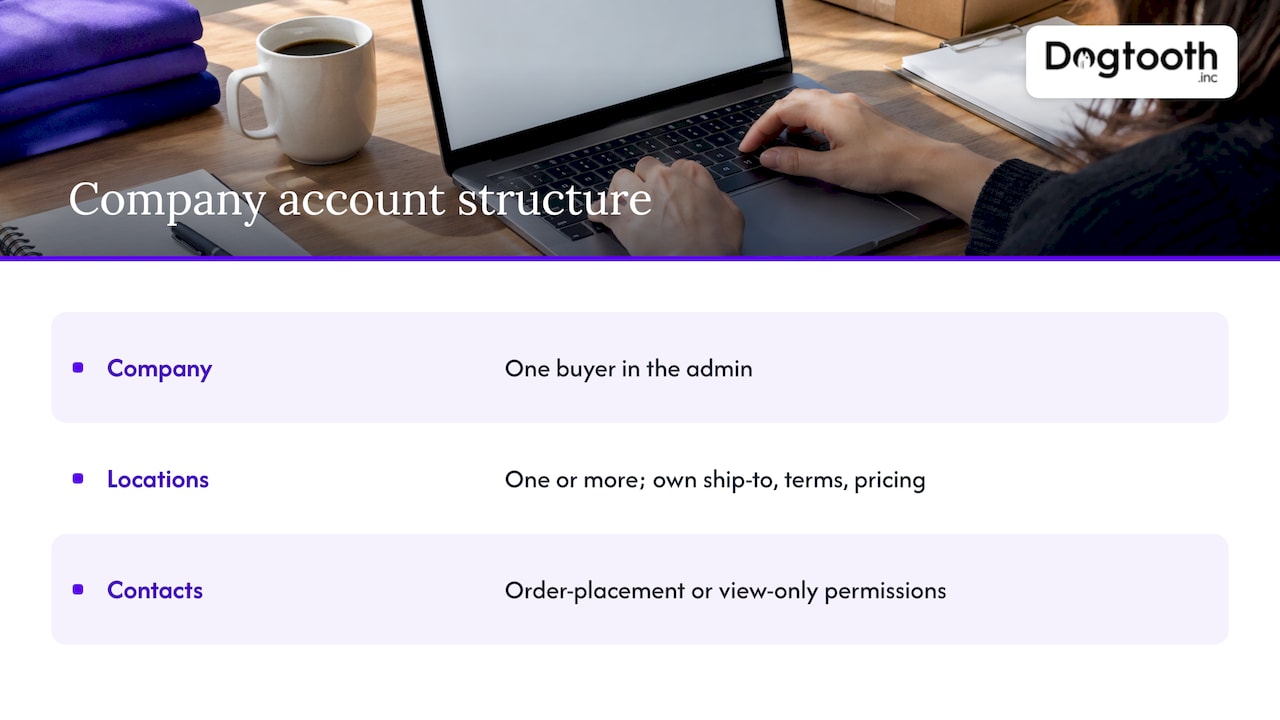
This matters for real operations. A restaurant group with five venues, or a dental supplier buying for several clinics, can sit under one company with separate ship-to locations. You see one buyer in the admin, and they see one account.
Catalogs and price lists
Catalogs control which products a buyer sees and at what price. You can build a curated catalog for a customer segment, apply a percentage discount or fixed prices, and hide products from buyers who shouldn’t see them. Shopify’s own description of the feature is a personalized buying experience with discounts, flexible purchasing rules and curated catalogs.
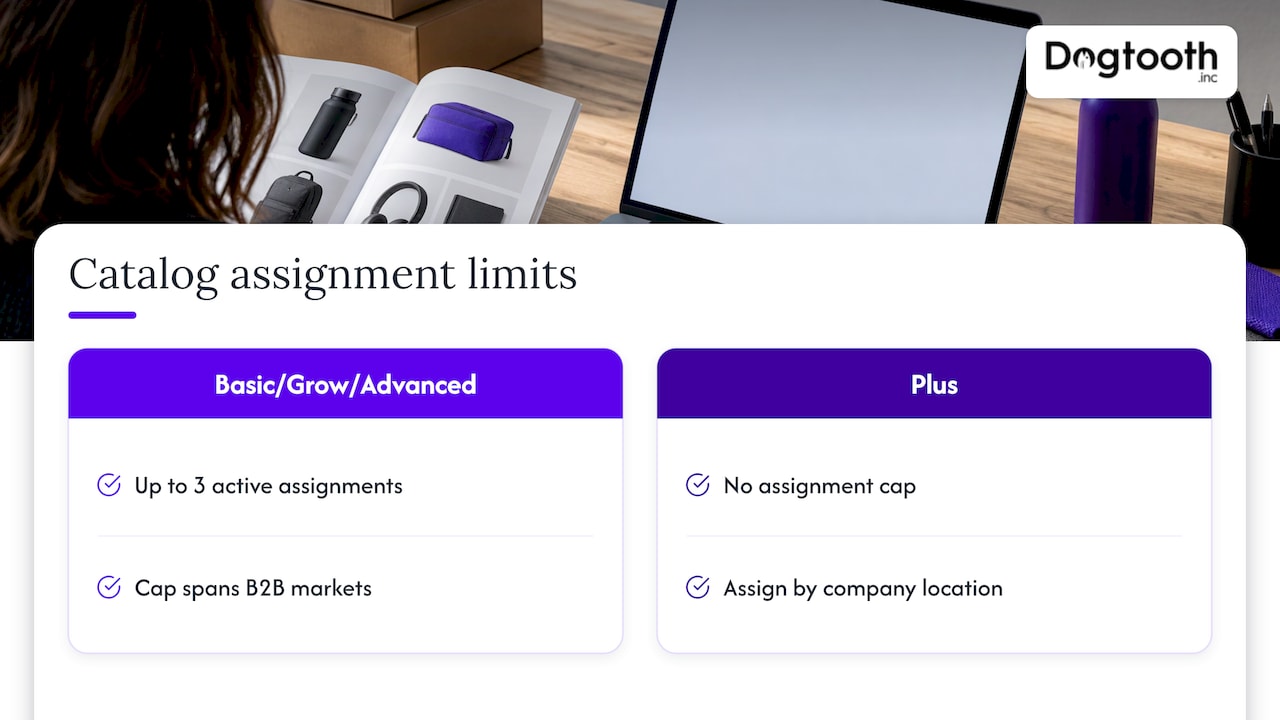
There is a plan limit here. On Basic, Grow and Advanced, Shopify allows up to three active catalog assignments across B2B markets. Plus removes that cap and lets you assign a catalog directly to a company location. If you plan to run many tiers, such as distributor, retailer, VIP and regional pricing, count your tiers before choosing a plan.
Quantity rules and volume pricing
Wholesale usually comes with minimums. Shopify’s native quantity rules can set minimum, maximum and increment quantities for variants, and quantity price breaks provide volume pricing. So you can require a case pack of 12, allow orders in multiples of 6 and drop the unit price at 48.
These rules are easy to set and easy to get wrong. A minimum that is too high loses small first orders. One that is too low lets wholesale margins erode on tiny shipments. Start from your real cost to fulfill and adjust after a quarter of order data.
B2B checkout and payment terms
B2B checkout lets you control how a business pays. You can set payment terms per company location and choose whether an order completes at checkout or is submitted as a draft for your team to review first. That second option is useful when freight, tax exemptions or credit limits need a human look.
On payment methods, B2B buyers can pay through Shopify Payments, third-party payment providers and manual payment methods. Vaulted cards let repeat buyers save a payment method. Invoices and draft orders handle the net-terms side. In the United States, Shopify also lists Automated Clearing House as a B2B payment feature, available only in the US.
Bulk ordering and reorders
Buyers who order by the case don’t want to click through product pages one by one. Shopify’s quick bulk ordering shows a list of products and variants so buyers can order sizes, colors and more from product pages or a separate order form. Logged-in buyers can also enter PO numbers, view order history, duplicate past orders, save cards and submit returns.
For most wholesale accounts, reordering is the revenue. A buyer who can repeat last month’s order in two clicks is a buyer who doesn’t call a sales rep or go to a competitor’s portal.
Markets, Flow, APIs and integrations
In a blended store, Markets can give B2B customers a different experience from retail shoppers. Shopify also says merchants can use draft orders, themes, analytics, Shopify Flow, APIs and ERP or external-system integrations to support B2B. Flow handles rules like tagging a new company or alerting your team when a large draft order arrives. APIs and integrations connect Shopify to the inventory, accounting or ERP system where your wholesale operation already lives.
What each plan includes
Plan is the most common surprise in Shopify B2B. The features are not all-or-nothing. Based on Shopify’s plan feature breakdown, this is how the main differences fall out for US merchants:
| Capability | Basic and Grow | Advanced | Plus |
|---|---|---|---|
| B2B company profiles, catalogs, payment terms | Yes | Yes | Yes |
| Active catalog assignments across B2B markets | Up to three | Up to three | No limit |
| Direct catalog assignment to company locations | No | No | Yes |
| Markets contextual checkout and storefront experiences | No | Yes | Yes |
| Deposits, partial payments, payment requests per fulfillment | No | No | Yes |
The catalog limit comes from the features overview, and the Markets and Plus-only rows come from the plan page. Shopify’s pricing page lists current monthly rates, so confirm those there rather than relying on a number in an article.
A practical reading of the table:
- Basic or Grow fits a small wholesale program with one or two price tiers, net terms and a simple order form.
- Advanced makes sense when you need Markets to give wholesale buyers a distinct storefront experience inside a blended store.
- Plus is the fit when you sell on deposits, take staged payments on large orders or manage many price tiers and company-specific catalogs.
Blended store or dedicated store?
This is the first decision, and it shapes everything after it. Shopify’s guidance on store type says blended stores may suit similar products, shared inventory or shared staff. Dedicated stores may suit separate B2B experiences, separate inventory, gated access or separate staff.
In practice:
- Blended works when wholesale and retail sell mostly the same catalog from the same warehouse. One inventory count, one set of products, one team. B2B buyers log in and see their pricing.
- Dedicated works when wholesale has its own product range, packaging, minimums or branding, or when you want the whole storefront behind a login.
If you’re unsure, ask where the stock lives and who fulfills the orders. Shared stock and shared people point to blended. Separate everything points to dedicated.
How to set up B2B on Shopify
Here is the sequence we use as a working checklist, built on Shopify’s own setup path:
- Pick the store type. Blended or dedicated, as above.
- Create companies and locations. Add each business buyer as a company, then add locations with shipping details.
- Set contact permissions. Decide who at each company can order and who can only view.
- Build catalogs and pricing. Create the catalogs, apply percentage discounts or fixed prices, and assign them within your plan’s limits.
- Add quantity rules and volume breaks. Minimums, maximums, increments and price breaks per variant.
- Set payment terms and methods. Net terms, cards, manual methods, and ACH if you’re in the US.
- Decide the checkout flow. Let orders complete automatically, or require draft-order review.
- Test as a buyer. Log in as a company contact and place an order from start to finish.
The last step catches more than you’d expect: a hidden product, a payment term applied to the wrong location, a minimum that blocks a legitimate order.
Give buyers a real self-service account
A wholesale buyer’s experience lives in the customer account: order history, reorders, saved addresses, team members. If your retail account page is bare-bones, wholesale buyers will notice. Guides on Shopify Plus customer accounts cover how the newer account pages work and how they can be customized for repeat purchases and quick order flows.
What it looks like when you add integrations
Native B2B covers a lot, but wholesale rarely lives in one system. Typical connections include an ERP for inventory and invoicing, a point-of-sale system, and a tax or shipping tool. We built one such connection for a craft brewery that needed POS and Shopify to stay in sync, and another for a brand running Shopify and WooCommerce side by side. If your wholesale data currently lives in spreadsheets or an older system, our write-up on API modernization without a big bang explains how to connect it step by step.
If you are coming from another platform, plan the move before you plan the wholesale features. Our guides on moving from Magento to Shopify and a safe Shopify Plus migration cover scope, SEO risk and cutover.
Our perspective
Most wholesale projects we see don’t fail on features. They fail on the seams: a price list that doesn’t match the ERP, a buyer who can’t find last month’s order, a sales team re-keying draft orders by hand.
Shopify’s native B2B covers the foundation well. Our job is the part around it. We connect it to the systems a business already runs, build the custom pieces a catalog or portal needs, and put AI agents inside the workflow to draft, check and report so a small team isn’t buried in order admin.
We run our own operation the same way, with AI handling drafting, compliance checks and scheduling on a single approval. That is why we push clients to design the workflow first and the settings second. A senior team that stays on after launch matters here, because wholesale terms, catalogs and buyers change every quarter.
If you already know you want Shopify, start with the native tools, map them to your real buyers, and only then decide what needs to be custom.
Chase Weir
Work with Dogtooth on your Shopify B2B build
If you want wholesale on Shopify without the loose ends, we handle platform builds and migrations, e-commerce engineering, integrations and APIs, and AI agents that automate the repetitive parts of order handling. We stay on after launch to support and optimize. See our e-commerce and platform services to start a conversation.
Common mistakes to avoid
- Choosing a plan before counting tiers. The three-catalog limit on lower plans is easy to hit when you have distributor, retailer and regional pricing.
- Skipping the draft-order decision. If freight or credit needs review, decide upfront which orders complete automatically.
- Ignoring checkout performance. Wholesale buyers still abandon clunky flows. Our notes on Shopify checkout optimization and conversion rate apply to B2B too.
- Not tracking wholesale separately. Without clean events, you can’t tell which accounts reorder. Set up GA4 ecommerce tracking and consider server-side tracking for payment events.
FAQ
Is Shopify good for B2B?
Shopify says its native B2B tools are designed for manufacturers, wholesalers and distributors. They cover company accounts, custom pricing, payment terms and bulk ordering, and you can run them from a retail store or a separate wholesale store. It fits best when your catalog and fulfillment are close to what Shopify handles natively, and integrations cover the rest.
Do I need Shopify Plus for B2B?
No. B2B is available on Basic, Grow, Advanced and Plus, with features depending on the plan. Plus is needed for direct catalog assignment to company locations, deposits, partial payments and payment requests per fulfillment, and it removes the three-catalog limit on other plans.
How much does Shopify B2B cost?
Shopify doesn’t list B2B as a separate fee in the sources we used. What you pay depends on the plan that includes the features you need, plus any apps, payment processing and implementation work. Check Shopify’s pricing page for current plan rates.
How do I set up B2B on Shopify?
Choose a blended or dedicated store, create each buyer as a company with locations and permissions, then build catalogs, quantity rules and payment terms. Finally, decide whether orders complete at checkout or go to draft review, and test as a buyer before you invite customers.
Sources
- Shopify Help Center: Overview of B2B features on Shopify
- Shopify Help Center: Shopify B2B
- Shopify Help Center: Shopify B2B features by plan
- Shopify Help Center: Checkout, orders, and draft orders in B2B
- Shopify Help Center: Choosing a store type for your B2B business
- B2B on Shopify
- Shopify Plus Customer Accounts: Setup, B2B and Customization